
TabBrew – AI Tab Manager, Organizer & Declutter
AI tab manager to organize, group & declutter too many tabs. Filter, save & clean up tabs with your AI.
As of June 2026, TabBrew – AI Tab Manager, Organizer & Declutter has 1,000 users and a 3.67/5 rating from 15 reviews in the Workflow & Planning category.
Usersno change0%
1.0K
1,000
Ratingno change0%
3.67
15 reviews
Reviewsno change0%
15
Version
4.12.0
Manifest V3
90-day change · In the last 90 days this extension 6 version updates.
History
7 snapshotsTracking since Apr 24, 2026.
View as table
| Date | Users | Rating | Reviews | Version |
|---|---|---|---|---|
| Apr 24, 2026 | 1.0K | 3.67 | 15 | 4.0.3 |
| May 19, 2026 | 1.0K | 3.67 | 15 | 4.0.3 |
| May 24, 2026 | 1.0K | 3.67 | 15 | 4.8.0 |
| May 29, 2026 | 1.0K | 3.67 | 15 | 4.9.3 |
| Jun 3, 2026 | 1.0K | 3.67 | 15 | 4.10.2 |
| Jun 7, 2026 | 1.0K | 3.67 | 15 | 4.10.5 |
| Jun 12, 2026 | 1.0K | 3.67 | 15 | 4.11.2 |
| Now | 1.0K | 3.67 | 15 | 4.12.0 |
Changelog
- May 29, 2026short_description
Tab manager and tab organizer for when you have too many tabs open. Filter, group, declutter — focus without losing your place.
AI tab manager to organize, group & declutter too many tabs. Filter, save & clean up tabs with your AI.
- May 29, 2026name
TabBrew: Tab Manager, Organizer & Declutter
TabBrew – AI Tab Manager, Organizer & Declutter
- May 24, 2026description
TabBrew — Tab Manager Built for People With Too Many Tabs 🚀

Drowning in browser tabs? TabBrew is a focused tab manager and tab organizer that helps you filter, declutter, and stay in control of every tab you open — so you can keep working without losing your place.

Replace your new tab page with a clean management dashboard built for researchers, developers, students, shoppers, and anyone juggling 50+ open tabs.

Why TabBrew ⭐

✅ Find any tab in under a second
✅ Stay focused even with 50, 100, 200 tabs open
✅ Group related tabs by project, topic, or workflow
✅ Pick up where you left off with the built-in session manager
✅ One-click cleanup when tabs spiral out of control

Core Features 🌟

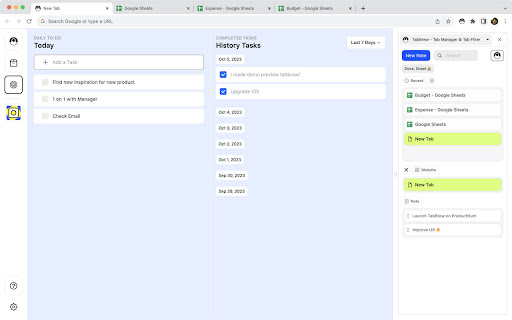
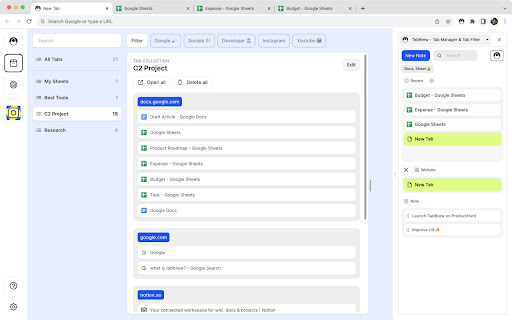
🔎 Tab Filter & Tab Desk — Type a keyword, instantly filter every open tab. Group related tabs into custom Desks for projects, research, or daily workflows.

📚 Tab Collections — Save the tabs you're working on as a collection and reopen the whole working set anytime. Built for active workflows, not passive storage.

📝 Tab Note — Attach quick notes to tabs so you remember why you opened them.

📥 Tab Uncategorized — Automatically surface tabs that don't belong to any group, so nothing slips through the cracks.

📌 Tab Sidebar — A vertical tab list that makes scanning, switching, and closing tabs effortless.

Built-in Tab Declutter Tools 🧹

Close duplicate tabs
Merge all windows into one
Discard inactive tabs to free memory
Sort tabs by domain, title, or recency
Group tabs automatically
Save tab sessions for later
Built for productivity & focus 🎯

The clean tab sidebar keeps every tab visible without overwhelming your screen. When clutter creeps in, the declutter tools clear it instantly — no manual sorting required.

Whether you're researching, coding, planning, or working across multiple projects, TabBrew helps you work with many tabs without losing your focus.

Try TabBrew free. Reclaim your browser. Reclaim your focus.

📩 Support & feedback: [email protected]
TabBrew — The AI Tab Manager for People With Too Many Tabs 🚀

Drowning in browser tabs? TabBrew is an AI-powered tab manager and tab organizer that groups, filters, and declutters your tabs in seconds — so you can keep working without losing your place.

Just describe what you want in plain English, and let Claude, Gemini, or ChatGPT clean up your tabs for you. No more dragging tabs around one by one.

Organize Tabs with AI 🤖

This is what makes TabBrew different. Open the Brew panel, snapshot your window, and copy a ready-made prompt into your favorite AI:

✅ "Group these tabs by project"
✅ "Close everything I'm done with"
✅ "Pin my work tabs and bundle the rest"

Paste the result back and TabBrew instantly executes it — bulk delete, group, pin, and reorder dozens of tabs in one click. Works with Claude, Gemini, and ChatGPT. Free, no signup required.

Replace your new tab page with a clean tab management dashboard built for researchers, developers, students, shoppers, and anyone juggling 50+ open tabs.

Why TabBrew ⭐

✅ Find any tab in under a second
✅ Stay focused with 50, 100, or 200 tabs open
✅ Group related tabs by project, topic, or workflow
✅ Stash tabs for later and restore them anytime
✅ One-click cleanup when tabs spiral out of control

Core Features 🌟

🔎 Tab Filter — Type a keyword to instantly filter every open tab, or create custom filters that organize tabs by project, topic, or workflow.

🧲 Super Tab — Turn any tab into a hub and bind related tabs to it as children. Auto-collect new tabs under it and reopen any child later — perfect for keeping a research thread together.

📦 Tab Stash — Stash tabs you don't need right now out of the way, then restore them whenever you want.

📝 Tab Note — Attach quick notes to tabs so you remember why you opened them.

📥 Uncategorized Tabs — Automatically surface tabs that don't belong to any group, so nothing slips through the cracks.

📌 Tab Sidepanel — A vertical tab list that makes scanning, switching, and closing tabs effortless.

Built-in Tab Declutter Tools 🧹

• Close duplicate tabs
• Merge all windows into one
• Discard inactive tabs to free memory
• Sort and group tabs by domain
• Bulk group, pin, and close tabs

Built for Productivity & Focus 🎯

The clean tab sidepanel keeps every tab visible without overwhelming your screen. When clutter creeps in, the AI Brew flow and one-click declutter tools clear it instantly — no manual sorting required.

Whether you're researching, coding, planning, or working across multiple projects, TabBrew helps you manage hundreds of tabs without losing your focus.

Try TabBrew free. Reclaim your browser. Reclaim your focus.

📩 Support & feedback: [email protected]
- May 19, 2026description
We want to help people to work with a lot of tabs easier. 🚀

TabBrew is a tab manager tool that provides a simple way to manage and declutter your browser tabs. Make a keyword to filter tabs. Help you simplify your workflow.

Highlight Features 🌟

● Tab Filter & Tab Desk

Easily filter and organize your tabs with intuitive keyword-based filtering, ensuring quick access to relevant content.

Features
● Tab Filter & Tab Desk
● Tab Collections
● Tab Note
● Tab Uncategorized
● Tab Sidebar
● Tasks

Tab Manager Tool
● Close duplicate tabs
● Merge windows
● Discard tabs
● Sort tabs
● Group tabs
● Save tabs

Stay focus and easy to look what you interested.

The sidebar will help you to view your tabs easily and keep focus and reduce your time to manage tabs. You can use the declutter tool when you get many tabs.

Multitasking on your tabs!

Experience seamless multitasking and enhanced productivity with TabBrew – Your Ultimate Tab Manager Tool.

-------

For support inquiries or feedback, please reach out to us at [email protected].
TabBrew — Tab Manager Built for People With Too Many Tabs 🚀

Drowning in browser tabs? TabBrew is a focused tab manager and tab organizer that helps you filter, declutter, and stay in control of every tab you open — so you can keep working without losing your place.

Replace your new tab page with a clean management dashboard built for researchers, developers, students, shoppers, and anyone juggling 50+ open tabs.

Why TabBrew ⭐

✅ Find any tab in under a second
✅ Stay focused even with 50, 100, 200 tabs open
✅ Group related tabs by project, topic, or workflow
✅ Pick up where you left off with the built-in session manager
✅ One-click cleanup when tabs spiral out of control

Core Features 🌟

🔎 Tab Filter & Tab Desk — Type a keyword, instantly filter every open tab. Group related tabs into custom Desks for projects, research, or daily workflows.

📚 Tab Collections — Save the tabs you're working on as a collection and reopen the whole working set anytime. Built for active workflows, not passive storage.

📝 Tab Note — Attach quick notes to tabs so you remember why you opened them.

📥 Tab Uncategorized — Automatically surface tabs that don't belong to any group, so nothing slips through the cracks.

📌 Tab Sidebar — A vertical tab list that makes scanning, switching, and closing tabs effortless.

Built-in Tab Declutter Tools 🧹

Close duplicate tabs
Merge all windows into one
Discard inactive tabs to free memory
Sort tabs by domain, title, or recency
Group tabs automatically
Save tab sessions for later
Built for productivity & focus 🎯

The clean tab sidebar keeps every tab visible without overwhelming your screen. When clutter creeps in, the declutter tools clear it instantly — no manual sorting required.

Whether you're researching, coding, planning, or working across multiple projects, TabBrew helps you work with many tabs without losing your focus.

Try TabBrew free. Reclaim your browser. Reclaim your focus.

📩 Support & feedback: [email protected]
- May 19, 2026short_description
Declutter tabs with keyword filtering. Simplify your browsing experience.
Tab manager and tab organizer for when you have too many tabs open. Filter, group, declutter — focus without losing your place.
- May 19, 2026name
TabBrew: Tab Declutter Tool
TabBrew: Tab Manager, Organizer & Declutter
Permissions & access
- Permissions
- tabsstoragetabGroupssidePanel
- Host access
- https://tabbrew.com/*, https://www.tabbrew.com/*, https://dqloywaklyuwrecshlyh.supabase.co/*
Screenshots

About
TabBrew — The AI Tab Manager for People With Too Many Tabs 🚀

Drowning in browser tabs? TabBrew is an AI-powered tab manager and tab organizer that groups, filters, and declutters your tabs in seconds — so you can keep working without losing your place.

Just describe what you want in plain English, and let Claude, Gemini, or ChatGPT clean up your tabs for you. No more dragging tabs around one by one.

Organize Tabs with AI 🤖

This is what makes TabBrew different. Open the Brew panel, snapshot your window, and copy a ready-made prompt into your favorite AI:

✅ "Group these tabs by project"
✅ "Close everything I'm done with"
✅ "Pin my work tabs and bundle the rest"

Paste the result back and TabBrew instantly executes it — bulk delete, group, pin, and reorder dozens of tabs in one click. Works with Claude, Gemini, and ChatGPT. Free, no signup required.

Replace your new tab page with a clean tab management dashboard built for researchers, developers, students, shoppers, and anyone juggling 50+ open tabs.

Why TabBrew ⭐

✅ Find any tab in under a second
✅ Stay focused with 50, 100, or 200 tabs open
✅ Group related tabs by project, topic, or workflow
✅ Stash tabs for later and restore them anytime
✅ One-click cleanup when tabs spiral out of control

Core Features 🌟

🔎 Tab Filter — Type a keyword to instantly filter every open tab, or create custom filters that organize tabs by project, topic, or workflow.

🧲 Super Tab — Turn any tab into a hub and bind related tabs to it as children. Auto-collect new tabs under it and reopen any child later — perfect for keeping a research thread together.

📦 Tab Stash — Stash tabs you don't need right now out of the way, then restore them whenever you want.

📝 Tab Note — Attach quick notes to tabs so you remember why you opened them.

📥 Uncategorized Tabs — Automatically surface tabs that don't belong to any group, so nothing slips through the cracks.

📌 Tab Sidepanel — A vertical tab list that makes scanning, switching, and closing tabs effortless.

Built-in Tab Declutter Tools 🧹

• Close duplicate tabs
• Merge all windows into one
• Discard inactive tabs to free memory
• Sort and group tabs by domain
• Bulk group, pin, and close tabs

Built for Productivity & Focus 🎯

The clean tab sidepanel keeps every tab visible without overwhelming your screen. When clutter creeps in, the AI Brew flow and one-click declutter tools clear it instantly — no manual sorting required.

Whether you're researching, coding, planning, or working across multiple projects, TabBrew helps you manage hundreds of tabs without losing your focus.

Try TabBrew free. Reclaim your browser. Reclaim your focus.

📩 Support & feedback: [email protected]
Technical
- Version
- 4.12.0
- Manifest
- V3
- Size
- 998KiB
- Min Chrome
- 114
- Languages
- 1
- Featured
- Yes
Metadata
- ID
- ikmpmkkcmhhnjmdiooekbhfmomcbefkf
- Developer ID
- ub0c4fb0990dfeb5fe1620d6586ec08a3
- Developer Email
- [email protected]
- Created
- Jan 21, 2022
- Last Updated (Store)
- Jun 9, 2026
- Last Scraped
- Jun 12, 2026
- Website
- tabbrew.com
- Support URL
- https://www.tabbrew.com/support
Similar extensions
Alternatives to TabBrew – AI Tab Manager, Organizer & Declutter, ranked by description similarity.

TabBud - Smart Tab Manager & Workspace
Save memory, organize tabs into spaces, and sync devices. The professional workspace manager for Chrome.
93
★ 4.7

BoardTab – Visual Kanban Tab Manager with Tab Analytics
Visual Order for Tab Hoarders
81
★ 5.0

TabDock
TabDock is a chrome extension that allows you to save your tabs in workspaces and open them later.
224
★ 5.0

SnoozeTab
Snooze tabs and manage them easily. Sort, search, export, and import for full session control.
11
★ 5.0

Tabner: Your Smart Tab Manager
🚀 Your Smart Tab Manager - Organize tabs into boards, groups & tags with a beautiful interface
201
★ 4.0

tabExtend - Easy Tab manager
Transform your new tab into a powerful dashboard. Add notes, set reminders, and sync across devices to boost productivity.
30.0K
★ 4.6

Taskify Tabs
🚀 Tabs Overwhelming You? Turn Them into Tasks! 🗂️
Save. Organize. Focus. Automate.
Tame your browser chaos with the ultimate tab…
30
★ 5.0

BaseTab - Productive New Tab
Transform your new tab into a beautiful productivity dashboard with tasks, Pomodoro timer, weather, quotes & stunning backgrounds.
18
Data sourced from the Chrome Web Store · last verified Jun 12, 2026.