
PixelFixer
Visual bug tracker — pin bugs on any page, auto-capture screenshots, and send reports to the Kanban board instantly.
As of June 2026, PixelFixer has 7 users in the Developer Tools category.
Usersup 250.0 percent+250.0%
7
7
Ratingno change0%
—
— reviews
Reviewsno change0%
—
Version
1.1.0
Manifest V3
History
4 snapshotsTracking since May 19, 2026.
View as table
| Date | Users | Rating | Reviews | Version |
|---|---|---|---|---|
| May 19, 2026 | 2 | — | — | 1.1.0 |
| May 26, 2026 | 3 | — | — | 1.1.0 |
| Jun 2, 2026 | 5 | — | — | 1.1.0 |
| Jun 8, 2026 | 6 | — | — | 1.1.0 |
| Now | 7 | — | — | 1.1.0 |
Permissions & access
- Permissions
- activeTabtabsstoragescriptingcontextMenus
- Host access
- <all_urls>
Screenshots



About
PixelFixer is a visual bug-tracking tool for QA engineers, designers, and developers. It lets you pin bugs directly on any web page, capture annotated screenshots automatically, and submit structured reports to a Kanban board — all without leaving the site you're testing.

🔍 HOW IT WORKS
1. Click the PixelFixer icon and activate the extension on the current page.
2. Click any element on the page — a pin appears at that location.
3. Fill out the bug report form (title, description, priority, tags, assignee).
4. Hit Submit — a screenshot is captured, metadata is collected, and the task card appears on your Kanban board instantly.

📌 KEY FEATURES
• Pin-to-report: click an element to visually mark the bug location.
• Automatic screenshot: the visible viewport is captured the moment you submit.
• Element context: the pinned element's HTML snippet, CSS path, and viewport coordinates are attached for precise reproduction.
• Metadata collection: browser info, viewport size, URL, console errors, and failed network requests are included in every report.
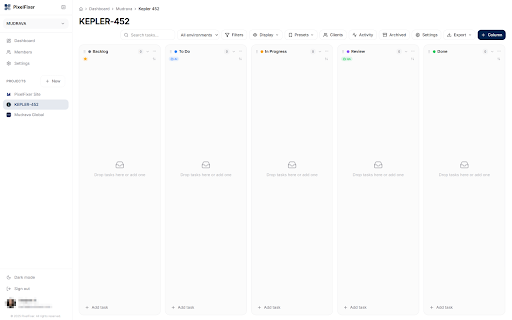
• Kanban integration: bug reports go straight to your project's Kanban board — no copy-pasting.
• Multi-project support: switch between teams and projects from the popup.
• SPA-aware: URL changes inside single-page apps are detected; pins survive navigation.
• Floating feedback button (FAB): optional always-visible button your QA team can click on any page.
• Right-click menu: "Report Bug on this page" context menu item for quick access.
• Dark theme: the popup and overlay are dark-themed to minimize visual interference.
• i18n: available in English, Ukrainian, and Russian.

🔒 PRIVACY & SECURITY
• No tracking, no analytics, no ads.
• The extension only activates on pages where you explicitly click "Activate".
• Screenshots and page data are sent exclusively to YOUR self-hosted or cloud PixelFixer server.
• Authentication tokens are stored locally in chrome.storage — never synced or shared.
• Full privacy policy: https://pixelfixer.mudrava.com/privacy

💡 WHO IS IT FOR?
• QA engineers filing visual bugs during testing sessions.
• Designers who spot UI inconsistencies and want to report them in context.
• Frontend developers who need to reproduce customer-reported layout issues.
• Product managers triaging visual defects on staging or production.

🌐 REQUIREMENTS
• A PixelFixer account (sign up at https://pixelfixer.mudrava.com).
• At least one project configured with columns on the Kanban board.
Technical
- Version
- 1.1.0
- Manifest
- V3
- Size
- 93.22KiB
- Min Chrome
- 116
- Languages
- 3
- Featured
- No
Metadata
- ID
- ikdgfdfamnppnhiphgbimcalfeahodaj
- Developer ID
- u8ed06ea5e062ba71b92f7829b30d39eb
- Developer Email
- [email protected]
- Created
- Mar 6, 2026
- Last Updated (Store)
- Mar 6, 2026
- Last Scraped
- Jun 8, 2026
- Website
- mudrava.com
- Support URL
- https://pixelfixer.mudrava.com/contact
- Privacy Policy
- https://pixelfixer.mudrava.com/privacy
Similar extensions
Alternatives to PixelFixer, ranked by description similarity.

UI Bug Detector
Visually detect UI bugs in user-selected sections of a web page.
72
★ 5.0

BugBul Bug Reporter
Hızlıca ekran görüntüsü veya video alın, sesli not ekleyin ve Jira/Trello'ya anında raporlayın.
7

amgiflol
Figma-like Layout Inspector For Web
46

WebPinch
Pin visual feedback directly on any website
7

Element Inspector - Precision UI Analysis
Professional UI inspection toolkit for developers. Analyze element alignment, colors, spacing, and typography with precision.
351
★ 5.0

BetterBugs: Create precise bug reports with 1-click
One-click bug reports with all the context devs need
10.0K
★ 4.9

Data collector and crash reporting
Collect screenshot, cookies, storage and network for internal reports.
8

Meta Pixel Inspector
Debug Meta (Facebook) Pixel events in a clean sidebar interface with validation
83
Data sourced from the Chrome Web Store · last verified Jun 8, 2026.