
Video Keyword Filter for YouTube
Hide YouTube videos by keyword. Match titles or channel names to block clickbait, spoilers, and channels. 100% local.
As of July 2026, Video Keyword Filter for YouTube has — users in the Productivity category.
Usersno change0%
—
—
Ratingno change0%
—
— reviews
Reviewsno change0%
—
Version
0.4.0
Manifest V3
History
1 snapshotsTracking since Jul 5, 2026.
Not enough history yet for this metric — the chart fills in as we collect more snapshots.
View as table
| Date | Users | Rating | Reviews | Version |
|---|---|---|---|---|
| Jul 5, 2026 | — | — | — | 0.4.0 |
| Now | — | — | — | 0.4.0 |
Permissions & access
- Permissions
- storage
- Host access
- https://www.youtube.com/*, https://m.youtube.com/*
Screenshots


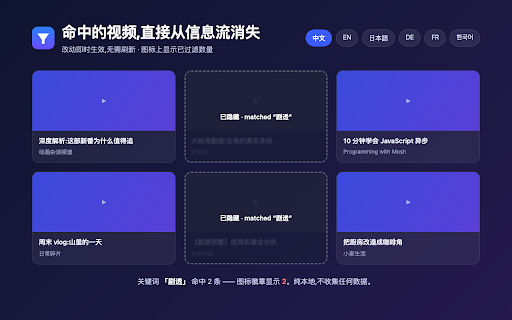
About
English

### Name (≤45 chars)
VideoKeyword Filter for YouTube

### Summary (≤132 chars)
Hide YouTube videos by keyword. Match titles or channel names to block clickbait, spoilers, and channels. 100% local, no tracking.

### Detailed description
Keep videos you don't want to see out of your YouTube feed — by keyword.

WHAT IT DOES
• Block mode: hide any video whose title or channel matches your keywords (default)
• Allow mode: keep only matching videos, hide the rest
• Match against the video title and/or the channel name (toggle each)
• Supports any language, case sensitivity, whole-word, and regular expressions
• Works on home, subscriptions, search results, the watch-page sidebar, channel pages, playlists, and Shorts
• Changes apply instantly — no page reload
• A badge on the toolbar icon shows how many videos were filtered on the current tab
• Export / import your keyword list as JSON for backup or moving between devices
• UI available in English, Chinese, Japanese, German, French, and Korean — switch manually or follow your browser

WHO IT'S FOR
• Anyone tired of clickbait and rage-bait in their feed
• Avoiding spoilers for a game, match, or show
• Muting specific channels or topics

PRIVACY
• 100% local — it only hides elements on the page in your browser
• No scraping, no uploads, no data collection of any kind
• Keywords live in your browser's chrome.storage (synced with your Chrome account if enabled) and are never sent to any server
• Requests only two permissions: storage (to save keywords) and running on YouTube pages

NOTE
The extension works by hiding matching video cards on the page, the same principle as ad-blocking extensions. YouTube redesigns may occasionally break a surface; updates will keep it working.


### 名称(≤45 字符)
VideoKeyword Filter — YouTube 关键词过滤

### 简介 / 摘要(≤132 字符)
按关键词隐藏 YouTube 视频:匹配标题或频道名,屏蔽标题党、剧透、不想看的频道。纯本地运行,不收集任何数据。

### 详细描述
用关键词把你不想看的 YouTube 视频从信息流里直接隐藏掉。

【能做什么】
• 黑名单模式:命中关键词的视频卡自动隐藏(默认)
• 白名单模式:只保留命中关键词的视频,其余隐藏
• 匹配「视频标题」「频道/作者名」,可分别开关
• 支持中英文、大小写、整词匹配、正则表达式
• 覆盖首页、订阅、搜索结果、观看页侧栏「相关视频」、频道页、播放列表、Shorts
• 改动即时生效,无需刷新页面
• 扩展图标上显示本页已过滤掉的视频数量
• 关键词可一键导出/导入(JSON),方便备份或换设备
• 界面支持中文、英文、日语、德语、法语、韩语,可手动切换或跟随浏览器

【适合谁】
• 被标题党、震惊体刷屏的人
• 想躲开某场比赛/某部剧的剧透
• 不想再看到某些频道或某类话题

【隐私】
• 100% 本地运行,只在你的浏览器里隐藏页面元素
• 不抓取、不上传、不收集任何数据
• 关键词仅存于浏览器的 chrome.storage(可随你的 Chrome 账号同步),不发往任何服务器
• 仅申请两项权限:储存关键词(storage)、在 YouTube 页面上运行

【说明】
扩展通过隐藏页面上命中关键词的视频卡来工作,原理等同广告拦截类扩展。YouTube 改版可能偶尔导致部分位置失效,会持续维护更新。
Technical
- Version
- 0.4.0
- Manifest
- V3
- Size
- 23.6KiB
- Min Chrome
- 88
- Languages
- 6
- Featured
- No
Metadata
- ID
- ikagmjjmegmlkkjafbbflebnkeipipjg
- Developer ID
- u0f096b48eb40eb797309aed400bed94b
- Developer Email
- [email protected]
- Created
- Jul 4, 2026
- Last Updated (Store)
- Jul 4, 2026
- Last Scraped
- Jul 5, 2026
- Website
- —
- Support URL
- —
Data sourced from the Chrome Web Store · last verified Jul 5, 2026.