
ChatGPT Dark Mode & Background
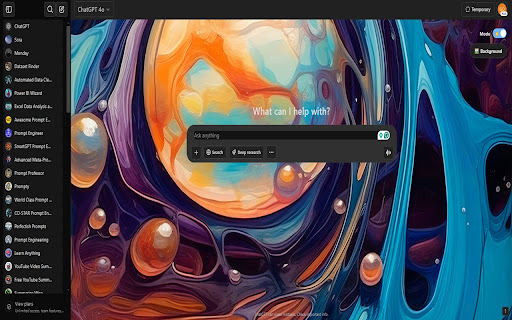
Applies a dark theme via toggle switch and allows setting/removing a custom background image.
As of June 2026, ChatGPT Dark Mode & Background has 11 users and a 2.00/5 rating from 1 reviews in the Productivity category.
Usersdown 31.3 percent−31.3%
11
11
Ratingno change0%
2.00
1 reviews
Reviewsno change0%
1
Version
1.3
Manifest V3
History
4 snapshotsTracking since Apr 1, 2026.
View as table
| Date | Users | Rating | Reviews | Version |
|---|---|---|---|---|
| Apr 1, 2026 | 16 | 2.00 | 1 | 1.3 |
| Apr 21, 2026 | 15 | 2.00 | 1 | 1.3 |
| May 11, 2026 | 16 | 2.00 | 1 | 1.3 |
| Jun 7, 2026 | 10 | 2.00 | 1 | 1.3 |
| Now | 11 | 2.00 | 1 | 1.3 |
Permissions & access
- Permissions
- storage
- Host access
- None declared
Screenshots


About
✨ Transform Your ChatGPT Experience! ✨
Tired of the standard look? Wish you could personalize your ChatGPT interface for better comfort and style? Now you can! Introducing the ChatGPT Dark Mode & Background Customizer – the simple way to make ChatGPT truly yours.

What Does It Do?
This lightweight extension adds easy-to-use controls directly onto the ChatGPT page, allowing you to instantly customize two key visual elements:

🌙 Sleek Dark Mode Toggle:

Give your eyes a break with a beautiful, deep black dark mode.

Simply click the intuitive toggle switch that appears in the top-right corner of the page.

Switch effortlessly between the default light theme and the comfortable dark theme anytime! The toggle visually confirms your current mode (☀️ for Light, 🌙 for Dark).

🖼️ Custom Background Image:

Personalize your chat environment like never before! Click the "🖼️ Background" button.

Your file explorer will open, allowing you to choose any image from your computer.

Watch as ChatGPT instantly adopts your chosen image as its background, working seamlessly in both light and dark modes.

❌ Easy Background Removal:

Changed your mind or want to go back to a solid background? No problem!

Simply hover your mouse over the "🖼️ Background" button. A small red "✕" icon will appear on the right side.

Click the "✕", and your custom background is instantly removed, restoring the default theme background (white or black depending on the toggle state).

Why You'll Love It:
Personalized Vibe: Make ChatGPT feel unique and inspiring with your favorite background.

Eye Comfort: Reduce eye strain during late-night sessions with the smooth dark mode.

Simple & Intuitive: Controls are added directly to the page – no complex settings menus.

Seamless Integration: Works flawlessly whether you prefer light or dark mode.

Lightweight: Focused purely on visual customization without unnecessary bloat.

How to Use:
Install the extension.

Visit chatgpt.com.

Look for the controls in the top-right corner.

Click the Toggle Switch to swap between Light (☀️) and Dark (🌙) modes.

Click "🖼️ Background" to select and apply an image from your computer.

Hover over "🖼️ Background" and click the "✕" (when visible) to remove the custom background.

Privacy Focused:
Your preferences matter, and so does your privacy.

Your chosen dark/light mode setting and your background image (if selected) are saved locally on your computer only, using standard browser storage (chrome.storage.local).

This extension does not collect, transmit, or share any of your data.

Give your ChatGPT a fresh new look today! Install the Dark Mode & Background Customizer and chat in style.
Technical
- Version
- 1.3
- Manifest
- V3
- Size
- 32.39KiB
- Min Chrome
- 88
- Languages
- 1
- Featured
- No
Metadata
- ID
- ijpikhibdjkljjldmalcblpfbjigacdi
- Developer ID
- uf9eef6d36e863e3317bd8ab107e24f15
- Developer Email
- [email protected]
- Created
- Apr 8, 2025
- Last Updated (Store)
- Apr 8, 2025
- Last Scraped
- Jun 7, 2026
- Website
- —
- Support URL
- —
Similar extensions
Alternatives to ChatGPT Dark Mode & Background, ranked by description similarity.

ThemeGPT
Custom theme for ChatGPT
3
★ 5.0

StylerGPT for ChatGPT
Custom Themes for ChatGPT, Prompt Manager, Prompt History, Folders, Export to PDF/DOCX, Bulk Actions, and more!
10.0K
★ 4.7

Custom Themes for ChatGPT - Skins, Dark Mode & UI Styles
16 Free + 7 Premium ChatGPT Themes with Dark Theme focus. ChatGPT Style, Skins, UI optimizer. Easy theme change.
1.0K
★ 4.1

GPT Theme Studio : ChatGPT Theme Editor
Your ChatGPT, your style. Unleash custom themes.
133
★ 4.0

ReskinGPT
Select themes for chatgpt.com, including custom themes.
—
★ 5.0

Amoled Dark Mode for ChatGPT
A Chrome extension to toggle dark mode for ChatGPT.
1.0K
★ 3.9

ChatGPT Stats
Displays statistics on ChatGPT interactions.
31
Akralys: ChatGPT Custom Themes, UI Tools & PDF Export
Akralys: Customize ChatGPT with custom themes, advanced UI tweaks and powerful tools. Export to PDF, edit fonts and colors live.
374
★ 4.6
Data sourced from the Chrome Web Store · last verified Jun 7, 2026.