
Multi Layout Manager
MLM captures and persists browser window layouts. Save position, size to reload pages exactly as before for a consistent experience.
As of July 2026, Multi Layout Manager has 1,000 users and a 4.56/5 rating from 25 reviews in the Accessibility category.
Usersno change0%
1.0K
1,000
Ratingno change0%
4.56
25 reviews
Reviewsno change0%
25
Version
1.9
Manifest V3
History
1 snapshotsTracking since Jul 1, 2026.
View as table
| Date | Users | Rating | Reviews | Version |
|---|---|---|---|---|
| Jul 1, 2026 | 1.0K | 4.56 | 25 | 1.9 |
| Now | 1.0K | 4.56 | 25 | 1.9 |
Permissions & access
- Permissions
- tabsbookmarksstoragescripting
- Host access
- None declared
Screenshots

About
Stop wasting time rearranging your Chrome windows.
With Multi Layout Manager, you can instantly save and restore the exact position and size of your browser windows — whether on a single screen or across multiple monitors.

Super simple to use:

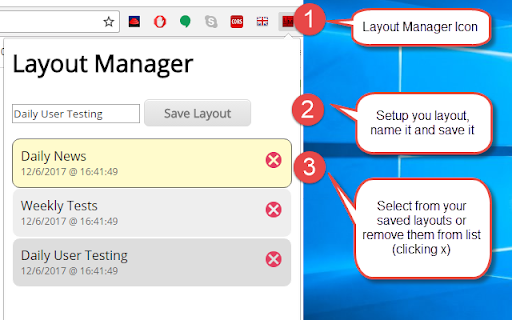
1. After installation, click the Multi Layout Manager icon in the top right of your browser.
2. Arrange your windows exactly how you want them, then click the icon, give your layout a name, and save it.
3. To restore, just click the icon and select your saved layout — everything returns to perfect position instantly.

Never rearrange your workspace again.
Get back to what matters.
Technical
- Version
- 1.9
- Manifest
- V3
- Size
- 67.42KiB
- Min Chrome
- 88
- Languages
- 1
- Featured
- No
Metadata
- ID
- ijpiffheldgmdkbaohoilabdnmeinand
- Developer ID
- ud773729e98a229a95b3547fa888df859
- Developer Email
- [email protected]
- Created
- Mar 21, 2017
- Last Updated (Store)
- Jun 30, 2026
- Last Scraped
- Jul 1, 2026
- Website
- —
- Support URL
- —
Data sourced from the Chrome Web Store · last verified Jul 1, 2026.