
Log Finder
Search text files easily with 2 keywords per line!
As of May 2026, Log Finder has 22 users in the Accessibility category.
Usersno change0%
22
22
Ratingno change0%
—
— reviews
Reviewsno change0%
—
Version
1.0
Manifest V3
History
2 snapshotsTracking since Apr 25, 2026.
View as table
| Date | Users | Rating | Reviews | Version |
|---|---|---|---|---|
| Apr 25, 2026 | 22 | — | — | 1.0 |
| May 21, 2026 | 26 | — | — | 1.0 |
| Now | 22 | — | — | 1.0 |
Permissions & access
- Permissions
- None declared
- Host access
- None declared
Screenshots

About
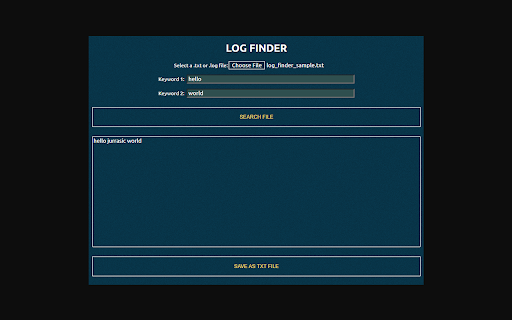
Log Finder is a tool that can help users quickly find specific information within their .txt or .log files. These types of files can often be large and difficult to navigate, making it time-consuming and frustrating to search for specific information manually. With Log Finder, users can simply enter their desired search terms into the extension's text fields and have the relevant information displayed in a matter of seconds.

To use Log Finder, users must first add their .txt or .log files to the extension. This can be done by clicking on the extension's icon in the Chrome browser and selecting the "Choose File" option. From there, users can browse their local file system and select the desired files to be added. Once a file has been added, it will be accessible for searching through the extension.

The Log Finder extension has two text fields for entering search terms: "keyword 1" and "keyword 2." These fields allow users to specify the terms they are looking for within the added files. "Keyword 1" is required, but "keyword 2" is optional. This means that users can search for a single term or a combination of terms, depending on their needs.

To perform a search, users simply need to enter their desired keywords into the text fields and click the "Search File" button. The extension will then search through the lines of the added files and display any matches in the text area or result area. This can be done for each file individually or for all added files at once, depending on the user's preference.

The results of a search are displayed in the text area in a clear and easy-to-read format. Each line that contains a match for the search terms is displayed, along with the line number and the file it came from. This allows users to quickly locate the specific information they are looking for and see its context within the larger file.

In addition to searching through added files, "Log Finder" also has a "Save As Txt File" button that allows users to save the displayed search results from the text area. This can be useful for saving the results they've searched for.

Overall, Log Finder is a useful and convenient tool for anyone who frequently works with .txt or .log files and needs to search for specific information within them. With its simple interface and powerful search capabilities, it can save users a significant amount of time and effort when it comes to finding the information they need.
Technical
- Version
- 1.0
- Manifest
- V3
- Size
- 2.46MiB
- Min Chrome
- 88
- Languages
- 1
- Featured
- No
Metadata
- ID
- ijpaefhdolbhpadbebncbmocnollleec
- Developer ID
- u3cf36ea340bf9e091a4dd02eecb68559
- Developer Email
- [email protected]
- Created
- Dec 26, 2022
- Last Updated (Store)
- Dec 27, 2022
- Last Scraped
- May 21, 2026
- Website
- —
- Support URL
- —
- Privacy Policy
- —
Similar extensions
Alternatives to Log Finder, ranked by description similarity.

Searches
Search multiple terms simultaneously on any page with OR logic. Open with Ctrl+Shift+F (Win) or Cmd+Shift+F (Mac).
—

PhuKienChe.com Search
Search Phu Kien Che website from your browser
—

Search Assistor
Helping you to search.
1

GrabTheLink
Save the link from the current tab.
3

File Link Extractor
Extract and copy all file links of a chosen type from the current page.
20

File Explorer
Transform local folders and directory listings into a powerful file browser with search, filters, previews & shortcuts.
1.0K
★ 4.1

OpenHighlighter
OpenHighlighter is a source available tool that quickly auto-highlights multiple custom search terms or phrases on any webpage.
6
★ 5.0

SearchAllTabs — OneClick Tools
Search text across all open tabs quickly and privately. No accounts, minimal permissions.
13
Data sourced from the Chrome Web Store · last verified May 21, 2026.