
Whop Exporter - Whop Videos Downloader
Whop Exporter: Export & Download Whop Course Videos in Bulk
As of July 2026, Whop Exporter - Whop Videos Downloader has — users in the Productivity category.
Usersno change0%
—
—
Ratingno change0%
—
— reviews
Reviewsno change0%
—
Version
2.0.0
Manifest V3
History
1 snapshotsTracking since Jul 14, 2026.
Not enough history yet for this metric — the chart fills in as we collect more snapshots.
View as table
| Date | Users | Rating | Reviews | Version |
|---|---|---|---|---|
| Jul 14, 2026 | — | — | — | 2.0.0 |
| Now | — | — | — | 2.0.0 |
Permissions & access
- Permissions
- storagedownloadsdeclarativeNetRequestwebRequestwebNavigationoffscreen
- Host access
- *://*.whop.com/*, *://*.mux.com/*, *://*.ricciflow.io/*
Screenshots
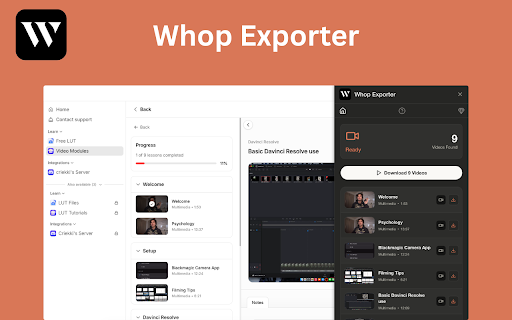


About
📥 Whop Exporter – Export & Download Whop Course Videos

Whop Exporter is a powerful Chrome extension that helps you export and download supported Whop course videos directly to your computer. Save lessons as high-quality MP4 files, export multiple videos from the current page, and upgrade to Pro to process entire courses with faster parallel downloads.

Whether you’re saving individual lessons for offline learning or exporting an entire course you have permission to access, Whop Exporter makes the process simple, fast, and private.

🚀 Key Features

🆓 Free Forever

Enjoy 3 successful MP4 video downloads every week, completely free.

✅ 3 successful downloads every week
✅ No credit card required
✅ Weekly allowance resets automatically
✅ Failed or canceled downloads don’t count toward your quota
✅ Remaining downloads are displayed inside the extension

🎬 Export Whop Videos as MP4

Save supported Whop course videos as complete MP4 files with both video and audio.

✨ Download supported Whop lessons directly from Chrome
🎧 Preserve original audio and video quality
💻 Play files with any standard media player
📁 Save videos directly to your Downloads folder
✈️ Watch lessons offline anytime

Perfect for building your personal offline study library.

📚 Export Multiple Videos

Download a single lesson or export multiple supported videos detected on the current page.

📥 Export one video with one click
📋 Queue multiple lessons automatically
⏱️ Reduce repetitive downloading
🔄 Monitor queued, completed, skipped, and failed downloads

⚡ Upgrade to Pro

Need to save an entire course?

Whop Exporter Pro unlocks powerful bulk export features.

🚀 Unlimited supported downloads
📚 Export videos across an entire course
⚡ Up to 5 simultaneous downloads for speeds up to 5× faster
🗂️ Automatically organize lessons into course folders
📈 Live download and conversion progress
💎 Monthly, yearly, and lifetime plans available

Large courses can be exported with far less manual work while keeping everything neatly organized.

🔒 Private Browser-Based Processing

Your downloads stay private.

🛡️ No online video converter required
☁️ No uploading videos to external servers
💻 Processing happens directly inside Chrome
📁 Files are saved to your own computer
🔄 Track download progress inside the extension

📖 How to Use

1️⃣ Open a supported Whop course or lesson.
2️⃣ Play the video so it can be detected.
3️⃣ Click the Whop Exporter extension icon.
4️⃣ Export an individual lesson or queue multiple videos.
5️⃣ Watch progress in real time.
6️⃣ Open your completed MP4 files from your Downloads folder.

💡 Why Choose Whop Exporter?

Whop Exporter is designed for students, professionals, and online learners who want an easier way to save authorized Whop course videos for offline viewing.

It helps you:

🎓 Build a personal offline learning library
📥 Export individual or multiple Whop videos
📚 Download supported course lessons in bulk
⚡ Save time with automated queues
🗂️ Keep course content organized
🔒 Maintain privacy with browser-based processing

If you’re looking for a reliable Whop video downloader, Whop course downloader, or Whop video exporter, Whop Exporter provides an efficient solution directly inside Google Chrome.

⚠️ Availability

Features depend on:

🔹 Supported video formats
🔹 Course structure
🔹 Your account permissions
🔹 The video player used by the course
🔹 Updates made to the Whop platform

Some embedded videos, livestreams, protected content, or unsupported formats may not be available.

⚖️ Disclaimer

Whop Exporter is an independent third-party Chrome extension and is not affiliated with, endorsed by, sponsored by, or officially associated with Whop Inc.

“Whop” is a trademark of its respective owner and is used solely to identify platform compatibility.

Please use this extension only for content that:

✅ You own
✅ You created
✅ You have permission to download
✅ Is made available for authorized offline use

Users are responsible for complying with applicable copyright laws, platform policies, creator permissions, and local regulations.
Technical
- Version
- 2.0.0
- Manifest
- V3
- Size
- 9.94MiB
- Min Chrome
- 88
- Languages
- 9
- Featured
- No
Metadata
- ID
- ijnmihclhbjdfpefaajadkjbejooijeb
- Developer ID
- u263f1b6ebcea97f40c5cab0846ef465d
- Developer Email
- [email protected]
- Created
- Jul 13, 2026
- Last Updated (Store)
- Jul 13, 2026
- Last Scraped
- Jul 14, 2026
- Website
- ricciflow.io
- Support URL
- https://ricciflow.io
- Privacy Policy
- https://ricciflow.io/privacy
Data sourced from the Chrome Web Store · last verified Jul 14, 2026.