
SESEO Shop Spy - Shopify Seller Toolbar and Store Analyzer
Analyze Shopify stores to view products, collections, vendors, and blog posts
As of June 2026, SESEO Shop Spy - Shopify Seller Toolbar and Store Analyzer has 76 users and a 5.00/5 rating from 3 reviews in the Productivity category.
Usersup 26.7 percent+26.7%
76
76
Ratingno change0%
5.00
3 reviews
Reviewsno change0%
3
Version
1.0.1
Manifest V3
History
6 snapshotsTracking since Apr 18, 2026.
View as table
| Date | Users | Rating | Reviews | Version |
|---|---|---|---|---|
| Apr 18, 2026 | 60 | 5.00 | 3 | 1.0.1 |
| Apr 28, 2026 | 59 | 5.00 | 3 | 1.0.1 |
| May 8, 2026 | 68 | 5.00 | 3 | 1.0.1 |
| May 15, 2026 | 67 | 5.00 | 3 | 1.0.1 |
| May 24, 2026 | 69 | 5.00 | 3 | 1.0.1 |
| Jun 3, 2026 | 74 | 5.00 | 3 | 1.0.1 |
| Now | 76 | 5.00 | 3 | 1.0.1 |
Permissions & access
- Permissions
- storageactiveTabscripting
- Host access
- None declared
Screenshots
About
SESEO – Shop Spy for Ecommerce Stores

Short description
Legally spy on any ecommerce store’s products, prices, tech stack & content… without leaving the page.

Full description

Most store owners guess what winners are doing.

SESEO users steal the blueprint.

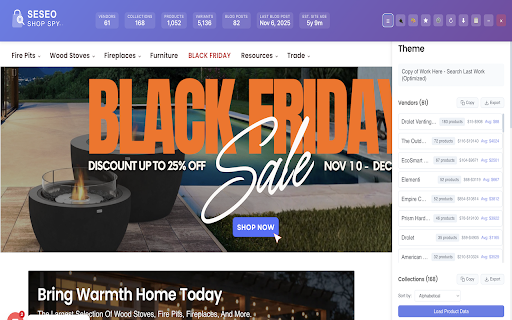
This Chrome extension slaps a “x-ray dashboard” on top of any supported ecommerce store (like Shopify) and quietly spills its guts: vendors, products, apps, prices, blog strategy, the whole enchilada.

No spreadsheets. No manual digging. No VA in the Philippines clicking around for 3 hours.

What SESEO Shows You (While Everyone Else Is Still On The Homepage)

Across the top you get an instant “vitals” bar:

Vendors – how many suppliers/brands they’re juggling

Collections – how they slice the catalog

Products & variants – real SKU depth, not fluffy brand talk

Blog posts – total count + last publish date

Estimated site age – are you studying a newborn or a battle-hardened veteran?

If a store isn’t worth your time, you’ll know in 3 seconds.

Vendors & Products: Follow The Money, Not The Hype

Click into Vendors and SESEO lines them up like suspects in a police lineup:

Every vendor/brand

How many products they’re responsible for

Fast idea of who the real money makers are

Then the Product panel lets you:

See all products with min, max, and average price

Sort and filter to spot low-ticket bait and high-ticket profit centers

Copy or export to CSV for deeper plotting in Sheets, Excel, Notion, whatever poison you prefer

This is how you find the “hidden whales” in a niche while your competitors argue about logos.

Tech Stack Snitch: The Apps They Pray Never Break

The Apps tab exposes the tools that keep the whole operation alive:

Analytics: Facebook Pixel, Google Analytics, Microsoft Clarity, Lucky Orange, etc.

Email & SMS: Klaviyo and friends

Live chat, CRO, tracking and other gizmos

Each app is grouped (Analytics, Email Marketing, Live Chat, All-in-One…) with simple confidence labels, so you know what they’re really running, not what they brag about on X.

Swipe these stacks, test them on your own store, and “mysteriously” improve conversions.

Collections: Their Merchandising Brain, Exposed

SESEO pulls out the entire collection structure:

Alphabetized, clean, and easy to skim

One click to Load Product Data per collection

Export for later scheming with your team

Use this to model your own navigation, bundles, and category structure without reinventing the wheel like a “creative” amateur.

Content Strategy: Are They Serious Or Just Posting Vibes?

The Blog tab gives you a 12-month content autopsy:

How many posts per month

When the last post went live

A simple bar chart that reveals if they’re consistent pros or “New Year’s Resolution bloggers”

Perfect for SEOs and content people who want to see if content is actually part of this brand’s growth engine or just decoration.

Export Like A Data Hoarder

With SESEO you can:

Copy lists straight to your clipboard

Export vendors, products, collections, and apps to CSV

Drag everything into Sheets, Excel, Airtable, BI tools, or send it to your poor analyst

You get the data. You own the data. You weaponize the data.

Who This Is For

Store owners who’d rather borrow winning ideas than suffer through “finding yourself” as a brand

Agencies and consultants who want to walk into pitches with creepily specific intel

Media buyers who like to see the tech stack before feeding a store ad money

SEOs and content people who want to reverse-engineer serious players

Product researchers & dropshippers who live and die by niche data

How It Works (In 3 Steps)

Install SESEO

Visit any supported ecommerce store

Click the SESEO icon – the “Shop Spy” panel slides in and starts singing like a canary

From there, flip between Overview, Vendors, Apps, Collections, Products, and Blog. Copy or export whatever makes you money.

If you’re happy guessing what your competitors are doing, you don’t need this.

If you’d rather see exactly how they’re built…

Add SESEO – Shop Spy to Chrome and start snooping.
Technical
- Version
- 1.0.1
- Manifest
- V3
- Size
- 74.35KiB
- Min Chrome
- 88
- Languages
- 1
- Featured
- No
Metadata
- ID
- ijmkgmigcefmiphpnemialmbeehnphep
- Developer ID
- u0fb27f367cf066c88ebd2648cde36682
- Developer Email
- [email protected]
- Created
- Nov 26, 2025
- Last Updated (Store)
- Nov 26, 2025
- Last Scraped
- Jun 3, 2026
- Website
- —
- Support URL
- EcomSEOTools.com/Contact
- Privacy Policy
- https://ecomseotools.com/privacy-policy
Similar extensions
Alternatives to SESEO Shop Spy - Shopify Seller Toolbar and Store Analyzer, ranked by description similarity.
Shopify Store Spy - Shoper Spy - Shopify apps
Shopify Competitor Analysis, Shopify App Detector & Shopify Theme Detector. Spy & Detect Competitor Store Products Apps & Themes
5.0K
★ 4.8

SimplyTrends - Shopify Spy & Dropship Scraper
Free all-in-one Shopify inspector, spy, parser, and dropshipping tools.
10.0K
★ 3.6

Shopify Store X-Ray
Reveal bestsellers, theme, and apps of any Shopify store instantly
—

SEO audit for Shopify
Complete Shopify SEO audit -track products, pricing, and best-sellers all in one dashboard
6

Nekoninja Shopify Inspector – Shopify Inspector & Store Analyzer
Nekoninja analyzes Shopify stores effortlessly—track trends, traffic, and competitors in one extension.
224
★ 4.8

Shopify Spying Tool - Shopify Apps - Louie's Sniffer
Detects marketing and growth plugins used on stores
12
★ 5.0

BestSellerSniffer
Adds a button to find out best-selling products on any Shopify store.
16

AI Visibility & Search Audit by eShopSEO
AI Visibility & SEO audit for any website. Browse pages, get instant scores with actionable fixes, and export a PDF report.
10
★ 5.0
Data sourced from the Chrome Web Store · last verified Jun 3, 2026.