
QuickPrompts
Quickly inject predefined prompts into conversations
As of May 2026, QuickPrompts has 21 users in the Workflow & Planning category.
Usersup 16.7 percent+16.7%
21
21
Ratingno change0%
—
— reviews
Reviewsno change0%
—
Version
1.0.0
Manifest V3
History
4 snapshotsTracking since Apr 1, 2026.
View as table
| Date | Users | Rating | Reviews | Version |
|---|---|---|---|---|
| Apr 1, 2026 | 18 | — | — | 1.0.0 |
| Apr 21, 2026 | 16 | — | — | 1.0.0 |
| May 6, 2026 | 17 | — | — | 1.0.0 |
| May 18, 2026 | 13 | — | — | 1.0.0 |
| Now | 21 | — | — | 1.0.0 |
Permissions & access
- Permissions
- storageunlimitedStorage
- Host access
- https://chat.openai.com/*, https://chatgpt.com/*, https://grok.com/*, https://x.com/i/grok/*, https://gemini.google.com/*, https://chat.deepseek.com/*, https://t3.chat/*, https://claude.ai/*, *://*.mistral.ai/*, https://aistudio.google.com/*, https://copilot.microsoft.com/*, https://www.perplexity.ai/*
Screenshots


About
Tired of constantly copying and pasting the same prompts into ChatGPT, Gemini, Claude, Google AI Studio, and other AI chat platforms? QuickPrompts is here to streamline your workflow!

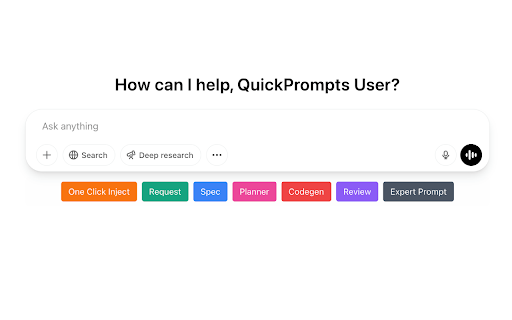
This powerful yet simple extension integrates directly into your favorite chat interfaces, adding customizable buttons below the input area. With a single click, you can instantly inject your frequently used prompts, instructions, or text snippets, saving you valuable time and effort.

Key Features:

-   🚀 One-Click Injection: Insert complex prompts instantly without leaving the chat window.
-   ✍️ Prompt Library: Easily create, save, edit, and manage all your essential prompts in one place.
-   🎨 Customization: Assign colors to your prompt buttons for quick visual identification.
-   🔄 Preserves Formatting: Your prompts are inserted exactly as you saved them, including line breaks and formatting.
-   🖱️ Smart Insertion: Inserts text directly at your cursor or replaces currently selected text.
-   💻 Wide Compatibility: Works seamlessly with ChatGPT, Gemini, Claude, Grok, Perplexity and many more providers!
-   🔒 Privacy Focused: Your prompts are stored securely and locally on your device using Chrome's storage.
-   ✨ (Optional) AI-Powered Features:
    -   Prompt Enhancer: Refine and improve your prompts using AI before saving (requires your OpenAI API key).
    -   AI Categorization: Automatically suggest categories for your prompts (requires your OpenAI API key).

How It Works:

1.  Click the QuickPrompts icon in your toolbar to open the options page.
2.  Add your prompts, give them names, and pick colors.
3.  Visit a supported chat website.
4.  See your custom prompt buttons appear below the text input area.
5.  Click a button to instantly insert the corresponding prompt!

Stop the copy-paste grind and supercharge your interactions with AI. Install QuickPrompts today and experience a smoother, faster workflow!
Technical
- Version
- 1.0.0
- Manifest
- V3
- Size
- 637KiB
- Min Chrome
- 88
- Languages
- 1
- Featured
- No
Metadata
- ID
- ijekoianhpbndakpmbiichgfecpljpjh
- Developer ID
- ua02ba36268ada55566634a200dff2d0c
- Developer Email
- [email protected]
- Created
- May 2, 2025
- Last Updated (Store)
- May 8, 2025
- Last Scraped
- May 18, 2026
- Website
- quickprompts.dev
- Support URL
- https://quickprompts.dev/support/
- Privacy Policy
- http://quickprompts.dev/privacy
Similar extensions
Alternatives to QuickPrompts, ranked by description similarity.

Prompt 01
Capture selected text, save prompts, and paste them into AI tools.
2

Powered Prompts
Insert prompts into ChatGPT, Claude, Gemini & more with one click. Save any text as prompt. Offline, private, no account needed.
3

Promptsheet
Your entire prompt library, just a click away. Use it across any AI or writing tool.
14

Prompt Holder: Store and Manage prompts effectively
Boost your AI workflow with a personal prompt library. Save, favorite, and inject prompts offline.
15
★ 5.0

Quick Prompts
Manage and quickly insert text prompts
25
★ 5.0

Promptu
Instantly refine your AI prompts. Get 3 polished versions with one click — works on ChatGPT, Claude, Gemini and more.
8
★ 5.0

Prompt Suite
Smart prompt manager for AI chats. Organize, schedule & insert prompts into ChatGPT, Claude, Gemini & Perplexity with folders.
35
★ 5.0

Auto Prompt
🧠 Auto Prompt — Automatically add and manage AI prompts. Switch modes, clean UI, full control — all in one lightweight extension.
18
Data sourced from the Chrome Web Store · last verified May 18, 2026.