
MailMindAI
Smart AI email organizer that safely sorts and manages your Gmail for a cleaner, stress-free inbox.
As of May 2026, MailMindAI has 15 users and a 4.67/5 rating from 3 reviews in the Productivity category.
Usersdown 37.5 percent−37.5%
15
15
Ratingno change0%
4.67
3 reviews
Reviewsno change0%
3
Version
1.0.2
Manifest V3
History
4 snapshotsTracking since Apr 20, 2026.
View as table
| Date | Users | Rating | Reviews | Version |
|---|---|---|---|---|
| Apr 20, 2026 | 24 | 4.67 | 3 | 1.0.2 |
| May 5, 2026 | 21 | 4.67 | 3 | 1.0.2 |
| May 16, 2026 | 20 | 4.67 | 3 | 1.0.2 |
| May 30, 2026 | 17 | 4.67 | 3 | 1.0.2 |
| Now | 15 | 4.67 | 3 | 1.0.2 |
Permissions & access
- Permissions
- identitystoragescripting
- Host access
- None declared
Screenshots


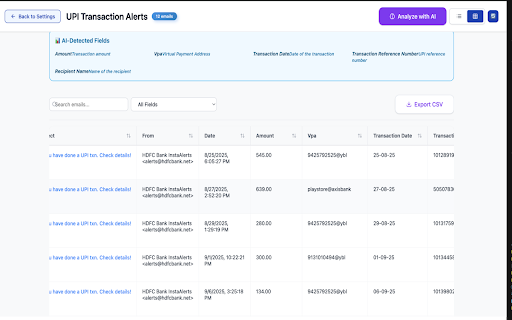
About
🚀 **Transform Your Gmail Into a Smart, Organized Inbox with AI**

MailMindAI is the ultimate AI-powered email organizer that intelligently sorts and manages your Gmail for a cleaner, stress-free inbox experience. Stop drowning in email chaos and let artificial intelligence handle the heavy lifting.

**🎯 What MailMindAI Does:**

**Smart AI Categorization**
• Automatically sorts emails into intelligent categories like "For You", "Finance", "Urgent Attention", and more
• Uses advanced AI to understand email content and context
• Learns from your preferences to improve categorization over time
• Handles thousands of emails with lightning-fast processing

**Intelligent Email Management**
• Creates custom categories based on your specific needs
• Extracts key information from emails automatically
• Provides one-line summaries for quick email scanning
• Identifies important emails that need immediate attention

**Advanced Organization Features**
• Auto-categorize emails by content, sender, and importance
• Manual category creation for personalized organization
• Bulk email processing and management
• Smart filtering and search capabilities
• Export categorized data to CSV for analysis

**🔧 How It Works:**

1. **Connect Securely**: Authenticate with your Gmail account using Google's secure OAuth2
2. **AI Analysis**: Our advanced AI analyzes your email content, patterns, and preferences
3. **Smart Sorting**: Emails are automatically categorized into relevant groups
4. **Custom Management**: Create and manage your own categories for personalized organization
5. **Stay Organized**: Enjoy a clean, stress-free inbox that works for you

**✨ Key Benefits:**

**Save Time**
• No more manual email sorting
• Quick access to important emails
• Reduced time spent searching through cluttered inboxes
• Automated organization that works 24/7

**Reduce Stress**
• Clean, organized inbox reduces email overwhelm
• Important emails are never missed
• Clear categorization makes email management effortless
• Peace of mind knowing your emails are properly organized

**Increase Productivity**
• Focus on important emails first
• Quick email scanning with AI-generated summaries
• Better email workflow and response times
• More time for actual work instead of email management

**🔒 Privacy & Security:**

• **Secure Authentication**: Uses Google's official OAuth2 for safe Gmail access
• **Read-Only Access**: Only reads your emails, never modifies or deletes anything
• **Local Processing**: Email analysis happens securely on your device
• **No Data Selling**: We never sell or share your email data
• **Transparent Privacy**: Clear privacy policy with no hidden data collection

**🎨 Professional Features:**

**Modern Interface**
• Clean, intuitive design that's easy to use
• Responsive layout that works on all screen sizes
• Professional color scheme and typography
• Smooth animations and user interactions

**Advanced Settings**
• Customizable AI categorization rules
• Personal role/profession settings for better categorization
• Flexible email count limits
• Comprehensive configuration options

**Data Management**
• Export categorized emails to CSV
• Backup and restore settings
• Clear data options for privacy
• Storage optimization with IndexedDB

**📊 Perfect For:**

**Professionals**
• Business owners managing multiple email accounts
• Sales professionals tracking leads and opportunities
• Project managers organizing team communications
• Freelancers managing client communications

**Students**
• Organizing academic emails and assignments
• Managing scholarship and application communications
• Keeping track of course-related information
• Separating personal and academic emails

**Personal Users**
• Managing family and personal communications
• Organizing subscription and service emails
• Keeping track of important personal documents
• Reducing email clutter and stress

**🏆 Why Choose MailMindAI:**

**Advanced AI Technology**
• Uses cutting-edge artificial intelligence for email understanding
• Continuously improves categorization accuracy
• Handles complex email patterns and contexts
• Processes emails faster than manual sorting

**User-Friendly Design**
• Simple setup process - get started in minutes
• Intuitive interface that anyone can use
• Clear visual feedback and status indicators
• Comprehensive help and guidance

**Reliable Performance**
• Works with Gmail accounts of any size
• Handles thousands of emails efficiently
• Stable performance with regular updates
• Cross-platform compatibility

**Ongoing Support**
• Regular updates with new features
• Responsive customer support
• Active development and improvements
• Community feedback integration

**🚀 Get Started Today:**

1. Install MailMindAI from the Chrome Web Store
2. Click the extension icon in your browser toolbar
3. Connect your Gmail account securely
4. Configure your AI settings and preferences
5. Watch as your inbox transforms into an organized, stress-free experience

**💡 Pro Tips:**

• Set your profession/role for better AI categorization
• Create custom categories for specific needs
• Use the export feature to analyze your email patterns
• Regularly review and adjust categorization rules
• Take advantage of the manual category features for maximum control

**🔄 Regular Updates:**

We continuously improve MailMindAI with:
• Enhanced AI categorization algorithms
• New organization features
• Performance optimizations
• User interface improvements
• Security enhancements

**📞 Support & Feedback:**

Have questions or suggestions? We're here to help! Contact us through the extension or visit our support page for assistance.

**🌟 Join Thousands of Users:**

MailMindAI is trusted by thousands of users worldwide who have transformed their email experience. Join them today and discover the power of AI-driven email organization.

**Download MailMindAI now and experience the future of email management!**

---

*MailMindAI - Smart AI email organizer that safely sorts and manages your Gmail for a cleaner, stress-free inbox.*
Technical
- Version
- 1.0.2
- Manifest
- V3
- Size
- 878KiB
- Min Chrome
- 88
- Languages
- 1
- Featured
- No
Metadata
- ID
- ijadndeimefngjlpaopnpjmgnhedmndk
- Developer ID
- u120b02c179d0e2d1593a192fe0d7af5e
- Developer Email
- [email protected]
- Created
- Sep 28, 2025
- Last Updated (Store)
- Sep 29, 2025
- Last Scraped
- May 30, 2026
- Website
- —
- Support URL
- —
Similar extensions
Alternatives to MailMindAI, ranked by description similarity.

Email Prioritizer
Organizes your Gmail inbox to prioritize important emails.
17

Smart Inbox - Email Intelligence
AI-powered email prioritization for Gmail. Find important emails fast with topic-based organization and sender insights.
4

inboxie - AI Email Assistant
AI-powered email organization and analytics for Gmail
12

FlashAi
Premium Gmail AI assistant with OAuth authentication and dark theme
13

SmartMail Cleaner
Intelligently clean Gmail inboxes based on message open rates per sender
8

Omee AI Email Writer
Enhance Your Gmail Experience with Omee AI : Unlock the potential of your Gmail with Omee AI, the advanced Chrome extension…
12

Replybox – AI Email Assistant for Gmail & Outlook
AI-powered email assistant that drafts smart replies, customizes tone, supports voice input, and summaries.
74
★ 5.0

MailMind AI – Gmail Follow-Up & Task Manager
Never miss a client follow up again. Turn email threads into clear tasks, deadlines, and next steps.
7
★ 4.5
Data sourced from the Chrome Web Store · last verified May 30, 2026.