
StackEdit
In-browser Markdown editor
As of May 2026, StackEdit has 30,000 users and a 4.78/5 rating from 1,829 reviews.
Usersno change0%
30.0K
30,000
Ratingno change0%
4.78
1.8K reviews
Reviewsdown 0.1 percent−0.1%
1.8K
Version
1.0.13
Manifest V2
History
2 snapshotsTracking since Apr 25, 2026.
View as table
| Date | Users | Rating | Reviews | Version |
|---|---|---|---|---|
| Apr 25, 2026 | 30.0K | 4.78 | 1.8K | 1.0.13 |
| May 21, 2026 | 30.0K | 4.78 | 1.8K | 1.0.13 |
| Now | 30.0K | 4.78 | 1.8K | 1.0.13 |
Permissions & access
- Permissions
- unlimitedStorage
- Host access
- None declared
Screenshots

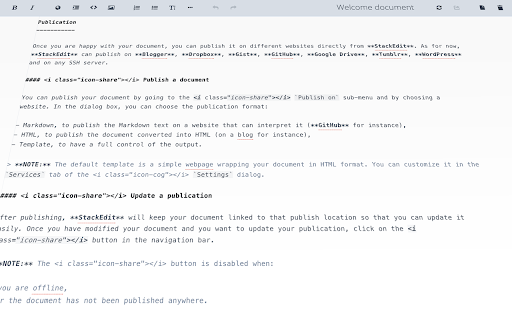


About
### New features ###
- Synchronize with Google Drive or Dropbox
- Publish directly on GitHub, Gist, Blogger, WordPress, Tumblr or any SSH server
- Google Drive multiple sign in


> NOTE:
> Documents are stored in the browser's local storage, which means they are not shared between different browsers/computers. Furthermore, clearing your browser's data may delete all your local documents.
> Full access to Dropbox or Google Drive is required to be able to import any document in StackEdit. Imported documents are downloaded in your browser and are not transmitted to a server.


StackEdit is a free, open-source Markdown editor based on PageDown, the Markdown library used by Stack Overflow and the other Stack Exchange sites.

### StackEdit can:

 - Manage multiple Markdown documents online or offline
 - Export your documents in Markdown, HTML or PDF and format it using a template
 - Synchronize your Markdown documents in the Cloud
 - Edit existing Markdown documents from Google Drive, Dropbox and your local hard drive
 - Post your Markdown document on Blogger/Blogspot, WordPress, Tumblr
 - Publish your Markdown document on GitHub, Gist, Google Drive, Dropbox or any SSH server
 - Share a link to a Markdown document that renders it in a nice viewer
 - Show statistics about your document
 - Convert HTML to Markdown

### Features:

 - Real-time HTML preview with Scroll Link feature to bind editor and preview scrollbars
 - Markdown Extra/GitHub Flavored Markdown support and Prettify/Highlight.js syntax highlighting
 - LaTeX mathematical expressions using MathJax
 - WYSIWYG control buttons
 - Configurable layout
 - Theming support with different themes available
 - A la carte extensions
 - Offline editing
 - Online synchronization using Google Drive (multi-accounts) and Dropbox
 - One click publish on Blogger, Dropbox, Gist, GitHub, Google Drive, SSH server, Tumblr, WordPress
Technical
- Version
- 1.0.13
- Manifest
- V2
- Size
- 51.75KiB
- Min Chrome
- —
- Languages
- 1
- Featured
- No
Metadata
- ID
- iiooodelglhkcpgbajoejffhijaclcdg
- Developer ID
- uefb3ec024ee136ef2b93803c8bf64ad6
- Developer Email
- [email protected]
- Created
- Apr 1, 2013
- Last Updated (Store)
- Apr 15, 2018
- Last Scraped
- May 21, 2026
- Website
- https://stackedit.io/
- Support URL
- —
- Privacy Policy
- —
Similar extensions
Alternatives to StackEdit, ranked by description similarity.

Markdown Editor for Chrome™
Create and view markdown files easily from anywhere with our simple, GitHub-flavored markdown editor.
10.0K
★ 3.8

MultiTabs Markdown Editor
Markdown Editor with Multiple Tabs
1.0K
★ 4.6

Markdown Viewer and Editor
Full featured Markdown editor with live preview, syntax highlighting, TeX, Flowchart. Useful for both beginners and experts alike.
29
★ 2.3

Mark It Down — Markdown Editor & Web Clipper
Clip pages, AI chats, and RSS articles to Markdown. Edit in New Tab & Side Panel. Export PDF, DOCX, PNG. Local-first.
99

My-Notes
My-Notes - Put your story into notes...
2.0K
★ 4.6

Markdown Viewer
Dark Mode • Themes • Autoreload • Mermaid Diagrams • MathJax • ToC • Syntax Highlighting
400.0K
★ 4.3

Markdown Magician — Markdown 編輯器
在瀏覽器側邊面板或完整分頁隨時編輯 Markdown,支援即時預覽、Mermaid 流程圖、KaTeX 數學公式、多分頁管理。
44
★ 5.0

Poe: Markdown Editor
Simple Markdown editor with live preview using GitHub's style
310
★ 3.1
Data sourced from the Chrome Web Store · last verified May 21, 2026.