
IMAGE Extension
Extension for the McGill IMAGE project. This is a beta release.
As of June 2026, IMAGE Extension has 214 users in the Accessibility category.
Usersup 8.1 percent+8.1%
214
214
Ratingno change0%
—
— reviews
Reviewsno change0%
—
Version
0.5.6
Manifest V3
History
5 snapshotsTracking since Apr 18, 2026.
View as table
| Date | Users | Rating | Reviews | Version |
|---|---|---|---|---|
| Apr 18, 2026 | 198 | — | — | 0.5.6 |
| May 3, 2026 | 206 | — | — | 0.5.6 |
| May 12, 2026 | 199 | — | — | 0.5.6 |
| May 24, 2026 | 207 | — | — | 0.5.6 |
| Jun 6, 2026 | 192 | — | — | 0.5.6 |
| Now | 214 | — | — | 0.5.6 |
Permissions & access
- Permissions
- contextMenusdownloadsstoragescriptingoffscreennotifications
- Host access
- <all_urls>
Screenshots


About
Extension for the McGill IMAGE project.
Making internet graphics accessible through rich audio and touch!

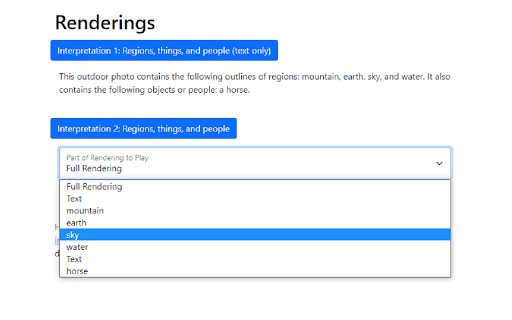
Have you ever wanted to hear a photograph or pie chart, and not just a description of what is in it? IMAGE (Internet Multimodal Access to Graphical Exploration) adds a new item to your browser’s context menu when you activate it on a graphic such as a photograph, on any webpage you visit. The goal is to provide people who are blind or have low vision with a new and useful experience of internet graphics that goes beyond automatically generating alt tags.

Once you have added the extension to your browser, activate IMAGE using a button next to a graphic on a webpage, or a menu item added your browser's right-click context menu. The graphic is sent to a server that creates a custom audio rendering, and if you are wearing headphones, uses “spatialized audio” so that you hear different parts of the graphic all around you, rendered as sounds. In addition, if you go to the extension's setting page, you can enable haptic devices such as the Haply and the Dot Pad in order to explore graphics with your sense of touch.

This release is a beta version of IMAGE, and does not work well on all graphics. To get started, we recommend visiting our tutorial page at https://image.a11y.mcgill.ca/pages/tutorial.html

INSTALLATION
Read these instructions for installation before proceeding with installation
1. For most browsers, find the "Add to browser" button, where "browser" is the name of your browser. If you are using Edge, find the button labeled "Get Extension" or simply "Get".
2. From there, a pop-up window titled "Add "IMAGE Extension"" will ask you to confirm your decision. Confirm by clicking "Add Extension".

IMAGE is carried out by McGill University's Shared Reality Lab (SRL) [1], in strategic partnership with Gateway Navigation CCC Ltd [2] and the Canadian Council of the Blind (CCB) [3]. The project is funded by Innovation Science Economic Development Canada through the Assistive Technology Program. The motivation for this project is to improve the access to internet graphics for people who are blind or partially sighted.

For more information about how we handle your data, please see:
https://image.a11y.mcgill.ca/pages/policies.html

For technical issues, please contact [email protected].
For other inquiries, please contact [email protected].

ABOUT US

[1] The Shared Reality Lab, in McGill University’s Department of
Electrical and Computer Engineering, works with audio, video, and
haptic technologies, building systems that leverage their capabilities
to facilitate and enrich both human-computer and computer-mediated
human-human interaction. http://srl.mcgill.ca

[2] Gateway Navigation CCC Limited is a unique social enterprise
bringing together social innovation and for-profit sustainability.
Founded in 2017 by individuals and organizations including the
Canadian Council of the Blind (CCB). Sharing a lived experience in
disability and a passion to make a difference in our communities. Our
social and business objective is to create a more accessible and
inclusive world through applying human centred design in the use of
inclusive audio-based (digital) augmented reality networks, while
promoting training and employment opportunities for people with
disabilities in this rapidly developing technology sector.
https://gnc3.com/

[3] The Canadian Council of the Blind (CCB) is the largest
member-based consumer organization of persons who are blind,
deaf-blind, or partially sighted in Canada. https://ccbnational.net/
Technical
- Version
- 0.5.6
- Manifest
- V3
- Size
- 609KiB
- Min Chrome
- 88
- Languages
- 2
- Featured
- No
Metadata
- ID
- iimmeciildnckfmnpbhglofiahllkhop
- Developer ID
- ufb580d9a3cdeac85a36936f7cb2cf911
- Developer Email
- [email protected]
- Created
- Nov 27, 2021
- Last Updated (Store)
- Oct 20, 2025
- Last Scraped
- Jun 6, 2026
- Website
- —
- Support URL
- https://image.a11y.mcgill.ca/pages/user.html
- Privacy Policy
- https://image.a11y.mcgill.ca/pages/policies.html
Similar extensions
Alternatives to IMAGE Extension, ranked by description similarity.

AlternAtIve
AlternAtIve: Redefine Your Web Experience with AI-Powered Image Descriptions
Revolutionize how you interact with images on the…
14
★ 5.0

AltSpeakify 🔊
No alt text? No problem - just AltSpeakify it! This extension helps those who are visually impaired better navigate the web.
—

Unglasses.ai
AI-powered extension providing visually impaired users with audible web page navigation by vocalizing webpages
2

Eye-Able Assist - Accessibility Assistant
Eye-Able Assist will let you see any website the way you need to.
2.0K
★ 4.4

Pixiv AI Generated Prompt Display
Enable you see generated picture prompt easyly on Pixiv.
139
★ 2.5

TalkGuidanceGPT
TalkGuidance is a screen reader powered by GPT, which designed to make web browsing more accessible for visually impaired users.
5

Mimi Sound Personalization
Customize your sound and elevate your browsing experience
1.0K
★ 5.0

HearChat: Accessible and Enhanced ChatGPT
adds features to make AI web apps more friendly for screen reader users.
14
★ 5.0
Data sourced from the Chrome Web Store · last verified Jun 6, 2026.