
glimpse
Visual tab manager
As of May 2026, glimpse has 88 users and a 5.00/5 rating from 1 reviews in the Workflow & Planning category.
Usersdown 2.2 percent−2.2%
88
88
Ratingno change0%
5.00
1 reviews
Reviewsno change0%
1
Version
0.0.0.1
Manifest V3
History
2 snapshotsTracking since Apr 25, 2026.
View as table
| Date | Users | Rating | Reviews | Version |
|---|---|---|---|---|
| Apr 25, 2026 | 90 | 5.00 | 1 | 0.0.0.1 |
| May 21, 2026 | 92 | 5.00 | 1 | 0.0.0.1 |
| Now | 88 | 5.00 | 1 | 0.0.0.1 |
Permissions & access
- Permissions
- tabswebNavigationbookmarks
- Host access
- <all_urls>
Screenshots


About
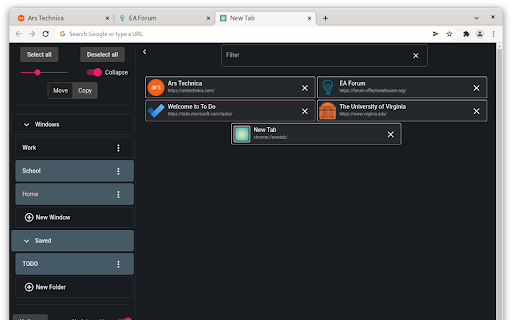
glimpse is a visual tab manager. See all your tabs in a grid; easily move, copy, save, and delete groups of tabs; quickly find what you need with search. Below is a guide to the features of glimpse.

**Hotkeys**
 - There are hotkeys for nearly all actions in glimpse. The full list can be viewed by clicking "Hotkeys" or using shift + ?

**Selecting**
 - Click a sidebar item to select/deselect it. You will see pages associated with selected sidebar items on the right, sorted by access time
 - Ctrl + click a page to select/deselect it
 - Shift + click to a sidebar item or page to select/deselect all items between your last selection and that item
 - Clicking "windows" or "folders" will select/deselect all sidebar items under that heading

**Basic functions**
 - Click a page to go to that page
 - Remove a page (close a tab, or delete a saved page) by clicking the "x"; remove all selected pages by clicking "Remove all"
 - Selected pages can be moved or copied by dragging. If "copy" is on, dragged pages will be added to the new window but will also remain in their original windows/saved folders. If "move" is on, the dragged pages will instead be closed in their original windows and deleted from their original saved folders. "Open all" is the same as dragging selected pages to the active window
 - Sidebar items can be deleted or renamed using the dropdown after clicking the icon with three dots. Deleting a window closes it and contained tabs; deleting a saved folder deletes it and pages therein
 - Use the search bar to filter pages by title and url. You can filter by multiple words independently by adding spaces between them

**Other functions**
 - Saved folders in glimpse are the same as browser bookmarks; all saved folders can be found in the "glimpse-saved" bookmark folder of your browser. If you want to save a page, you can simply bookmark it; just make sure that you add it to a folder directly inside "glimpse-saved" (folders cannot be nested, and pages cannot be added directly under the "glimpse-saved" folder)
 - If you move/copy all the pages in a named window or folder to a new window or folder, the original name will automatically be retained
 - Keep "Update settings" on if you want glimpse to remember your most recent settings, like page size, dark mode, and which sidebar items are selected. Turn it off to keep the settings as they are. For example, if you want glimpse to always show a particular saved folder on open, select that folder then turn "Update settings" off
Technical
- Version
- 0.0.0.1
- Manifest
- V3
- Size
- 328KiB
- Min Chrome
- 88
- Languages
- 1
- Featured
- No
Metadata
- ID
- iidnogbffdeodijicfkmfmblanfojcel
- Developer ID
- ue2d9bb37257fc3e18658920b0c2248ca
- Developer Email
- [email protected]
- Created
- Aug 16, 2022
- Last Updated (Store)
- Aug 16, 2022
- Last Scraped
- May 21, 2026
- Website
- —
- Support URL
- https://github.com/Zach332/glimpse/issues
- Privacy Policy
- https://github.com/Zach332/glimpse/blob/main/privacy.md
Similar extensions
Alternatives to glimpse, ranked by description similarity.

Tab Manager
Pltab: Management of all windows and tabs. You can quickly find tabs. Includes pinning, copying, deleting, sorting, reordering,…
220
★ 5.0

Key Mode
Keyboard-driven command palette for Chrome tab and tab group management
10
★ 5.0

EZ Tabs: Tabs & Bookmarks Manager
Easy tabs and bookmarks manager with intuitive hotkeys.
You can
- see a list of tabs opened in current window
- open or close a…
18
★ 5.0

Tablazy
Smart tab management - Save, organize, and manage your browser tabs with daily snapshots and custom groups
6

HelloTabs - fast tab switching
Extension to search for and switch between tabs in seconds with a simple shortcut
259
★ 5.0

Tab Grouper
Find and manage your tabs easier.
244
★ 5.0

QuicKey – The quick tab switcher
Add keyboard shortcuts to switch tabs via Quicksilver-style search or a most recently used list
10.0K
★ 4.6

Power Tabs
Organize and manage all your tab groups in a powerful sidebar with visual previews, flexible layouts, and quick actions
2
★ 5.0
Data sourced from the Chrome Web Store · last verified May 21, 2026.