
StudyTutor - AI Study Assistant
Get instant answers to any question with AI-powered screenshots, highlighting, and personal chat
As of June 2026, StudyTutor - AI Study Assistant has 13 users in the Education category.
Usersup 225.0 percent+225.0%
13
13
Ratingno change0%
—
— reviews
Reviewsno change0%
—
Version
2.9.15
History
5 snapshotsTracking since Apr 18, 2026.
View as table
| Date | Users | Rating | Reviews | Version |
|---|---|---|---|---|
| Apr 18, 2026 | 4 | — | — | 2.9.15 |
| Apr 28, 2026 | 8 | — | — | 2.9.15 |
| May 8, 2026 | 9 | — | — | 2.9.15 |
| May 24, 2026 | 11 | — | — | 2.9.15 |
| Jun 3, 2026 | 16 | — | — | 2.9.15 |
| Now | 13 | — | — | 2.9.15 |
Permissions & access
- Permissions
- None declared
- Host access
- None declared
Screenshots


About
🎓 StudyTutor - Your AI-Powered Homework Companion

StudyTutor is an intelligent Chrome extension that helps students learn faster by providing instant, accurate answers to any question using advanced AI technology. Whether you're studying for exams, working on homework, or learning something new, StudyTutor is your 24/7 personal tutor.

✨ KEY FEATURES

📸 Screenshot Image for Identification

Need to identify something visual? Take a screenshot to identify animals, plants, objects, diagrams, or any visual content. Perfect for biology, art history, and science courses!


✍️ Highlight & Explain
• Select any text on any webpage
• Right-click and choose "Explain with StudyTutor"
• Get clear, concise explanations instantly

💬 Personal AI Chat
• Ask follow-up questions and have natural conversations
• Get step-by-step explanations tailored to your learning style
• Access your chat history anytime from the extension popup

🎯 WHO IS THIS FOR?

• Students studying for exams and completing assignments
• Learners exploring new topics and concepts
• Anyone who needs quick, reliable explanations
• Visual learners who benefit from seeing concepts explained

⚡ HOW IT WORKS

1. Install the extension
2. Use Ctrl+Shift+S (Windows/Linux) or Cmd+Shift+S (Mac) to capture screenshots
3. Or highlight text and right-click to get explanations
4. Click the extension icon to view your chat history and ask questions

🔒 PRIVACY & SECURITY

• Your data is secure and encrypted
• We never share your information with third parties
• Read our full privacy policy at: https://studytutor-landing-ff9neu.abacusai.app/privacy-policy

🌟 WHY CHOOSE STUDYTUTOR?

• Instant answers powered by advanced AI
• Works on any website or digital content
• Simple, intuitive interface
• Affordable pricing with flexible plans
• Continuous improvements and updates

📚 PERFECT FOR

• Mathematics and science problems
• Programming and coding questions
• History and literature analysis
• Language learning and translation
• Research and homework help
• Test preparation

Start learning smarter today with StudyTutor - your personal AI study assistant that's always ready to help!

Need help? Contact us at [email protected]


Category
 Productivity, Education & Learning
Technical
- Version
- 2.9.15
- Manifest
- —
- Size
- 167KiB
- Min Chrome
- 88
- Languages
- 53
- Featured
- No
Metadata
- ID
- iibnkjhaamehccffkcoalfafggmldadk
- Developer ID
- u56c26211d67af50dce7c6efa584faec9
- Developer Email
- [email protected]
- Created
- Nov 15, 2025
- Last Updated (Store)
- Dec 18, 2025
- Last Scraped
- Jun 3, 2026
- Website
- —
- Support URL
- https://studytutor.io/#contact
- Privacy Policy
- https://studytutor.io/privacy-policy
Similar extensions
Alternatives to StudyTutor - AI Study Assistant, ranked by description similarity.

AI Study Helper
Meet AI Study helper, your learning companion and homework solver. Ask questions or capture screen areas —perfect AI for students.
807
★ 4.3

AnswersAi
School on Easy Mode
10.0K
★ 4.3
AI College Help - for homework and study
Solve quizzes, exams, and homework with AI tools designed to help students study more effectively and receive detailed explanations.
206
★ 5.0
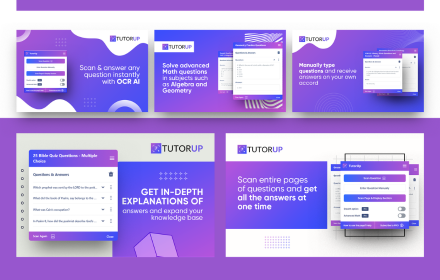
TutorUp - AI Homework & Exam Helper
Instant answers to homework and exam questons using ChatGPT and OCR AI photo solver
1.0K
★ 4.0

AskProf
AI-powered learning assistant that helps with multiple choice questions and more
3

Answerly - Visual AI Assistant
AI assistant that analyzes your screen to find and solve questions.
1.0K
★ 3.6

Classology AI – Homework & Quiz Helper
Study smarter with Classology! Instant AI answers and explanations for all your questions to help you learn and succeed!
3.0K
★ 4.7

Secret Study Buddy – AI Canvas Homework Assistant
AI-powered study assistant
435
★ 4.7
Data sourced from the Chrome Web Store · last verified Jun 3, 2026.