
YT Playback Speed Controller
Fine-grained YouTube playback speed control with a slider, presets, and keyboard shortcuts — injected natively into the player.
As of June 2026, YT Playback Speed Controller has 3 users and a 5.00/5 rating from 1 reviews in the Productivity category.
Usersno change0%
3
3
Ratingno change0%
5.00
1 reviews
Reviewsno change0%
1
Version
1.0.2
Manifest V3
90-day change · In the last 90 days this extension 2 version updates.
History
4 snapshotsTracking since May 2, 2026.
View as table
| Date | Users | Rating | Reviews | Version |
|---|---|---|---|---|
| May 2, 2026 | — | — | — | 1.0.0 |
| May 8, 2026 | — | — | — | 1.0.0 |
| Jun 1, 2026 | 2 | 5.00 | 1 | 1.0.1 |
| Jun 7, 2026 | 2 | 5.00 | 1 | 1.0.2 |
| Now | 3 | 5.00 | 1 | 1.0.2 |
Changelog
- May 8, 2026description
Fine-grained YouTube playback speed control with a slider, presets, and keyboard shortcuts — injected natively into the player.
Take full control of YouTube's playback speed — without ever leaving the player.

YT Playback Speed Controller adds a sleek speed panel directly into YouTube's player bar, styled to match YouTube's own UI. Whether you're speeding through lectures, slowing down tutorials, or finding the perfect pace for a podcast, everything is one click away.

FEATURES

▸ Native-style speed panel
Opens instantly from the player controls bar — no settings menus, no extra tabs.

▸ Logarithmic slider (0.25x → 16x)
Precision where it matters. The slider gives you 4× more control in the everyday 0.25x–2x range while still reaching all the way to 16x for power users.

▸ Fine-tune buttons (±0.05x)
Nudge the speed up or down in tiny increments to land on exactly the right pace.

▸ Speed presets
One-tap chips for the most common speeds: 0.5, 1.0 (Normal), 1.25, 1.5, 2.0, and 3.0.

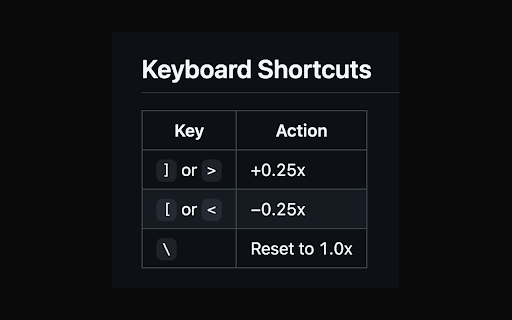
▸ Keyboard shortcuts
Control speed without touching the mouse:
  ] or >  →  Speed up +0.25x
  [ or <  →  Slow down −0.25x
  \       →  Reset to 1.0x

▸ On-screen speed indicator
A brief overlay appears on the video whenever you use a shortcut, so you always know your current speed at a glance.

▸ Always in sync
Listens to YouTube's own ratechange event — stays accurate even if you change speed through YouTube's native menu.

▸ Survives page navigation
Re-injects automatically on every YouTube page transition. Works on all videos, Shorts, and playlists.

PRIVACY

This extension collects zero data. No permissions required beyond access to YouTube pages. No network requests. No tracking. Open source under the MIT license.
Permissions & access
- Permissions
- None declared
- Host access
- None declared
Screenshots


About
Take full control of YouTube's playback speed — without ever leaving the player.

YT Playback Speed Controller adds a sleek speed panel directly into YouTube's player bar, styled to match YouTube's own UI. Whether you're speeding through lectures, slowing down tutorials, or finding the perfect pace for a podcast, everything is one click away.

FEATURES

▸ Native-style speed panel
Opens instantly from the player controls bar — no settings menus, no extra tabs.

▸ Logarithmic slider (0.25x → 16x)
Precision where it matters. The slider gives you 4× more control in the everyday 0.25x–2x range while still reaching all the way to 16x for power users.

▸ Fine-tune buttons (±0.05x)
Nudge the speed up or down in tiny increments to land on exactly the right pace.

▸ Speed presets
One-tap chips for the most common speeds: 0.5, 1.0 (Normal), 1.25, 1.5, 2.0, and 3.0.

▸ Keyboard shortcuts
Control speed without touching the mouse:
  ] or >  →  Speed up +0.25x
  [ or <  →  Slow down −0.25x
  \       →  Reset to 1.0x

▸ On-screen speed indicator
A brief overlay appears on the video whenever you use a shortcut, so you always know your current speed at a glance.

▸ Always in sync
Listens to YouTube's own ratechange event — stays accurate even if you change speed through YouTube's native menu.

▸ Survives page navigation
Re-injects automatically on every YouTube page transition. Works on all videos, Shorts, and playlists.

PRIVACY

This extension collects zero data. No permissions required beyond access to YouTube pages. No network requests. No tracking. Open source under the MIT license.
Technical
- Version
- 1.0.2
- Manifest
- V3
- Size
- 668KiB
- Min Chrome
- 88
- Languages
- 1
- Featured
- No
Metadata
- ID
- iibhdnmldcnmkdcjfplglhafohbjjnog
- Developer ID
- u120c33086c0d3c35f97f12371ab648ec
- Developer Email
- [email protected]
- Created
- May 1, 2026
- Last Updated (Store)
- Jun 1, 2026
- Last Scraped
- Jun 7, 2026
- Website
- —
- Support URL
- —
- Privacy Policy
- —
Data sourced from the Chrome Web Store · last verified Jun 7, 2026.