
PlanoGraphics Mobile
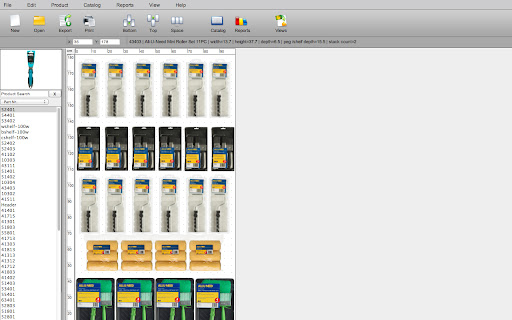
Create stunning planograms quickly, easily and visually by simply dragging and dropping products on your display.
As of May 2026, PlanoGraphics Mobile has 56 users.
Usersdown 11.1 percent−11.1%
56
56
Ratingno change0%
—
— reviews
Reviewsno change0%
—
Version
1.1.2
Manifest V2
History
2 snapshotsTracking since Apr 29, 2026.
View as table
| Date | Users | Rating | Reviews | Version |
|---|---|---|---|---|
| Apr 29, 2026 | 63 | — | — | 1.1.2 |
| May 25, 2026 | 54 | — | — | 1.1.2 |
| Now | 56 | — | — | 1.1.2 |
Permissions & access
- Permissions
- clipboardReadclipboardWrite
- Host access
- None declared
Screenshots
About
PlanoGraphics Mobile lets you access and edit planograms from your PlanoGraphics Mobile account from virtually any device. Take your products and planograms with you to any kind of setting or situation. Regardless if you are presenting a planogram on your Android tablet for an important customer or planning your next big product launch on your Windows, Mac or Chromebook back at the office, PlanoGraphics mobile makes it easy to have your planograms, products and images with you at all times on virtually any device. PlanoGraphics automatically keeps planograms, product images and product data synced across multiple mobile and desktop versions of PlanoGraphics Mobile and multiple users regardless of geographical location.
*Full functionality requires the purchase a PlanoGraphics Mobile subscription available at www.planographics.com or use the FREE demo accrount by entering DEMO for the user name and DEMO for the password when the app first starts. Your PlanoGraphics Mobile account gives you access to iOS and Android versions of the software as well available at the Apple App Store and Google Play Store.

Main Features Include:
- Create new or edit existing planograms
- Create pegboard, slatwall planograms or planograms with custom backgrounds
- Create photo or schematic based planograms
- Generate quick reports including; Product Listings, Financial and Space Usage
- Planograms are automatically synced across all devices and users of your PlanoGraphics Mobile account
Technical
- Version
- 1.1.2
- Manifest
- V2
- Size
- 15.73KiB
- Min Chrome
- —
- Languages
- 1
- Featured
- No
Metadata
- ID
- ihimkcnagabnbcnbgfkmlcmoebobmbgi
- Developer ID
- u6819cfe70c28cec30536ccbcbcee36ee
- Developer Email
- —
- Created
- Mar 14, 2014
- Last Updated (Store)
- Aug 26, 2015
- Last Scraped
- May 25, 2026
- Website
- secure.planogramming.com
- Support URL
- —
- Privacy Policy
- —
Similar extensions
Alternatives to PlanoGraphics Mobile, ranked by description similarity.

ExhibitCore Event Planner
With the ExhibitCore Event Planner event professionals can easily layout any floor plan in minutes. Get started now!
383
★ 3.3

Home Inspector Pro Mobile
Home Inspection Software
—
★ 2.4

ExhibitCore Floor Planner
With the ExhibitCore Floor Planner you can easily layout any event or space in minutes. Get Started now!
4.0K
★ 3.3

Planstery
Planstery is a multipurpose solution to convert a 2D DWF drawing into the interactive plan.
335
★ 3.2
Planyway for Trello: Calendar, Timeline, Time Tracking and Reports
Google Calendar & Outlook 2-way sync, roadmap, project plan, Gantt chart, time tracker, reports, weekly planner, project management
90.0K
★ 4.6

App Press NOW
App Press allows designers to create apps code free
30
★ 1.0

Top Producer® for Google Chrome™
Quick access to your Top Producer® Account
297
★ 2.4

Floorplanner
The easiest way to create floor plans
400.0K
★ 3.8
Data sourced from the Chrome Web Store · last verified May 25, 2026.