
SmartSpeed: Custom Video Speed Controller
Control video speed on YouTube, online courses, and any site. Customize playback shortcuts and boost productivity with SmartSpeed.
As of June 2026, SmartSpeed: Custom Video Speed Controller has 22 users in the Productivity category.
Usersup 46.7 percent+46.7%
22
22
Ratingno change0%
—
— reviews
Reviewsno change0%
—
Version
2.0.0
Manifest V3
History
4 snapshotsTracking since Apr 20, 2026.
View as table
| Date | Users | Rating | Reviews | Version |
|---|---|---|---|---|
| Apr 20, 2026 | 15 | — | — | 2.0.0 |
| May 15, 2026 | 21 | — | — | 2.0.0 |
| May 27, 2026 | 19 | — | — | 2.0.0 |
| Jun 8, 2026 | 23 | — | — | 2.0.0 |
| Now | 22 | — | — | 2.0.0 |
Permissions & access
- Permissions
- storageactiveTabtabs
- Host access
- https://*/*, http://*/*
Screenshots
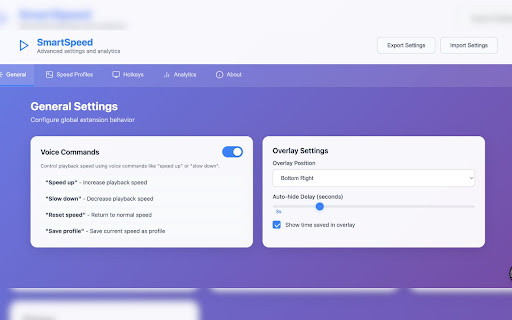


About
SmartSpeed — Advanced Video Playback Control:

Take control of your streaming experience. Use SmartSpeed so you have more time to watch what you love.
SmartSpeed lets you adjust video playback speed on any platform — from Netflix to YouTube to Disney+ and beyond — using keyboard shortcuts or voice commands.

Whether you’re speeding through lectures, slowing down tutorials, or customizing default speeds for your favorite sites, SmartSpeed makes it seamless.

🎯 Key Features:
🎛️ Adjust playback speed from 0.25x to 3x on ANY streaming site, including major platforms without integrated video playback control such as Disney+, Hulu, HBO MAX, and more!
⚡ Customizable hotkeys to control speed in real-time
🎙️ Voice command support for hands-free control--intuitive speech commands like "speed up"
📊 See how much time you've saved with speed adjustments
🌐 Set default speeds per site for a personalized experience
📈 Session analytics: track speed changes, time saved, and watch time
📝 Easy access to documentation, bug reports, feature requests, and ratings

💡 Why SmartSpeed?
Most platforms restrict playback options — SmartSpeed gives you full control anywhere you stream, all from a lightweight, easy-to-use extension.

Install SmartSpeed to save time so you can watch more of what you love.

We respect your privacy and are committed to keeping your browsing experience secure and private.

Data Collection:
SmartSpeed does not collect, store, or transmit any personal information, browsing history, or sensitive data.

Data Usage:
The extension uses local browser storage to save your custom hotkeys, playback speed preferences, and session-based video analytics (like total time saved). This data remains on your device and is never shared externally.

Permissions Explanation:

activeTab: Allows the extension to control video playback on the currently active tab.

storage: Saves your preferences and settings locally.

tabs: Identifies video tabs to enable playback speed control and display analytics.

host permissions: Enables script injection only on pages with video content to apply your playback preferences.

Third-Party Data Sharing:
SmartSpeed does not share data with any third parties.

Security:
All extension scripts and logic are bundled locally within the extension. No remote code is executed or fetched at runtime.
Technical
- Version
- 2.0.0
- Manifest
- V3
- Size
- 159KiB
- Min Chrome
- 88
- Languages
- 1
- Featured
- No
Metadata
- ID
- ihffkejgfmcneojegefkehcagbbobmob
- Developer ID
- u36cfa0c41ad7de308fa5dfd3a80b69f7
- Developer Email
- [email protected]
- Created
- Jul 6, 2025
- Last Updated (Store)
- Jul 10, 2025
- Last Scraped
- Jun 8, 2026
- Website
- —
- Support URL
- —
Similar extensions
Alternatives to SmartSpeed: Custom Video Speed Controller, ranked by description similarity.

XSpeedUp - Video Speed Controller
Powerful video speed controller with screenshot functionality for online videos
468

SpeedMaster
Control video playback speed on any website.
7
★ 5.0

SpeedView - Video Speed Controller
SpeedView - video speed controller with overlay UI, keyboard shortcuts. Works on YouTube, Netflix, and all videos.
—

Video Speeder
Adjust video playback speed with ease.
775
★ 4.0

Video Speeder Pro - Playback Speed Controller
Control video playback speed on any website. Speed up or slow down from 0.25x to 4x. Works on all HTML5 video players.
9

Playback Speed
Control playback speed for all media (video/audio) with a simple, customizable interface.
—

YouTube Speed Manager
Manage default playback speeds for different YouTube channels.
5

YouTube Speed Controller
Adds custom speed buttons to YouTube videos automatically.
—
Data sourced from the Chrome Web Store · last verified Jun 8, 2026.