
25 Minute Timer
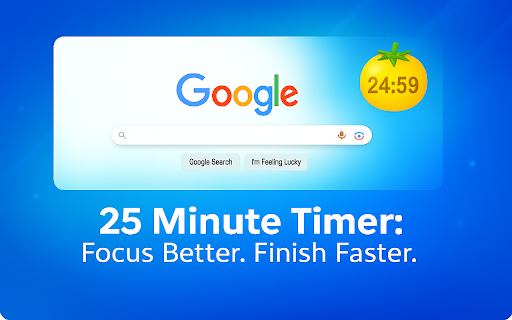
Boost productivity with the 25 Minute Timer. One-click Focus mode, ideal for Deep work, Study sessions, or as a Desktop task timer!
As of June 2026, 25 Minute Timer has 118 users and a 5.00/5 rating from 3 reviews in the Workflow & Planning category.
Usersdown 7.1 percent−7.1%
118
118
Ratingno change0%
5.00
3 reviews
Reviewsno change0%
3
Version
1.1.3
Manifest V3
History
5 snapshotsTracking since Apr 20, 2026.
View as table
| Date | Users | Rating | Reviews | Version |
|---|---|---|---|---|
| Apr 20, 2026 | 127 | 5.00 | 3 | 1.1.3 |
| May 5, 2026 | 119 | 5.00 | 3 | 1.1.3 |
| May 15, 2026 | 120 | 5.00 | 3 | 1.1.3 |
| May 27, 2026 | 118 | 5.00 | 3 | 1.1.3 |
| Jun 8, 2026 | 115 | 5.00 | 3 | 1.1.3 |
| Now | 118 | 5.00 | 3 | 1.1.3 |
Permissions & access
- Permissions
- storageactiveTabscripting
- Host access
- https://api2.amplitude.com/*, https://ipapi.co/*
Screenshots
About
Boost your productivity effortlessly using the powerful 25 Minutes Timer Chrome extension.
This tool is specially designed for anyone who works in intervals, or simply wants to maintain deep focus during tasks. 🕑

Why choose this app?

✅ Enhanced Efficiency:

Stay focused and productive by dividing your work into 25 minute intervals.

Ideal for deep work sessions, studying, or task-oriented projects.

One-click start—simple, quick, and efficient.

🎯 How Does Our 25 Minute Interval Timer Work?
1️⃣ Set an alarm directly from your browser.
2️⃣ Focus intensely until the alarm rings.
3️⃣ Take a short break to recharge before your next interval.

Who Can Benefit from This Chrome Extension?
➤ Students looking for an effective study clock.
➤ Professionals needing a reliable work countdown for deep work sessions.
➤ Individuals with ADHD who benefit from structured productivity tools.

🌟 Key Features of the extension:
• Simple, intuitive interface—no unnecessary distractions.
• Desktop stop-watch functionality directly in your browser.
• Perfectly complements the Interval technique ADHD users frequently rely on.

📍 Main Advantages of the Interval Chrome Extension:

A stay-focused app helps eliminate procrastination.

An efficiency clock enhances your daily workflow.

Break integration ensures optimal rest periods.

How to Use this app:

Install the Chrome extension in just two clicks.

Click on the timer icon whenever you're ready to work.

Enjoy distraction-free 25 min timer intervals.

🔑 Proven Benefits of Our Focus Timer:
• Increases concentration and productivity.
• Provides structured breaks to maintain high mental clarity.
• Helps effectively manage tasks and projects with ease.

🚀 Additional Productivity Benefits:

Desktop timer convenience keeps your workflow seamless.
Task timer ensures every 25 min interval is maximized.
Encourages disciplined, effective time management.

Your privacy is fully protected: the extension runs entirely inside your browser,
storing every preference and countdown locally.
Nothing is transmitted to external servers, analytics tools, or any third-party service,
meaning your focus sessions and personal workflow data stay strictly on your device.

Whether you’re cramming for finals, polishing a mission-critical report,
or orchestrating rapid-fire agile sprints, this nimble,
unobtrusive browser clock glides effortlessly into your workflow - quietly scaffolding each day with crisp,
reliable structure while adding absolutely zero friction to your creative momentum.

📌 Frequently Asked Questions (FAQs):

❓ What is the Interval Technique?
💡 It's a productivity method using 25-minute focused intervals followed by short breaks to maximize efficiency.

❓ Can this extension help with ADHD?
💡 Absolutely! Many individuals use the Interval technique ADHD methods effectively to enhance their focus.

❓ Is this app easy to operate?
💡 Yes, it's a one-click software designed for simplicity and ease of use.

❓ How do I set an alarm?
💡 Simply click the extension icon—your timer for 25 minutes starts instantly.

🎓 Why students love this study timer:
• Promotes consistent study habits.
• Helps break large tasks into manageable intervals.
• Reduces burnout and fatigue by integrating short breaks.

🖥️ Why professionals choose this work timer:

Ideal for deep work sessions.

Helps prioritize tasks effectively.

Reduces interruptions with clearly defined work periods.

🚨 Attention! This is More Than Just a Timer:

Integrates seamlessly into your Chrome browser.

Tailored specifically for enhanced productivity sessions.

Enables structured productivity sessions, crucial for success.

✅ Summary of Our Powerful App Features:
• One-click activation.
• Fully browser-integrated desktop clock.
• Perfect for work, study, and productivity management.
• Supports structured work intervals and regular breaks.

🔔 Get the Most Out of Your 25 Minute Intervals:

Combine it with task lists to efficiently track your progress.

Adjust intervals and breaks to suit your workflow perfectly.

Leverage the app to manage distractions effectively.

🌟 Bonus Tips for Maximizing Your Productivity:
➤ Identify tasks clearly before starting each 25-minute interval.
➤ Eliminate unnecessary distractions by muting notifications during deep work sessions.
➤ Take active breaks—stretch, hydrate, or meditate—to refresh your mind and maintain energy.

Join thousands who are already enhancing their productivity!
Install this Chrome extension today and experience a revolutionary improvement in your workflow,
study habits, and overall task management.
Transform your productivity routine with a single click! 🚀
Technical
- Version
- 1.1.3
- Manifest
- V3
- Size
- 693KiB
- Min Chrome
- 88
- Languages
- 52
- Featured
- No
Metadata
- ID
- igpefbpfdhhkpiiglbpahbpfkiefiljp
- Developer ID
- u980a8ffa6d6d250984088591d2c56414
- Developer Email
- [email protected]
- Created
- Jul 17, 2025
- Last Updated (Store)
- Aug 19, 2025
- Last Scraped
- Jun 8, 2026
- Website
- 25-minute-timer.app
- Support URL
- —
- Privacy Policy
- https://25-minute-timer.app/privacy
Similar extensions
Alternatives to 25 Minute Timer, ranked by description similarity.

Timer Countdown
An easy-to-use interface for the Countdown clock Timer—to manage time! After all, you'll be redirected to the last active tab.
10.0K
★ 4.8

QSEO Task Timer
A sleek timer for focused work with sound notifications and task logging
6

Focus Timer
Use Focus Timer to build deep work habits with structured pomodoro sessions, distraction-free workflow, and smart breaks
956
★ 5.0

Timer, Alarm ,Countdown and Stopwatch for Google Chrome™
A simple Timer, Alarm ,Countdown and Stopwatch for Google Chrome
21

Break Timer
Set a break timer to focus on your work. Our focus app will improve your productivity. Use a online timer to ease eye strain.
1.0K
★ 4.8
Study Timer
Use Study Timer: Boost your time focus with the Pomodoro Technique and task timer for ultimate productivity with our app.
6.0K
★ 4.8

Timer For 3 Minutes
Use a 3 minute timer - countdown clock and web alarm clock for second timing. It is an online counter as 3, 5 and 15 minute timer.
487
★ 4.9

Pomodoro Timer
Use an aesthetic Pomodoro Timer app online based on time management methods as a work, study, and break timer in a Chrome extension.
379
★ 5.0
Data sourced from the Chrome Web Store · last verified Jun 8, 2026.