
YouTube Music Visualizer
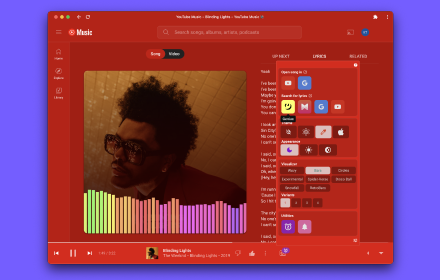
Immersive audio visualizer for YouTube Music with waveform, frequency bars, particles & 17 themes.
As of June 2026, YouTube Music Visualizer has 38 users in the Entertainment category.
Usersup 52.0 percent+52.0%
38
38
Ratingno change0%
—
— reviews
Reviewsno change0%
—
Version
6.0.0
Manifest V3
History
7 snapshotsTracking since Apr 3, 2026.
View as table
| Date | Users | Rating | Reviews | Version |
|---|---|---|---|---|
| Apr 3, 2026 | 25 | — | — | 6.0.0 |
| Apr 25, 2026 | 17 | — | — | 6.0.0 |
| May 2, 2026 | 23 | — | — | 6.0.0 |
| May 8, 2026 | 20 | — | — | 6.0.0 |
| May 13, 2026 | 47 | — | — | 6.0.0 |
| May 19, 2026 | 53 | — | — | 6.0.0 |
| Jun 4, 2026 | 27 | — | — | 6.0.0 |
| Now | 38 | — | — | 6.0.0 |
Permissions & access
- Permissions
- storage
- Host access
- https://music.youtube.com/*
Screenshots


About
YouTube Music Visualizer
Transform your YouTube Music listening experience with an immersive, fullscreen audio visualizer that brings your music to life through stunning real-time graphics.
Features:
* Multiple Visualization Modes: Experience your music through smooth waveform displays, dynamic frequency spectrum bars, floating particle effects, and circular radial visualizations that react to the audio in real-time.
* 17 Customizable Themes: Choose from professionally designed themes inspired by popular code editors including Dracula, Monokai, One Dark, Nord, Tokyo Night, Gruvbox, Night Owl, and more. Each theme offers unique color palettes for both dark and light preferences.
* Smart Audio Processing: Built with the Web Audio API for zero-latency audio analysis. The visualizer taps directly into the audio stream without interrupting playback, ensuring your music never stops or glitches.
* Video Mode Support: Automatically detects when YouTube Music plays music videos versus album artwork, seamlessly integrating video content into the visualization experience.
* Intuitive Controls: Toggle the visualizer with a simple keyboard shortcut (V) or use the on-screen button. Access theme switching, playback controls, seekbar navigation, and like functionality without leaving the fullscreen view.
* Professional Interface: Features glass-morphism UI design with auto-hiding controls that fade away when not in use, keeping the focus on your music and visuals.
* Performance Optimized: Runs at a smooth 60 FPS with hardware acceleration support. Efficient memory usage ensures the extension won't slow down your browser.
How to Use:
1. Install the extension and navigate to YouTube Music
2. Start playing any song
3. Press "V" or click the visualizer button in the player bar
4. Use the settings menu to change themes or enable auto-rotation
5. Press ESC or V to exit
Privacy & Permissions:
This extension only accesses YouTube Music (music.youtube.com) and uses the minimum required permissions. Your listening data stays on your device and is never transmitted or stored externally.
Browser Compatibility:
Works on Chrome, Edge, Brave, Opera, and other Chromium-based browsers.
---
Icon Attribution: Extension icon created by Freepik (www.freepik.com)
Technical
- Version
- 6.0.0
- Manifest
- V3
- Size
- 132KiB
- Min Chrome
- 88
- Languages
- 1
- Featured
- No
Metadata
- ID
- igialobomkbaeipbmmfcioimnkplgdlc
- Developer ID
- u211c98b695d599219649d4cac27102c5
- Developer Email
- [email protected]
- Created
- Feb 23, 2026
- Last Updated (Store)
- Feb 23, 2026
- Last Scraped
- Jun 4, 2026
- Website
- —
- Support URL
- —
- Privacy Policy
- —
Similar extensions
Alternatives to YouTube Music Visualizer, ranked by description similarity.

Neon Audio Visualizer
A Neon Audio Visualizer for YouTube Music
179
★ 5.0

YouTube Music Supporter
Transform YouTube into a powerful music player with visualizer, lyrics, bandwidth tracking, and more!
13
ThemeSong for YouTube Music™ (Enhancer)
Enhancer for YouTube Music™. Dynamic Themes, Visualizers, Side Panel Mini Player, Lyrics, Sleep Timer, Notifications, and more!
40.0K
★ 4.9

Lumyvox – YouTube Visualizer
Lumyvox adds real-time audio visualizations to YouTube videos. Enhance your watching experience with beautiful audio visuals.
42

YTM Enhancer
Smarter controls, automation, notifications, and visual upgrades for YouTube Music
25
★ 2.0

Audioforma | Universal Audio Visualizer
What does your favorite song look like?
180
★ 5.0

Spotify Fullscreen Mode
Enhances Spotify Web Player with a beautiful fullscreen mode featuring album art and canvas videos
77
★ 5.0

YouTube - Ambient Studio
Watch videos with ambient lighting and no distractions. Removes comments and clutter to keep the video in focus.
17
Data sourced from the Chrome Web Store · last verified Jun 4, 2026.