
Tabfolio
Finally, a tab manager that works and looks great. Every tab one keystroke away. Hibernate the rest into named Spaces.
As of June 2026, Tabfolio has — users and a 5.00/5 rating from 2 reviews in the Productivity category.
Usersno change0%
—
—
Ratingno change0%
5.00
2 reviews
Reviewsno change0%
2
Version
0.7.3
Manifest V3
90-day change · In the last 90 days this extension 1 version update.
History
4 snapshotsTracking since May 20, 2026.
View as table
| Date | Users | Rating | Reviews | Version |
|---|---|---|---|---|
| May 20, 2026 | — | — | — | 0.7.2 |
| May 26, 2026 | — | — | — | 0.7.2 |
| Jun 2, 2026 | 25 | 5.00 | 2 | 0.7.3 |
| Jun 8, 2026 | 38 | 5.00 | 2 | 0.7.3 |
| Now | — | 5.00 | 2 | 0.7.3 |
Permissions & access
- Permissions
- tabsstoragewindows
- Host access
- http://*/*, https://*/*
Screenshots


About
Finally, a tab manager that works and looks great.

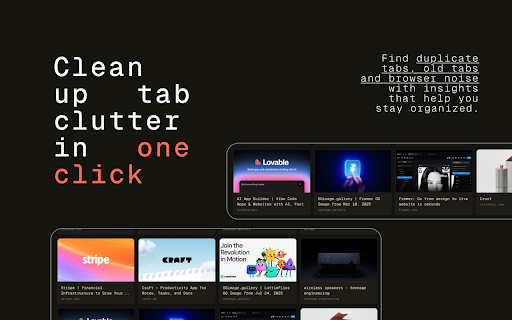
The last tab manager you'll ever need — and the only one that doesn't feel like a 2014 admin panel. Press ⌘⇧E (or Ctrl+Shift+E) and every tab across every Chrome window appears as a card in one calm, typographic grid. Search. Hibernate. Lock. Drag. Restore. That's the whole pitch.

— WHY PEOPLE SWITCH —

→ Everything is one keystroke away. Open with one shortcut. Search with /. Hibernate with H. Close with C. Move to a new window with O. Cycle group modes with G. The whole product is keyboard-first.

→ Spaces, not folders. Hibernate tabs into named buckets — "Reading", "Trip to Lisbon", "Q4 research". They persist across browser restarts. Drag them between Spaces, into Chrome, back out again. Restore a whole Space with one click.

→ Locked Spaces. Some Spaces are bookmark banks, not read-once piles. Locking a Space and reopening its tabs keeps the entries intact. Your "Reading list" stays full.

→ Hibernate a whole group. Filter to a domain (or to your single-tab "loners"), then hibernate the entire visible set into a new Space with one click. Fully undoable.

→ Insights. Tabfolio quietly notices when you have 12 duplicate tabs or 8 tabs you haven't touched in a week, and offers one-click cleanup. It never nags.

→ Drag everywhere. Move tabs between windows, into Spaces, out of Spaces, and between Spaces. Drop indicators show exactly where a card will land.

→ Real thumbnails. Every tab card shows a 16:9 preview pulled from the page's Open Graph image. YouTube and Vimeo tabs show actual video thumbnails. Compact mode for sessions with hundreds of tabs.

— PRIVACY BY DEFAULT —

No accounts. No cloud. No analytics. No telemetry. Everything lives in chrome.storage.local on your computer. The only network requests Tabfolio makes are to read the og:image tag on tabs you already have open — the same data Chrome itself sees. Full policy: https://tabfol.io/privacy/

— BUILT BY THE TEAM BEHIND DROPFOLIO —

We make tools that designers and engineers actually want on their machines. Tabfolio is the one we built for ourselves first.

tabfol.io
Technical
- Version
- 0.7.3
- Manifest
- V3
- Size
- 344KiB
- Min Chrome
- 88
- Languages
- 1
- Featured
- No
Metadata
- ID
- iggafofpfkchebhplbmemkgmfhfmlfec
- Developer ID
- u335ef4b92c9a7fb10d2d558201c68406
- Developer Email
- [email protected]
- Created
- May 19, 2026
- Last Updated (Store)
- May 21, 2026
- Last Scraped
- Jun 8, 2026
- Website
- —
- Support URL
- http://tabfol.io
- Privacy Policy
- https://tabfol.io/privacy/
Data sourced from the Chrome Web Store · last verified Jun 8, 2026.