
Player Assistant
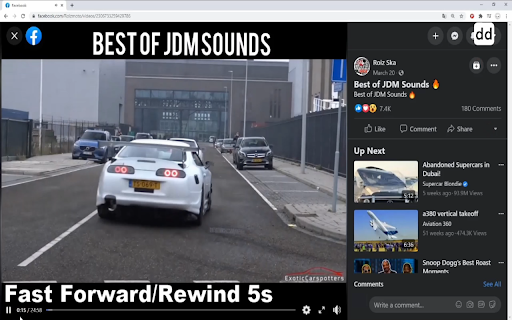
Player Assistant is an auxiliary tool for video watching. Because not every video player provides the same keyboard shortcuts, the…
As of June 2026, Player Assistant has 159 users and a 5.00/5 rating from 3 reviews in the Workflow & Planning category.
Usersup 8.9 percent+8.9%
159
159
Ratingno change0%
5.00
3 reviews
Reviewsno change0%
3
Version
1.1.4.2
Manifest V3
History
9 snapshotsTracking since Apr 28, 2026.
View as table
| Date | Users | Rating | Reviews | Version |
|---|---|---|---|---|
| Apr 28, 2026 | 146 | 5.00 | 3 | 1.1.4.2 |
| May 9, 2026 | 148 | 5.00 | 3 | 1.1.4.2 |
| May 16, 2026 | 149 | 5.00 | 3 | 1.1.4.2 |
| May 20, 2026 | 142 | 5.00 | 3 | 1.1.4.2 |
| May 25, 2026 | 144 | 5.00 | 3 | 1.1.4.2 |
| May 29, 2026 | 147 | 5.00 | 3 | 1.1.4.2 |
| Jun 3, 2026 | 151 | 5.00 | 3 | 1.1.4.2 |
| Jun 8, 2026 | 145 | 5.00 | 3 | 1.1.4.2 |
| Jun 13, 2026 | 153 | 5.00 | 3 | 1.1.4.2 |
| Now | 159 | 5.00 | 3 | 1.1.4.2 |
Changelog
- Apr 28, 2026description
Player Assistant is an auxiliary tool for video watching.

Because not every video player provides the same keyboard shortcuts, the goal of Player Assistant is to integrate common shortcuts of these players, make every video player can have the same integrated features, and give users a better viewing experience.

Features:
* Support multiple keyboard shortcuts for video watching
* Adjustable time/speed/volume offset!

Support shortcuts for:
* Rewind/Fast Forward
* Decreasing/Increasing playback speed or volume
* Toggling fullscreen, mute, play/pause on every video player
* Skipping to beginning/end/0% - 90% of video
* Playing next episode for Netflix
* Toggling caption between 'Traditional Chinese' and 'English' for Netflix

For more usage and info, check me on Github:
https://github.com/Andre3000TW/player-assistant

Changelog:
*v1.1.4.2
    -Bug fix for Youtube play/pause issue
*v1.1.4.1
    -Netflix caption toggle bug fixes
*v1.1.4
    -Migrated to Manifest V3
* v1.1.3
    -Auto focus bug fixes
    -Embedded Youtube videos bug fixes
    -Netflix draining next episode button bug fixes
* v1.1.2
    -Netflix next episode button bug fixes
* v1.1.1
    -Netflix bug fixes
* v1.1.0
    -cross-origin videos & Youtube is now available for Player Assistant
    -change default volume offset from 5% to 10%
    -increase reliability and decrease the possibility for keyboard shortcut conflicts
    -fix 's' key conflict(volume down & skipping intro) in Netflix
    -change max playback speed of Netflix to 16x
* v1.0.0
    -initial release
Player Assistant is an auxiliary tool for video watching. Because not every video player provides the same keyboard shortcuts, the goal of Player Assistant is to integrate common shortcuts of these players, make every video player can have the same integrated features, and give users a better viewing experience. Features: * Support multiple keyboard shortcuts for video watching * Adjustable time/speed/volume offset! Support shortcuts for: * Rewind/Fast Forward * Decreasing/Increasing playback speed or volume * Toggling fullscreen, mute, play/pause on every video player * Skipping to beginning/end/0% - 90% of video * Playing next episode for Netflix * Toggling caption between 'Traditional Chinese' and 'English' for Netflix For more usage and info, check me on Github: https://github.com/Preneur247/player-assistant Changelog: *v1.1.4.2 -Bug fix for Youtube play/pause issue *v1.1.4.1 -Netflix caption toggle bug fixes *v1.1.4 -Migrated to Manifest V3 * v1.1.3 -Auto focus bug fixes -Embedded Youtube videos bug fixes -Netflix draining next episode button bug fixes * v1.1.2 -Netflix next episode button bug fixes * v1.1.1 -Netflix bug fixes * v1.1.0 -cross-origin videos & Youtube is now available for Player Assistant -change default volume offset from 5% to 10% -increase reliability and decrease the possibility for keyboard shortcut conflicts -fix 's' key conflict(volume down & skipping intro) in Netflix -change max playback speed of Netflix to 16x * v1.0.0 -initial release
Permissions & access
- Permissions
- tabsstorage
- Host access
- None declared
Screenshots


About
Player Assistant is an auxiliary tool for video watching.

Because not every video player provides the same keyboard shortcuts, the goal of Player Assistant is to integrate common shortcuts of these players, make every video player can have the same integrated features, and give users a better viewing experience.

Features:
* Support multiple keyboard shortcuts for video watching
* Adjustable time/speed/volume offset!

Support shortcuts for:
* Rewind/Fast Forward
* Decreasing/Increasing playback speed or volume
* Toggling fullscreen, mute, play/pause on every video player
* Skipping to beginning/end/0% - 90% of video
* Playing next episode for Netflix
* Toggling caption between 'Traditional Chinese' and 'English' for Netflix

For more usage and info, check me on Github:
https://github.com/Preneur247/player-assistant

Changelog:
*v1.1.4.2
    -Bug fix for Youtube play/pause issue
*v1.1.4.1
    -Netflix caption toggle bug fixes
*v1.1.4
    -Migrated to Manifest V3
* v1.1.3
    -Auto focus bug fixes
    -Embedded Youtube videos bug fixes
    -Netflix draining next episode button bug fixes
* v1.1.2
    -Netflix next episode button bug fixes
* v1.1.1
    -Netflix bug fixes
* v1.1.0
    -cross-origin videos & Youtube is now available for Player Assistant
    -change default volume offset from 5% to 10%
    -increase reliability and decrease the possibility for keyboard shortcut conflicts
    -fix 's' key conflict(volume down & skipping intro) in Netflix
    -change max playback speed of Netflix to 16x
* v1.0.0
-initial releaseTechnical
- Version
- 1.1.4.2
- Manifest
- V3
- Size
- 35.37KiB
- Min Chrome
- 88
- Languages
- 1
- Featured
- Yes
Metadata
- ID
- igdagoipdgdcidbkflnildofndcbnfff
- Developer ID
- uaa0d1eede03da0aa6979233be02175f5
- Developer Email
- [email protected]
- Created
- Jul 22, 2020
- Last Updated (Store)
- Apr 2, 2026
- Last Scraped
- Jun 13, 2026
- Website
- —
- Support URL
- —
- Privacy Policy
- —
Similar extensions
Alternatives to Player Assistant, ranked by description similarity.

Youtube Playback Speed Control
Control speed of the youtube playback using keyboard. Press '+' to increase and '-' to decrease the playback speed.
300.0K
★ 4.5
Just Youtube Playback Speed Control
Control speed of the youtube playback using keyboard. Press '+' to increase and '-' to decrease the playback speed.
3.0K
★ 4.8

Video playback rate control for YouTube™
Take full control of YouTube video playback speed. Adjust the rate more extensively.
9.0K
★ 4.6

Video Auto Pause
Stops multiple video services on tab unfocus and continues on focus
4.0K
★ 3.8

YT Speed Quick Access
Adds customizable preset buttons to control Youtube video playback speed
41
★ 4.3
Tweaks for YouTube
Seek, control volume, speed, and more with mouse and keyboard. Adjust player controls, progress bar, UI elements, process audio...
80.0K
★ 4.7

Viaplay Keyboard Shortcuts
Adds keyboard shortcuts to the Viaplay streaming site. Natively the streaming website only supports space to pause/unpause. This…
38

Improve Crunchyroll
Enhance Crunchyroll: theater mode, skip intros/outros, mark as watched/not watched, fast forward/backward buttons, ...
40.0K
★ 4.4
Data sourced from the Chrome Web Store · last verified Jun 13, 2026.