
DeafTawk Avatar (beta)
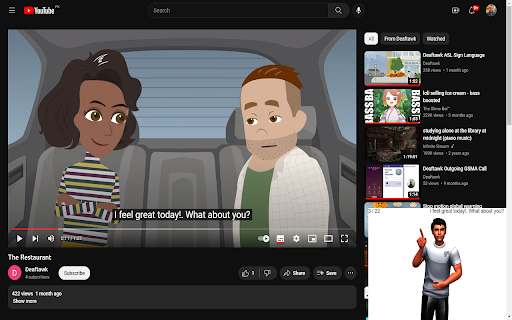
The DeafTawk Avatar extension is a cutting-edge technological innovation that enables people with hearing disabilities to access…
As of May 2026, DeafTawk Avatar (beta) has 54 users in the Accessibility category.
Usersdown 10.0 percent−10.0%
54
54
Ratingno change0%
—
— reviews
Reviewsno change0%
—
Version
0.2.0
Manifest V3
History
2 snapshotsTracking since Apr 28, 2026.
View as table
| Date | Users | Rating | Reviews | Version |
|---|---|---|---|---|
| Apr 28, 2026 | 60 | — | — | 0.2.0 |
| May 25, 2026 | 68 | — | — | 0.2.0 |
| Now | 54 | — | — | 0.2.0 |
Permissions & access
- Permissions
- contextMenustabs
- Host access
- None declared
Screenshots

About
The DeafTawk Avatar extension is a cutting-edge technological innovation that enables people with hearing disabilities to access web pages and YouTube videos seamlessly. This extension converts the video and text of web pages and YouTube videos into sign language, making them understandable to individuals who are deaf or hard of hearing.
The users can easily navigate and explore web pages and YouTube videos. They can watch any video, read any text, or browse any page, without worrying about missing out on the video and text content. This extension uses state-of-the-art artificial intelligence algorithms to recognize speech, video and text, and it translates them into sign language in real-time.
DeafTawk Avatar extension is easy to install and use. It integrates seamlessly into web browsers, making it accessible with a single click. Users can activate and the extension will begin translating the video and text into sign language.
extension is a vital tool for people with hearing disabilities. It allows them to access web pages and YouTube videos like any other user, without any limitations or barriers.

Instructions to use:
There are two ways to use the app.
1. On a regular website.
2. On YouTube video (with captions only).

How to use on a regular website?
1. Go to any website (except youtube.com). You can go to https://deaftawkai.web.app/ as a sample.
2. A window will appear at the bottom right of your screen. Enter authentication code. Upon successful login, you will see the avatar after it loads.
3. You can enter any sentence and send to see the avatar perform sign language for your given sentence.
4. Select any sentence and right click. Then select "search sign language". After this, you will see the avatar perform sign language.

How to use on YouTube video (with captions only)?
1. Go to youtube.com
2. A window will appear at the bottom right of your screen. Enter authentication code. Upon successful login, you will see the avatar after it loads.
3. Open up your favorite video (which has captions). Avatar will start performing sign language for the played video.

This is beta version. Please ignore errors and issues for now. Also, if you encounter any issue that stops you from using this extension, reload page and try again. If this does not work, reload extension from the extensions panel and try again.
Technical
- Version
- 0.2.0
- Manifest
- V3
- Size
- 323KiB
- Min Chrome
- 88
- Languages
- 1
- Featured
- No
Metadata
- ID
- ifnfodpidgekicmiefpfmglecbkmoigd
- Developer ID
- u88cf8e8fb85be6552313a4e9135ae47b
- Developer Email
- [email protected]
- Created
- May 14, 2023
- Last Updated (Store)
- May 22, 2023
- Last Scraped
- May 25, 2026
- Website
- —
- Support URL
- —
- Privacy Policy
- —
Similar extensions
Alternatives to DeafTawk Avatar (beta), ranked by description similarity.

Inkaai Video Translator
Translate video content in real-time
134

Screen Reader Description
Provides screen reader-based audio descriptions for select videos on various streaming sites.
47

Signspaces - Sign Language Learning
Learn American Sign Language while browsing the web.
3.0K
★ 4.3

YourVoice - Control Browser by Voice
YourVoice: control your browser by your voice!
34
★ 5.0

Dual Subtitles Any Site
View subtitles anywhere
177
★ 1.0

SignUp - Sign Language for Netflix & Disney+
This extension allows the user to overlay videos of American Sign Language interpreting onto Disney+ and Netflix videos.
10.0K
★ 4.6

TikTokGaze
Endless TikTok videos are made accessible with eye gaze devices
16
★ 3.7

GIA
Traduce texto a lengua de señas.
5
★ 2.5
Data sourced from the Chrome Web Store · last verified May 25, 2026.