
Aura Volume Booster
Crystal-clear volume boost up to 600% with ASMR mode, noise reduction, and smart compression
As of July 2026, Aura Volume Booster has 1 users in the Productivity category.
Usersno change0%
1
1
Ratingno change0%
—
— reviews
Reviewsno change0%
—
Version
3.0.0
Manifest V3
History
1 snapshotsTracking since Jul 4, 2026.
View as table
| Date | Users | Rating | Reviews | Version |
|---|---|---|---|---|
| Jul 4, 2026 | 1 | — | — | 3.0.0 |
| Now | 1 | — | — | 3.0.0 |
Permissions & access
- Permissions
- tabCaptureactiveTaboffscreenstoragetabs
- Host access
- None declared
Screenshots

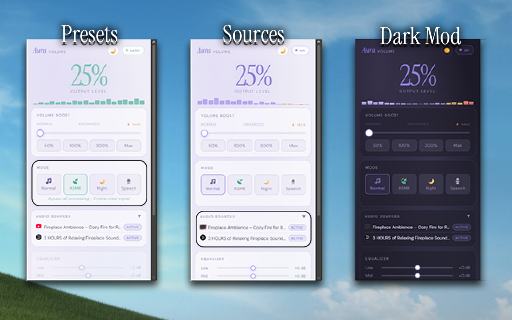
About
Frustrated with quiet laptop speakers or low audio on your favorite streaming platforms? Meet Aura Volume Booster, the ultimate audio extension to amplify sound and take full control of your media directly inside Google Chrome. Whether you are watching a movie, listening to a podcast, or blasting music, Aura gives your audio the power it deserves.

🚀 KEY FEATURES:
• Volume Boost up to 600%: Increase volume on any tab instantly.
• Advanced Audio Equalizer: Fine-tune your sound with pro-level presets (including ASMR, Night Mode, and Speech Optimization).
• Perfect Distortion Control: Our smart limiter prevents ugly audio clipping and crackling, keeping the sound crystal clear even at maximum levels.
• Sleek UI with Dark Mode: A beautiful, modern, and lightweight interface designed not to slow down your browser.
• 100% Ad-Free: No annoying pop-ups or hidden scripts.

🎵 PERFECT FOR ALL MEDIA:
If your sound is too quiet on popular video platforms, movie streaming services, live streams, or music websites, Aura fixes it in one click. It acts as a powerful sound booster for Chrome, making sure you never miss a single word in a dialogue or a single beat in a song.

Stop struggling with a sound too low on Chrome or quiet laptop speakers. Download Aura Volume Booster today and unlock the true potential of your audio setup!
Technical
- Version
- 3.0.0
- Manifest
- V3
- Size
- 844KiB
- Min Chrome
- 116
- Languages
- 1
- Featured
- No
Metadata
- ID
- ifkkeblggcbdccokicenjeakbmjpmidc
- Developer ID
- u79784d218b6ba3d7a4db5e3fbd2d5e49
- Developer Email
- [email protected]
- Created
- Jul 3, 2026
- Last Updated (Store)
- Jul 3, 2026
- Last Scraped
- Jul 4, 2026
- Website
- —
- Support URL
- —
Data sourced from the Chrome Web Store · last verified Jul 4, 2026.