
Save Links to ClickUp
Save Links to ClickUp helps to manage all your hyperlinks in ClickUp document easily.
As of May 2026, Save Links to ClickUp has 172 users and a 5.00/5 rating from 1 reviews in the Workflow & Planning category.
Usersdown 12.7 percent−12.7%
172
172
Ratingno change0%
5.00
1 reviews
Reviewsno change0%
1
Version
1.1
Manifest V3
History
2 snapshotsTracking since Apr 28, 2026.
View as table
| Date | Users | Rating | Reviews | Version |
|---|---|---|---|---|
| Apr 28, 2026 | 197 | 5.00 | 1 | 1.1 |
| May 25, 2026 | 180 | 5.00 | 1 | 1.1 |
| Now | 172 | 5.00 | 1 | 1.1 |
Permissions & access
- Permissions
- storageidentity
- Host access
- <all_urls>
Screenshots

About
Save Links to ClickUp is a simple and easy to use tool for managing the hyperlinks in ClickUp document. This extension helps the user to store important Links according to various categories. So next time the user wants to access any link from their document they can simply open the extension and access them.

𝐅𝐞𝐚𝐭𝐮𝐫𝐞𝐬:
●Easy , Simple UI
●Create new categories
●View links
●Add title to your links.
●Delete link

𝐔𝐬𝐞𝐫-𝐆𝐮𝐢𝐝𝐞:
1.Install the Extension .
2.Click on Connect and wait for few seconds.
3.Wait till a window for clickUp authorization opens.
4.Login with your clickUp Id(email) and password.
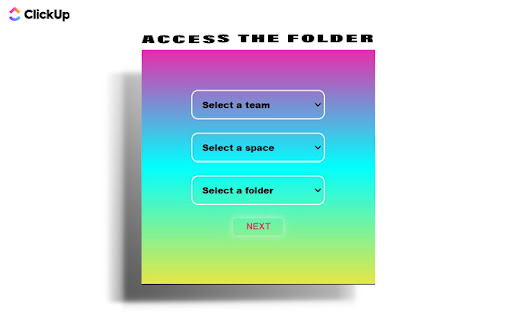
5.Select the team , then select the space within the team and finally select the folder inside which you want to store all the hyperlinks.
6.Make sure that you create a folder(for the links) in advance at clickUp website.
7.Now you are all set .
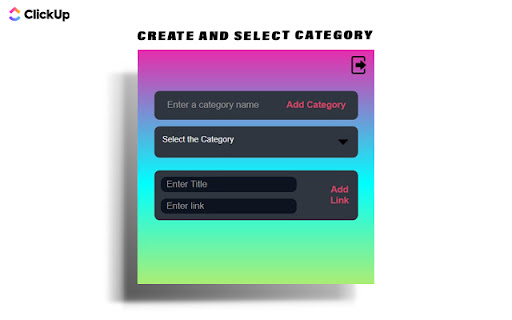
8.To create a new category simply type the category name and click on Add category.
9.To select a category click on "Select the Category" dropdown.
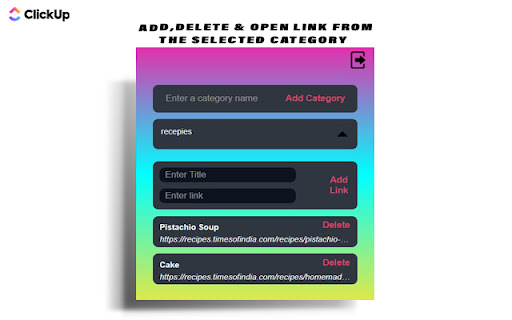
10.All Links within the category will be displayed.
11.To open a link click on the hyperlink or the title . To delete it click on the delete button.
12.To add a link select the category and enter the link title and the link in their respective section , then click on the "Add Link" button .
13. In case you find any difficulty simply restart the extension and also check the internet connection.
Technical
- Version
- 1.1
- Manifest
- V3
- Size
- 22.63KiB
- Min Chrome
- 88
- Languages
- 1
- Featured
- No
Metadata
- ID
- ifjjpkcmeeanecflmdpndenamehcdgff
- Developer ID
- u685d3718ff6f717c3d9dad618c872824
- Developer Email
- [email protected]
- Created
- Sep 27, 2022
- Last Updated (Store)
- Oct 7, 2022
- Last Scraped
- May 25, 2026
- Website
- —
- Support URL
- —
- Privacy Policy
- —
Similar extensions
Alternatives to Save Links to ClickUp, ranked by description similarity.

Gather Links
Quickly gather important links directly in your browser!
74
★ 5.0

Save Links
This extension helps you to save links and tabs that you want to store. At the same time, it provide edit and delete functionality…
156

Link Manager
Link Manager is a clean and user friendly Chrome extension that helps you save, organize, and access your favorite links all from a…
20
★ 5.0

Custom Links New Tab
A new tab extension enables putting custom links on your new tab to improve your workflow. Backup, restore, and share links.
58
★ 5.0

LinkCollect - Save & Share Bookmarks
linkcollect is the simplest way to save & share web links, bookmarks or tabs from anywhere to anyone
1.0K
★ 4.1

Clickup File Manager
A simple Extension that allows you to manage files on ClickUp
123
★ 3.0

URL Hub
Store and organize your favorite URLs and profile links
11
★ 5.0

ClickUp: Tasks, Screenshots, Email, Time
ClickUp is a productivity platform that makes your personal and work lives more productive, saving you time.
200.0K
★ 2.6
Data sourced from the Chrome Web Store · last verified May 25, 2026.