
Canvas Assignments Timeline
Canvas Assignments Timeline Transform your Canvas LMS dashboard with an interactive timeline to manage your assignments more…
As of May 2026, Canvas Assignments Timeline has 153 users and a 5.00/5 rating from 3 reviews in the Education category.
Usersdown 15.5 percent−15.5%
153
153
Ratingno change0%
5.00
3 reviews
Reviewsno change0%
3
Version
1.2.0
Manifest V3
History
2 snapshotsTracking since Apr 28, 2026.
View as table
| Date | Users | Rating | Reviews | Version |
|---|---|---|---|---|
| Apr 28, 2026 | 181 | 5.00 | 3 | 1.2.0 |
| May 25, 2026 | 183 | 5.00 | 3 | 1.2.0 |
| Now | 153 | 5.00 | 3 | 1.2.0 |
Permissions & access
- Permissions
- storage
- Host access
- None declared
Screenshots


About
Canvas Assignments Timeline
Transform your Canvas LMS dashboard with an interactive timeline to manage your assignments more efficiently.

✅ Interactive Timeline on Dashboard
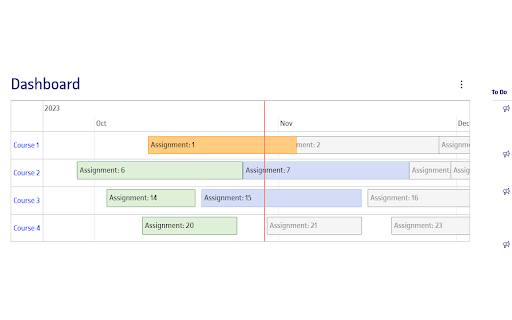
Introducing a dynamic timeline directly in your Canvas dashboard, allowing you to view and manage your assignments with ease. Get a comprehensive view of your workload and upcoming deadlines at a glance.

✅ Assignment Completion with One Click
Simply click on an assignment in the timeline to mark it as done. Keep track of your progress and stay organized.

✅ Assignment Details on Hover
Hover over any assignment on the timeline to get immediate details. No need to navigate away from your dashboard to understand what's due next.

✅ Zoom & Scroll for Enhanced Timeline Navigation
Easily zoom in and out, and scroll horizontally across your timeline for a tailored view of your assignments. Whether you're planning for the week or the entire semester, we've got you covered.

✅ Persistent Timeline Customization
Your timeline’s position and the status of assignments marked as done are automatically remembered. Return to your dashboard with your custom settings intact, saving time and maintaining focus.

✅ Direct Course Access
Click on a course in the timeline to jump directly to its modules and assignments, streamlining your navigation through Canvas LMS.

✅ Multilingual Support for Global Users
Our extension supports internationalization and is available in 13 languages, catering to a diverse, global user base.

✅ Free & Easy to Use, No Account Needed
Canvas Assignments Timeline is free to use and doesn't require any account setup. Just install and improve your Canvas LMS experience instantly.

This extension requires minimal permissions, including:

"storage": To store your personal settings and configuration, ensuring a customized and consistent experience across your Canvas dashboard.
Canvas Assignments Timeline seamlessly integrates into your Canvas dashboard, offering an enhanced, personalized, and more organized educational experience. Try it now and take control of your assignments like never before!
Technical
- Version
- 1.2.0
- Manifest
- V3
- Size
- 463KiB
- Min Chrome
- 88
- Languages
- 1
- Featured
- No
Metadata
- ID
- ifgeabdejopdnkdojbpcjhljclchmcbn
- Developer ID
- u74caba7a71ff62f0841af43f630445a8
- Developer Email
- [email protected]
- Created
- Nov 4, 2023
- Last Updated (Store)
- Mar 13, 2024
- Last Scraped
- May 25, 2026
- Website
- —
Similar extensions
Alternatives to Canvas Assignments Timeline, ranked by description similarity.

CanvasFlow: AI Assistance for Canvas LMS
Smart Canvas companion with AI insights, assignment tracking, and weekly schedule generation.
36
★ 5.0

Tasks for Canvas – now supporting Blackboard, D2L Brightspace
A better to-do list sidebar for Canvas, Blackboard, and D2L Brightspace.
800.0K
★ 4.7

Canvas Session Sync
Sync your Canvas session to the Canvas Assignments app
—

Linear Canvas
UX enhancement tool for Canvas LMS
11
★ 5.0

Canvas LMS Quick Add
Adds a Quick Add button to Canvas LMS to quickly add learning objects to course modules.
26
★ 5.0

Riveta Sync
Auto-sync assignments from Canvas to Riveta
2

DueMo
Download and export Canvas assignments to Excel
6
★ 5.0

Learning Agent - Canvas Sync
Sync your Canvas LMS courses, assignments, grades, and files to a local backend — powering AI-ready study tools.
3
Data sourced from the Chrome Web Store · last verified May 25, 2026.