
Gone Phishin'
Warns you about phishing links in Gmail and Outlook before you click them.
As of June 2026, Gone Phishin' has 2 users and a 5.00/5 rating from 3 reviews in the Privacy & Security category.
Usersno change0%
2
2
Ratingno change0%
5.00
3 reviews
Reviewsno change0%
3
Version
0.1.2
Manifest V3
History
6 snapshotsTracking since May 6, 2026.
View as table
| Date | Users | Rating | Reviews | Version |
|---|---|---|---|---|
| May 6, 2026 | — | — | — | 0.1.2 |
| May 11, 2026 | — | — | — | 0.1.2 |
| May 16, 2026 | 2 | 5.00 | 2 | 0.1.2 |
| May 30, 2026 | 4 | 5.00 | 3 | 0.1.2 |
| Jun 5, 2026 | 2 | 5.00 | 3 | 0.1.2 |
| Jun 12, 2026 | — | 5.00 | 3 | 0.1.2 |
| Now | 2 | 5.00 | 3 | 0.1.2 |
Permissions & access
- Permissions
- storage
- Host access
- https://mail.google.com/*, https://outlook.live.com/*, https://outlook.office.com/*, https://outlook.office365.com/*, http://localhost:3000/*, https://*.vercel.app/*, https://gonephishin.tech/*
Screenshots


About
Gone Phishin' watches the links in your Gmail and Outlook inbox and warns
  you before you click on a phishing or malware page.

  It's free, it doesn't read your email, and it was designed for the people in
  your life who are most often targeted — your parents, your grandparents,
  and anyone else who finds the modern web a little hostile.

  WHAT IT DOES

  • Marks dangerous links in your inbox with a small icon, so you can see at
    a glance which messages are sketchy.
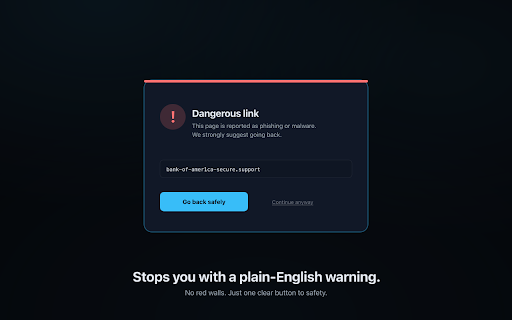
  • Stops you when you click a known phishing or malware page and asks you
    to confirm — with a clear, plain-English warning, not a wall of red text.
  • Works on Gmail and Outlook (web). No setup, no accounts, no tracking
    required to use it.

  HOW IT WORKS

  When you open Gmail or Outlook, the extension reads the URLs of the links
  already shown on the page (the same ones your browser shows in the
  link-preview tooltip when you hover over them). Each unfamiliar URL is
  checked against Google's Safe Browsing list, which is the same threat
  database that powers Chrome's red "Deceptive site ahead" page. Verdicts are
  cached locally in your browser so we don't keep asking about the same link.

  We do NOT read your emails, attachments, subject lines, senders, or
  recipients. We never see the contents of your inbox. The only thing the
  extension looks at is the clickable URLs that the webmail page already
  renders for you.

  FOR FAMILIES

  If you're setting this up for a parent, grandparent, or anyone else who
  isn't a power-user, sign in to gonephishin.tech, create a "family circle"
  with their name on it, and read them a 6-digit pairing code over the phone
  (no email links to click — that would be ironic). Once they enter the code,
  the extension on their browser is paired to your dashboard, where you can
  see the threats it's blocked for them. You can revoke the pairing at any
  time from Settings.

  You can also use Gone Phishin' just for yourself — sign in for yourself
  from the extension popup, or skip sign-in entirely. Either way works.

  PRIVACY

  • We never read your email contents, subjects, senders, recipients, or
    attachments.
  • We do not track your browsing history.
  • We do not show ads, sell data, or train AI models on your data.
  • Full privacy policy: https://gonephishin.tech/privacy

  PERMISSIONS WE ASK FOR (AND WHY)

  • "Read and change all your data on Gmail / Outlook" — required by Chrome
    to read the link URLs already displayed on those pages so we can flag
    the dangerous ones. The extension only runs on those four hostnames.
  • "storage" — caches link verdicts and your sign-in state locally.

  That's it. We don't ask for permissions on any other site, we don't read
  your tabs, and we don't have access to anything outside the webmail tabs
  themselves.

  OPEN ABOUT WHAT WE'RE NOT

  This is a community-maintained, free safety net — not a replacement for
  careful clicking. It catches the phishing and malware sites that Google
  already knows about, plus a small set of obvious-looking lookalikes
  (typosquats, IP-only links, suspicious TLDs, brand-impersonation links
  where the text says one company but the URL goes somewhere else). Brand-new
  attacks that haven't been reported yet won't be in the database. Pair it
  with the old-fashioned advice: if a message feels off, don't click; if it
  claims to be your bank, log into your bank directly.

  CONTACT & FEEDBACK

  • Web: https://gonephishin.tech
  • Privacy questions: [email protected]
  • Bug reports: [email protected]

  If the extension flagged something it shouldn't have, please send us the
  domain — we'd like to know.
Technical
- Version
- 0.1.2
- Manifest
- V3
- Size
- 90.73KiB
- Min Chrome
- 88
- Languages
- 1
- Featured
- No
Metadata
- ID
- ifckleibjeadbcebapahhahhleoifofb
- Developer ID
- uca67a719cbd9e4ff63d3dca962dbe7f5
- Developer Email
- [email protected]
- Created
- May 5, 2026
- Last Updated (Store)
- May 5, 2026
- Last Scraped
- Jun 12, 2026
- Website
- —
- Support URL
- https://gonephishin.tech/support
- Privacy Policy
- https://gonephishin.tech/privacy
Data sourced from the Chrome Web Store · last verified Jun 12, 2026.