
Copy Link and shorten,複製連結網址並縮短
A Chrome extension to copy link on right click and shorten it,一個Chrome的插件可以滑鼠右鍵複製並縮短連結
As of May 2026, Copy Link and shorten,複製連結網址並縮短 has 269 users and a 3.00/5 rating from 2 reviews in the Workflow & Planning category.
Usersdown 2.2 percent−2.2%
269
269
Ratingno change0%
3.00
2 reviews
Reviewsno change0%
2
Version
1.0
Manifest V3
History
2 snapshotsTracking since Apr 28, 2026.
View as table
| Date | Users | Rating | Reviews | Version |
|---|---|---|---|---|
| Apr 28, 2026 | 275 | 3.00 | 2 | 1.0 |
| May 25, 2026 | 263 | 3.00 | 2 | 1.0 |
| Now | 269 | 3.00 | 2 | 1.0 |
Permissions & access
- Permissions
- contextMenusclipboardWritescripting
- Host access
- https://*/*
Screenshots
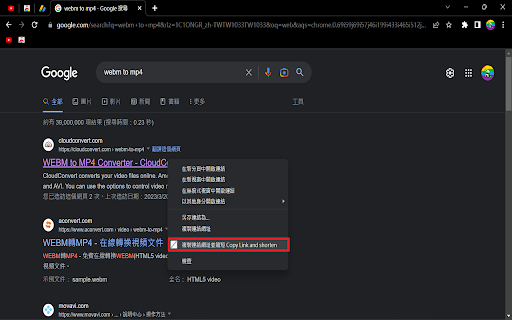

About
在現代的網際網路世界中,大量的資訊流動著,而不少的時候,我們需要分享其他網站的連結網址,這時候,縮短連結就變得相對重要,因為如果你分享的連結網址太長且難以記憶,將會產生一些問題,比如說,它將減少你分享文章的可能性,也可能會反過來讓讀者感到困惑。

縮短連結的好處在於,它能夠減少網址的總長度。此外,縮短連結也可以幫助提高網址的可分享性和使用性,更加方便於社交媒體或其他網站分享。

現在,在大部分的網站上,普遍有提供縮短網址的功能,有些甚至是自動的,當然也有些可以透過手動方式來實現,以下是幾種方式:

1.使用縮網址服務

縮網址服務是目前最通用的方法之一。你可以使用一些縮網址服務比如bit.ly,tinyurl.com或Rebrandly等等。一般情況下,只需將你想要分享的網址複製到網址欄位中,然後按下縮網址按鈕就行了。

2.使用Chrome瀏覽器擴展程序

如果你是Chrome用戶,可以使用一個叫做"縮網址"的擴展程序,它可以簡單方便地縮短你的網址。你需要先從Chrome網上應用商店中下載這款擴展程序,並在安裝成功後,就可以透過這個擴展程序在瀏覽器中找到你想分享的網址,然後進行縮短。
Technical
- Version
- 1.0
- Manifest
- V3
- Size
- 17.81KiB
- Min Chrome
- 88
- Languages
- 1
- Featured
- No
Metadata
- ID
- iepcbcaffpahjjmfokdalapfbjnjpfcj
- Developer ID
- u4a3cd367138724a600774008eea51d96
- Developer Email
- [email protected]
- Created
- Mar 17, 2023
- Last Updated (Store)
- Mar 22, 2023
- Last Scraped
- May 25, 2026
- Website
- —
- Support URL
- —
- Privacy Policy
- —
Similar extensions
Alternatives to Copy Link and shorten,複製連結網址並縮短, ranked by description similarity.

Goolink
Short URL in a click, fast and clean.
381
★ 5.0

Shorten and undo closed URL 333
Shorten URLs & Restore closed tabs 短網址生成器 & 恢復已關閉分頁
6

4cUrls
最舒服的網頁體驗,4xDev ^^
2.0K
★ 4.6

URL Operator
一个用于批量操作URL的Chrome扩展
4

Сократить ссылку с iDeb
Короткие ссылки: мгновенно сокращайте длинные веб-адреса в компактные ссылки без отслеживания реферера.
12

lihi.io 行銷短網址 | AB 測試 | 縮網址
套件可創立短網址跟 增加多連結AB分流. 創立後到後台可追蹤流量, 埋像素, 埋GTM, 產QR Code 等等
5.0K
★ 5.0

SShopee
快速使用文字搜尋商品的工具,並且可以複製縮網址。4xDev(4-x.tw)
18

IBF Short URL
讓IBF.TW幫您縮短冗長、難記憶的網址吧!
176
★ 5.0
Data sourced from the Chrome Web Store · last verified May 25, 2026.