
Review Harvest for Amazon
Harvest Amazon product reviews in bulk + Pro-tier AI Intel (Gemini themes per ASIN). Filter by stars, export to XLSX.
As of June 2026, Review Harvest for Amazon has 3 users in the Workflow & Planning category.
Usersno change0%
3
3
Ratingno change0%
—
— reviews
Reviewsno change0%
—
Version
0.4.2
Manifest V3
90-day change · In the last 90 days this extension 3 version updates, changed permissions.
History
5 snapshotsTracking since Apr 20, 2026.
View as table
| Date | Users | Rating | Reviews | Version |
|---|---|---|---|---|
| Apr 20, 2026 | — | — | — | 0.3.0 |
| Apr 25, 2026 | — | — | — | 0.3.0 |
| May 2, 2026 | 1 | — | — | 0.3.1 |
| May 13, 2026 | 2 | — | — | 0.4.1 |
| May 26, 2026 | 2 | — | — | 0.4.2 |
| Now | 3 | — | — | 0.4.2 |
Changelog
- May 2, 2026description
Review Harvest for Amazon turns an Amazon search results page into a CSV of product reviews. You stay signed in to your own Amazon account, pick filters in a small popup, and get a single CSV in your Downloads folder.

No sign-up, no API key, no account tied to the extension. Everything runs locally in your browser.

How we're different

Other Amazon review scrapers on the Chrome Web Store have one of two problems: they scrape only one product at a time (you have to open each product page manually), or they gate real usage behind a paywall that caps you at 10 to 100 reviews per day. Review Harvest for Amazon is built the other way around.

One run, dozens of products. Point it at an Amazon search results page and it collects reviews for up to 50 products automatically. Competitors still make you visit each product page.

Free while in beta. No credit card, no paywall. You export everything you ask for. When we add paid tiers, the email signup (optional, post-first-run) is how you'll find out.

Uses your own Amazon session. Credentials are never stored or transmitted.

A typical run takes a few minutes to harvest all reviews.

What it does

Reads products directly from the Amazon search or browse page you are viewing. Filters by star rating, verified purchases, and sort order (most recent or most helpful). Saves one CSV to your Downloads folder when the run finishes and shows a desktop notification. Keeps a list of recent runs so you can re-download past scrapes without re-running them.

How to use

1. Install the extension and pin it to your toolbar.
2. Sign in to amazon.com as you normally would.
3. Run an Amazon search.
4. Click the Review Harvest for Amazon toolbar icon.
5. Set filters: number of products to scrape (1 to 50), star ratings, reviews per product (10 to 50), verified purchases only, and sort order.
6. Click Scrape. A progress bar shows progress. You can click Cancel any time — the extension still saves a CSV of what it has so far.
7. When the run completes, Chrome saves the CSV to your Downloads folder and shows a notification.
8. To re-download a past result, switch to the Recent tab and click re-download.

A run takes a few minutes to harvest all reviews. Don't run multiple scrapes in parallel.

What you get

Each run produces a single CSV saved as amazon-reviews-<query>-<YYYY-MM-DD>.csv. The file opens cleanly in Excel, Sheets, and any spreadsheet tool.

Columns:

asin — the product's Amazon ASIN.
brand — the brand as shown on the product page (best effort; empty string if not detected).
productTitle — the product title from the search results card.
stars — integer 1 to 5.
title — the review's headline.
body — the review text.
date — as Amazon displays it, for example "Reviewed in the United States on March 26, 2026".
verified — true if Amazon marks the review as a Verified Purchase, otherwise false.
helpful — number of helpful votes on the review, or 0 if none shown.
reviewerName — the public display name shown next to the review.
error — populated only when an entire product fails to scrape. Normal review rows leave this blank.

Strings that could be misread as a formula by Excel or Sheets are escaped, so opening the CSV can't trigger anything.

Privacy

Everything stays on your machine. The extension does not handle, store, or transmit your Amazon credentials. No telemetry, no analytics. The CSV is written directly to your Downloads folder. The list of recent runs is stored in Chrome's local extension storage on your device. You can clear it from the Recent tab.

Requirements

Desktop Chrome. An Amazon account, signed in at amazon.com in the same browser profile. The active tab must be an Amazon search or browse page when you open the popup.

Not in scope

This extension is scoped to amazon.com (the US marketplace). Other Amazon marketplaces (amazon.co.uk, amazon.de, amazon.co.jp, etc.) are not supported. It does not include product research, ranking analysis, review sentiment classification, cross-run deduplication, or seller-side analytics.

Frequently asked questions

Will using this extension get my Amazon account banned?
No. The extension uses your normal signed-in session. Your Amazon credentials are never transmitted, read, or stored.

Why does it need me to be signed into Amazon?
Amazon only shows reviews to signed-in users. The extension doesn't add that requirement — Amazon does.

What's the real review limit per product?
Amazon itself caps its review listings at around 100 reviews per product. That's a platform limit, not ours. A mode that can raise the practical ceiling to roughly 500 per product is on the roadmap — sign up for updates via the post-scrape banner if you want it.

Is it really free? What's the catch?
While we're in beta, yes — completely free, no cap, no credit card, no subscription. When we add paid tiers (likely: Google Sheets export, scheduled scrapes, cross-run deduplication), anyone who opted into the email list will get notified first. Opting in is optional.

Why does it take a few minutes?
A full run across dozens of products collects hundreds of reviews, which takes a bit of time. You can close the popup and switch tabs — the run continues in the background.

Does it work on amazon.co.uk / .de / .ca / other country stores?
Not yet. Today the extension is scoped to amazon.com. Multi-marketplace support is on the roadmap.

Do you collect or store the reviews I scrape?
No. Every review is written to a CSV on your own computer. It doesn't pass through our servers. The only thing we store, and only if you explicitly opt in via the email banner, is your email address — nothing else.

What data does the extension collect?
Two things, both explicit opt-in: (1) the email you type in the post-scrape signup banner, if you use it at all; (2) an anonymous install UUID, sent only with that email submission. Nothing else. Full details in the privacy policy.

What if I see duplicate reviews in the CSV?
You shouldn't. If you do, that's a bug — please email [email protected] with the ASIN and we'll fix it.

What if the extension says "0 reviews" but the product clearly has reviews?
Amazon occasionally changes their page structure. We ship fixes quickly — update the extension or wait a day. If it persists, contact us.
Review Harvest for Amazon turns an Amazon search results page into an XLSX of product reviews — plus a free **AI Intel** sheet that summarizes recurring weaknesses per product. You stay signed in to your own Amazon account, pick filters in a small popup, and get the files in your Downloads folder.

No sign-up, no API key, no account tied to the extension. Scraping runs locally in your browser. The optional AI summarization step sends only the just-scraped review text to our backend (proxied to Google's Gemini API) and returns themed insights — full disclosure in the privacy policy.

How we're different

Other Amazon review scrapers on the Chrome Web Store have one of three problems: they scrape only one product at a time (you have to open each product page manually), they gate real usage behind a paywall that caps you at 10 to 100 reviews per day, or they hand you a raw spreadsheet with no pattern recognition across hundreds of reviews. Review Harvest for Amazon addresses all three.

One run, dozens of products. Point it at an Amazon search results page and it collects reviews for up to 50 products automatically. Competitors still make you visit each product page.

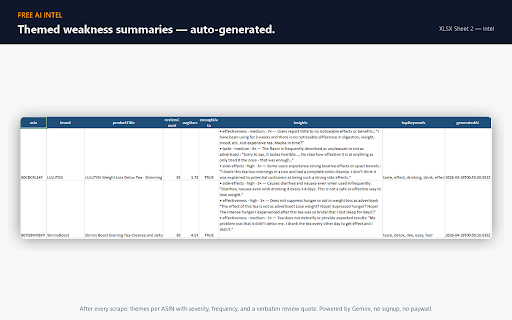
Free AI Intel — themed weakness summaries per product. After every scrape, the extension sends each product's reviews to our Gemini-powered backend and writes 3 themed insights per ASIN into Sheet 2 of the XLSX: category (e.g., "effectiveness", "taste", "side-effects"), severity, frequency, and a verbatim quote. Categories are coined by the model from your actual reviews — not a fixed taxonomy. No paywall, no signup.

Free while in beta. No credit card, no paywall. You export everything you ask for. When we add paid tiers, the email signup (optional, post-first-run) is how you'll find out.

Uses your own Amazon session. Credentials are never stored or transmitted.

A typical run takes a few minutes to harvest reviews and analyze themes.

What it does

Reads products directly from the Amazon search or browse page you are viewing. Filters by star rating, verified purchases, and sort order (most recent or most helpful). After the scrape, automatically sends each product's reviews to our backend for AI theme analysis. Saves XLSX files to your Downloads folder and shows a desktop notification when done. Keeps a list of recent runs so you can re-download past scrapes without re-running them.

How to use

1. Install the extension and pin it to your toolbar.
2. Sign in to amazon.com as you normally would.
3. Run an Amazon search.
4. Click the Review Harvest for Amazon toolbar icon.
5. Set filters: number of products to scrape (1 to 50), star ratings, reviews per product (10 to 50), verified purchases only, and sort order.
6. Click Scrape. A progress bar shows progress. You can click Cancel any time — the extension still saves what it has so far.
7. When the scrape completes, the reviews-only XLSX is saved automatically and AI Intel runs in the background. A second progress bar shows the analyze step.
8. When analyze completes, click "Download Intel (XLSX)" to save the file with both sheets (raw reviews + AI themes).
9. To re-download a past result, switch to the Recent tab and click re-download.

A run takes a few minutes to harvest reviews and analyze themes. Don't run multiple scrapes in parallel.

What you get

Two XLSX files per run (both styled with a brand-blue header band, ready for Excel/Sheets/LibreOffice):

`amazon-reviews-<query>-<YYYY-MM-DD>.xlsx` — the raw reviews export (single sheet), saved immediately when the scrape finishes.

`review-intel-<query>-<YYYY-MM-DD>.xlsx` — the full intel export (two sheets: reviews + AI themes), available after AI Intel completes.

Both files share the same Sheet 1 columns:

asin — the product's Amazon ASIN.
brand — the brand as shown on the product page (best effort; empty if not detected).
productTitle — the product title from the search results card.
stars — visualized as ★ glyphs (★★★★☆ = 4); the underlying numeric value is preserved for filtering.
title — the review's headline.
body — the review text.
date — as Amazon displays it, for example "Reviewed in the United States on March 26, 2026".
verified — true if Amazon marks the review as a Verified Purchase.
helpful — number of helpful votes, or 0 if none shown.
reviewerName — the public display name shown next to the review.
error — populated only when an entire product fails to scrape.

The Intel XLSX adds a second sheet with one row per product:

asin, brand, productTitle, reviewCount, avgStars — match Sheet 1.
enoughData — true when there were enough reviews (≥2) to attempt analysis.
insights — bulleted theme summary, one bullet per theme: `<category> · <severity> · <frequency>× — <label>: "<verbatim quote>"`.
topKeywords — five most-frequent non-stopword tokens across the review bodies (no AI here).
generatedAt — ISO 8601 UTC timestamp.

Strings that could be misread as a formula by Excel or Sheets are escaped, so opening either file can't trigger anything.

Privacy

The extension does not handle, store, or transmit your Amazon credentials. No telemetry, no analytics, no advertising SDKs.

What stays on your device: scraped review rows in your XLSX files, the run-history list, the brand-lookup cache, and an anonymous install identifier.

What leaves your device, with disclosure: when AI Intel runs (default-on after every scrape), each product's review text is POSTed over HTTPS to our Railway-hosted backend, which forwards the prompt to Google's Gemini API. Themed summaries return to your browser and land in Sheet 2 of the Intel XLSX. Per Google's paid Gemini API terms, your reviews are not used to train Google's models. Full detail in the privacy policy linked from the listing.

The list of recent runs is stored in Chrome's local extension storage on your device. You can clear it from the Recent tab. Uninstalling the extension wipes everything device-side.

Requirements

Desktop Chrome. An Amazon account, signed in at amazon.com in the same browser profile. The active tab must be an Amazon search or browse page when you open the popup.

Not in scope

This extension is scoped to amazon.com (the US marketplace). Other Amazon marketplaces (amazon.co.uk, amazon.de, amazon.co.jp, etc.) are not supported. It does not include product research, ranking analysis, review sentiment classification, cross-run deduplication, or seller-side analytics.

Frequently asked questions

Will using this extension get my Amazon account banned?
No. The extension uses your normal signed-in session. Your Amazon credentials are never transmitted, read, or stored.

Why does it need me to be signed into Amazon?
Amazon only shows reviews to signed-in users. The extension doesn't add that requirement — Amazon does.

What's the real review limit per product?
Amazon itself caps its review listings at around 100 reviews per product. That's a platform limit, not ours. A mode that can raise the practical ceiling to roughly 500 per product is on the roadmap — sign up for updates via the post-scrape banner if you want it.

Is it really free? What's the catch?
While we're in beta, yes — completely free, no cap, no credit card, no subscription. AI Intel is also free during beta. When we add paid tiers (likely: Google Sheets export, scheduled scrapes, cross-run deduplication, higher daily limits), anyone who opted into the email list will get notified first. Opting in is optional.

Why does it take a few minutes?
A full run across dozens of products collects hundreds of reviews and runs theme analysis on each, which takes a bit of time. You can close the popup and switch tabs — the run continues in the background.

Does it work on amazon.co.uk / .de / .ca / other country stores?
Not yet. Today the extension is scoped to amazon.com. Multi-marketplace support is on the roadmap.

Do you store the reviews I scrape?
We do not retain reviews server-side. When AI Intel runs, the reviews for each product are POSTed to our backend, which immediately forwards them to Google's Gemini API. Gemini returns themed summaries; the request body is not retained by us beyond standard request logging (IP + timestamp for rate limiting, no review text). Per Google's paid Gemini API terms, your reviews are also not used to train Google's models. Sheet 1 of the XLSX (raw review rows) lives only on your device.

What data does the extension collect?
Three things, with clear disclosure:
(1) Review text — sent to our backend / Gemini API for theme analysis when AI Intel runs (default-on after every scrape). Not retained beyond the request lifecycle.
(2) Email — sent only if you explicitly type one into the post-scrape banner and click Notify me.
(3) Anonymous install UUID — generated locally; sent off-device only when you submit the email form.
Full details in the privacy policy. There is no telemetry, no analytics, no advertising SDK, no behavioral tracking.

Can I opt out of AI Intel?
Yes. The reviews-only XLSX (`amazon-reviews-<query>-<date>.xlsx`) is saved BEFORE any AI analysis fires — open that file and ignore the analyze step. To skip the analyze entirely, cancel the scrape mid-run; the partial reviews-only XLSX still saves.

What if I see duplicate reviews in the XLSX?
You shouldn't. If you do, that's a bug — please email [email protected] with the ASIN and we'll fix it.

What if the extension says "0 reviews" but the product clearly has reviews?
Amazon occasionally changes their page structure. We ship fixes quickly — update the extension or wait a day. If it persists, contact us.

---

## Notes for next release (v0.4.2+)

- The "10 to 50 reviews per product" range above intentionally soft-pedals the deep-harvest claim so the AI Intel feature gets the spotlight. The actual code slider goes 10–500. If a future release wants to put 500-mode back on the marquee, update step 5 in "How to use" + the FAQ.
- AI Intel is described as "free during beta" — when a paid tier ships, update both this file and `privacy-policy.md` "What we share" subprocessor disclosure before the paid build hits CWS.
- Subprocessors disclosed in `privacy-policy.md`: Railway (API hosting), Google Gemini API (paid tier — input not used for training), MongoDB Atlas (email subscriber rows only).
- May 2, 2026short_description
Harvest Amazon product reviews in bulk from the search results page, filter by stars, and export to CSV.
Harvest Amazon product reviews in bulk + Pro-tier AI Intel (Gemini themes per ASIN). Filter by stars, export to XLSX.
- May 2, 2026permissions
tabs, scripting, storage, downloads, notifications
tabs, scripting, storage, downloads, offscreen
Permissions & access
- Permissions
- tabsscriptingstoragedownloadsoffscreen
- Host access
- https://*.amazon.com/*, https://amazon-review-scraper-production-3be7.up.railway.app/*
Screenshots


About
Review Harvest for Amazon turns an Amazon search results page into an XLSX of product reviews — plus a free **AI Intel** sheet that summarizes recurring weaknesses per product. You stay signed in to your own Amazon account, pick filters in a small popup, and get the files in your Downloads folder.

No sign-up, no API key, no account tied to the extension. Scraping runs locally in your browser. The optional AI summarization step sends only the just-scraped review text to our backend (proxied to Google's Gemini API) and returns themed insights — full disclosure in the privacy policy.

How we're different

Other Amazon review scrapers on the Chrome Web Store have one of three problems: they scrape only one product at a time (you have to open each product page manually), they gate real usage behind a paywall that caps you at 10 to 100 reviews per day, or they hand you a raw spreadsheet with no pattern recognition across hundreds of reviews. Review Harvest for Amazon addresses all three.

One run, dozens of products. Point it at an Amazon search results page and it collects reviews for up to 50 products automatically. Competitors still make you visit each product page.

Free AI Intel — themed weakness summaries per product. After every scrape, the extension sends each product's reviews to our Gemini-powered backend and writes 3 themed insights per ASIN into Sheet 2 of the XLSX: category (e.g., "effectiveness", "taste", "side-effects"), severity, frequency, and a verbatim quote. Categories are coined by the model from your actual reviews — not a fixed taxonomy. No paywall, no signup.

Free while in beta. No credit card, no paywall. You export everything you ask for. When we add paid tiers, the email signup (optional, post-first-run) is how you'll find out.

Uses your own Amazon session. Credentials are never stored or transmitted.

A typical run takes a few minutes to harvest reviews and analyze themes.

What it does

Reads products directly from the Amazon search or browse page you are viewing. Filters by star rating, verified purchases, and sort order (most recent or most helpful). After the scrape, automatically sends each product's reviews to our backend for AI theme analysis. Saves XLSX files to your Downloads folder and shows a desktop notification when done. Keeps a list of recent runs so you can re-download past scrapes without re-running them.

How to use

1. Install the extension and pin it to your toolbar.
2. Sign in to amazon.com as you normally would.
3. Run an Amazon search.
4. Click the Review Harvest for Amazon toolbar icon.
5. Set filters: number of products to scrape (1 to 50), star ratings, reviews per product (10 to 50), verified purchases only, and sort order.
6. Click Scrape. A progress bar shows progress. You can click Cancel any time — the extension still saves what it has so far.
7. When the scrape completes, the reviews-only XLSX is saved automatically and AI Intel runs in the background. A second progress bar shows the analyze step.
8. When analyze completes, click "Download Intel (XLSX)" to save the file with both sheets (raw reviews + AI themes).
9. To re-download a past result, switch to the Recent tab and click re-download.

A run takes a few minutes to harvest reviews and analyze themes. Don't run multiple scrapes in parallel.

What you get

Two XLSX files per run (both styled with a brand-blue header band, ready for Excel/Sheets/LibreOffice):

`amazon-reviews-<query>-<YYYY-MM-DD>.xlsx` — the raw reviews export (single sheet), saved immediately when the scrape finishes.

`review-intel-<query>-<YYYY-MM-DD>.xlsx` — the full intel export (two sheets: reviews + AI themes), available after AI Intel completes.

Both files share the same Sheet 1 columns:

asin — the product's Amazon ASIN.
brand — the brand as shown on the product page (best effort; empty if not detected).
productTitle — the product title from the search results card.
stars — visualized as ★ glyphs (★★★★☆ = 4); the underlying numeric value is preserved for filtering.
title — the review's headline.
body — the review text.
date — as Amazon displays it, for example "Reviewed in the United States on March 26, 2026".
verified — true if Amazon marks the review as a Verified Purchase.
helpful — number of helpful votes, or 0 if none shown.
reviewerName — the public display name shown next to the review.
error — populated only when an entire product fails to scrape.

The Intel XLSX adds a second sheet with one row per product:

asin, brand, productTitle, reviewCount, avgStars — match Sheet 1.
enoughData — true when there were enough reviews (≥2) to attempt analysis.
insights — bulleted theme summary, one bullet per theme: `<category> · <severity> · <frequency>× — <label>: "<verbatim quote>"`.
topKeywords — five most-frequent non-stopword tokens across the review bodies (no AI here).
generatedAt — ISO 8601 UTC timestamp.

Strings that could be misread as a formula by Excel or Sheets are escaped, so opening either file can't trigger anything.

Privacy

The extension does not handle, store, or transmit your Amazon credentials. No telemetry, no analytics, no advertising SDKs.

What stays on your device: scraped review rows in your XLSX files, the run-history list, the brand-lookup cache, and an anonymous install identifier.

What leaves your device, with disclosure: when AI Intel runs (default-on after every scrape), each product's review text is POSTed over HTTPS to our Railway-hosted backend, which forwards the prompt to Google's Gemini API. Themed summaries return to your browser and land in Sheet 2 of the Intel XLSX. Per Google's paid Gemini API terms, your reviews are not used to train Google's models. Full detail in the privacy policy linked from the listing.

The list of recent runs is stored in Chrome's local extension storage on your device. You can clear it from the Recent tab. Uninstalling the extension wipes everything device-side.

Requirements

Desktop Chrome. An Amazon account, signed in at amazon.com in the same browser profile. The active tab must be an Amazon search or browse page when you open the popup.

Not in scope

This extension is scoped to amazon.com (the US marketplace). Other Amazon marketplaces (amazon.co.uk, amazon.de, amazon.co.jp, etc.) are not supported. It does not include product research, ranking analysis, review sentiment classification, cross-run deduplication, or seller-side analytics.

Frequently asked questions

Will using this extension get my Amazon account banned?
No. The extension uses your normal signed-in session. Your Amazon credentials are never transmitted, read, or stored.

Why does it need me to be signed into Amazon?
Amazon only shows reviews to signed-in users. The extension doesn't add that requirement — Amazon does.

What's the real review limit per product?
Amazon itself caps its review listings at around 100 reviews per product. That's a platform limit, not ours. A mode that can raise the practical ceiling to roughly 500 per product is on the roadmap — sign up for updates via the post-scrape banner if you want it.

Is it really free? What's the catch?
While we're in beta, yes — completely free, no cap, no credit card, no subscription. AI Intel is also free during beta. When we add paid tiers (likely: Google Sheets export, scheduled scrapes, cross-run deduplication, higher daily limits), anyone who opted into the email list will get notified first. Opting in is optional.

Why does it take a few minutes?
A full run across dozens of products collects hundreds of reviews and runs theme analysis on each, which takes a bit of time. You can close the popup and switch tabs — the run continues in the background.

Does it work on amazon.co.uk / .de / .ca / other country stores?
Not yet. Today the extension is scoped to amazon.com. Multi-marketplace support is on the roadmap.

Do you store the reviews I scrape?
We do not retain reviews server-side. When AI Intel runs, the reviews for each product are POSTed to our backend, which immediately forwards them to Google's Gemini API. Gemini returns themed summaries; the request body is not retained by us beyond standard request logging (IP + timestamp for rate limiting, no review text). Per Google's paid Gemini API terms, your reviews are also not used to train Google's models. Sheet 1 of the XLSX (raw review rows) lives only on your device.

What data does the extension collect?
Three things, with clear disclosure:
(1) Review text — sent to our backend / Gemini API for theme analysis when AI Intel runs (default-on after every scrape). Not retained beyond the request lifecycle.
(2) Email — sent only if you explicitly type one into the post-scrape banner and click Notify me.
(3) Anonymous install UUID — generated locally; sent off-device only when you submit the email form.
Full details in the privacy policy. There is no telemetry, no analytics, no advertising SDK, no behavioral tracking.

Can I opt out of AI Intel?
Yes. The reviews-only XLSX (`amazon-reviews-<query>-<date>.xlsx`) is saved BEFORE any AI analysis fires — open that file and ignore the analyze step. To skip the analyze entirely, cancel the scrape mid-run; the partial reviews-only XLSX still saves.

What if I see duplicate reviews in the XLSX?
You shouldn't. If you do, that's a bug — please email [email protected] with the ASIN and we'll fix it.

What if the extension says "0 reviews" but the product clearly has reviews?
Amazon occasionally changes their page structure. We ship fixes quickly — update the extension or wait a day. If it persists, contact us.

---

## Notes for next release (v0.4.2+)

- The "10 to 50 reviews per product" range above intentionally soft-pedals the deep-harvest claim so the AI Intel feature gets the spotlight. The actual code slider goes 10–500. If a future release wants to put 500-mode back on the marquee, update step 5 in "How to use" + the FAQ.
- AI Intel is described as "free during beta" — when a paid tier ships, update both this file and `privacy-policy.md` "What we share" subprocessor disclosure before the paid build hits CWS.
- Subprocessors disclosed in `privacy-policy.md`: Railway (API hosting), Google Gemini API (paid tier — input not used for training), MongoDB Atlas (email subscriber rows only).
Technical
- Version
- 0.4.2
- Manifest
- V3
- Size
- 1.14MiB
- Min Chrome
- 88
- Languages
- 1
- Featured
- No
Metadata
- ID
- iembliacpmilfcdinjikflamdbhmedme
- Developer ID
- u2ce4068926ac1e5c765dbe54b774c039
- Developer Email
- [email protected]
- Created
- Apr 19, 2026
- Last Updated (Store)
- May 11, 2026
- Last Scraped
- Jun 8, 2026
- Website
- —
Data sourced from the Chrome Web Store · last verified Jun 8, 2026.