
Clipboard Manager
Capture, search, pin, tag, and organize everything you copy. Templates, snippets, quick-paste, and privacy guards.
As of July 2026, Clipboard Manager has — users in the Workflow & Planning category.
Usersno change0%
—
—
Ratingno change0%
—
— reviews
Reviewsno change0%
—
Version
1.1.0
Manifest V3
History
1 snapshotsTracking since Jul 6, 2026.
Not enough history yet for this metric — the chart fills in as we collect more snapshots.
View as table
| Date | Users | Rating | Reviews | Version |
|---|---|---|---|---|
| Jul 6, 2026 | — | — | — | 1.1.0 |
| Now | — | — | — | 1.1.0 |
Permissions & access
- Permissions
- storageunlimitedStoragecontextMenusclipboardWriteclipboardReadscriptingalarms
- Host access
- <all_urls>
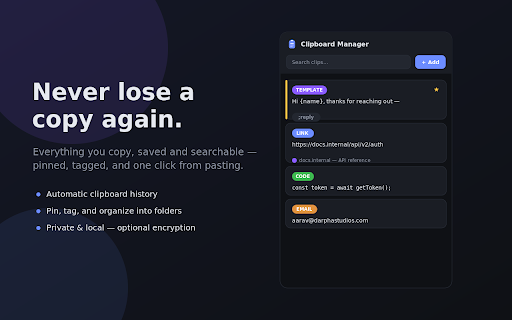
Screenshots


About
Ever copied something important, copied one more thing, and lost the first? Clipboard Manager remembers everything you copy so you never have to.

It quietly saves the text (and images) you copy on any page into a searchable history you actually control — pin the things you reuse, tag and file them into folders, and paste them back anywhere in one click. Everything stays on your own computer.

WHY YOU'LL WANT IT


Never lose a copy again. Your clipboard history is captured automatically, so that link, code snippet, or paragraph you copied ten minutes ago is still one search away.
Paste faster, everywhere. Open a searchable quick-paste picker right on the page (Ctrl/Cmd+Shift+Space) and drop the right snippet into any field without breaking your flow. Assign your most-used clips to Ctrl/Cmd+Shift+1–9 for instant paste.
Stop retyping the same things. Turn any clip into a snippet with a short trigger like ";sig" or ";addr" — type the trigger in any text box and it expands instantly. Add {placeholders} to fill in names or dates on the fly.
Actually organized. Pin favorites so they never scroll away, group clips into folders, tag them, and open a full-page library built for large collections with filters, sorting, and bulk actions.
Private by design. Everything is stored locally on your browser — nothing is uploaded or synced anywhere. Set a passcode and your clips are encrypted at rest (AES-GCM); while locked, the extension can't read them at all. A password-field guard skips anything you copy from password inputs, card-number protection can skip or mask credit-card-like numbers, and you can disable capture entirely on sites you choose (your bank, webmail, etc.).


KEY FEATURES


Automatic capture of copied text, plus copied images
Instant search across your history, including where a clip came from
Pin / favorite important clips (never auto-deleted)
Folders and tags, with a filterable full-page library and bulk actions
Smart type detection — links, emails, code, colors, phone numbers — with a one-click "open link"
Templates with fill-in placeholders
Snippet expansion: type a trigger, get the full text
Quick-paste overlay and pinned-slot keyboard shortcuts
Save the current selection to your history with a shortcut or right-click
Character/word counts, "copied N times", and source page for every clip
Optional passcode with real encryption at rest
Password-field guard, card-number masking, and per-site exclusions
Auto-expiry to keep history tidy, plus JSON export/import for backups
Light and dark themes, all offline


PRIVACY

No accounts. No servers. No tracking. Your clips live only in this browser's local storage, and are encrypted when you set a passcode. Uninstalling removes them.

Install Clipboard Manager and give your copy-paste a memory.
Technical
- Version
- 1.1.0
- Manifest
- V3
- Size
- 44.08KiB
- Min Chrome
- 88
- Languages
- 1
- Featured
- No
Metadata
- ID
- iejlpmlhnnbnjflommhonmpkkadnlhah
- Developer ID
- u594107659675cc763fdbe79a0502c1ad
- Developer Email
- [email protected]
- Created
- Jul 5, 2026
- Last Updated (Store)
- Jul 5, 2026
- Last Scraped
- Jul 6, 2026
- Website
- —
- Support URL
- —
Data sourced from the Chrome Web Store · last verified Jul 6, 2026.