
SQLite Reader
Easily browse, edit and manage SQLite database inside your browser!
As of June 2026, SQLite Reader has 3,000 users and a 2.88/5 rating from 8 reviews in the Productivity category.
Usersno change0%
3.0K
3,000
Ratingno change0%
2.88
8 reviews
Reviewsno change0%
8
Version
0.1.6
Manifest V3
Permissions & access
- Permissions
- storagecontextMenus
- Host access
- None declared
Screenshots



About
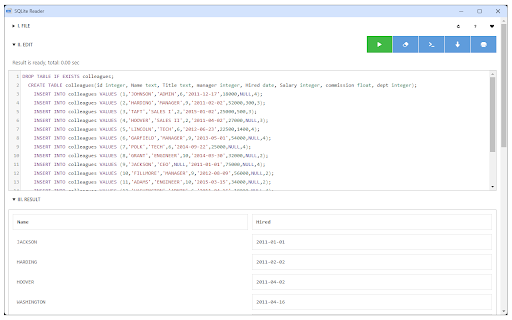
SQLite Reader is an extension that helps you easily browse, edit and render SQLite databases.

You can execute any SQLite command that you would like (SQL and SQLite have many differences but SQLite has most of the SQL standard). This add-on uses SQLite library which is compiled from C language to JavaScript with Emscripten compiler. Emscripten is a source-to-source compiler that can compile native C/C++ codes to JavaScript language.

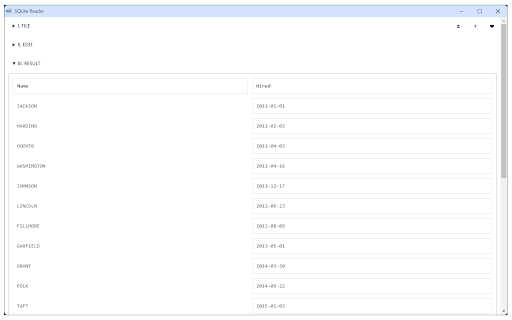
To work with this add-on, just open the app UI and drag an SQLite file to the designated area in the app (top section). Once the SQLite is fully loaded, you will see the commands in the text area (middle section) within the UI. Simply add/edit the code and then click on the - Execute SQLite - button at the top left corner (the green button). Please note that executing any command may take some time depending on the SQLite database size. The result is rendered in the result section (section III) within the app UI. You can also save the database by pressing the - Save Database - button at the top. Moreover, there is also a button to insert a "sample" SQLite code. Simply press this button and then click on the - Execute SQLite - button to see the results.

Note 1: since this add-on runs SQLite commands within the browser, it runs slower than the native SQLite application/library. However, using it is very easy compared to the native SQLite application. Please note that, for a very large SQLite database, you still need the native application. This add-on is only suitable for a reasonable database size.

Note 2: this add-on is still in beta and may work as expected. Please report your bugs or any feature request via addon's homepage (https://mybrowseraddon.com/sql-reader.html), bug report form.
Technical
- Version
- 0.1.6
- Manifest
- V3
- Size
- 535KiB
- Min Chrome
- 88
- Languages
- 1
- Featured
- No
Metadata
- ID
- iefihcnlpcaplfbklakcbcbngfangjeg
- Developer ID
- u71792319a8099b50ea26847bc7c06a55
- Developer Email
- [email protected]
- Created
- Aug 5, 2018
- Last Updated (Store)
- Jan 22, 2026
- Last Scraped
- Jun 10, 2026
- Website
- —
- Support URL
- https://mybrowseraddon.com/sql-reader.html
- Privacy Policy
- —
Similar extensions
Alternatives to SQLite Reader, ranked by description similarity.

SQLite Manager
Chrome extension for managing SQLite databases
42

SQLite Database Explorer
Browse and manage SQLite databases effortlessly.
11

DBine
Collaborative SQLite & CSV viewer. Open, query, and edit databases in your browser sidebar with real-time P2P collaboration.
3
★ 5.0

Text Editor
A free, highly customizable text and code editor extension for your browser.
30.0K
★ 4.0

Audio Converter
Convert any audio file to selected formats (i.e. mp3) inside your browser!
10.0K
★ 3.3

SQL Query Generator
Free offline tool to generate SQL queries from a Chrome extension.
70

Shi.Bi
Command Shì'Bì maid to automate the browser from any webpage with JSON, which compatible with Chrome DevTools Recorder recordings.
2

ZIP Reader
View & extract any zip file via an easy-to-use UI right in your browser!
10.0K
★ 3.8
Data sourced from the Chrome Web Store · last verified Jun 10, 2026.