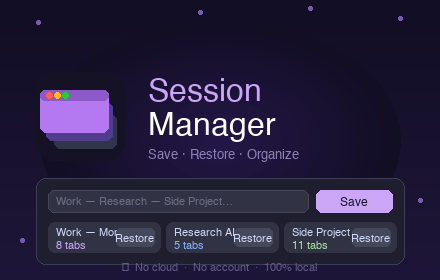
Session Manager
Save and restore tab sessions locally.
As of June 2026, Session Manager has — users in the Productivity category.
Usersno change0%
—
—
Ratingno change0%
—
— reviews
Reviewsno change0%
—
Version
2.1
Manifest V3
90-day change · In the last 90 days this extension 1 version update.
History
2 snapshotsTracking since Jun 2, 2026.
Not enough history yet for this metric — the chart fills in as we collect more snapshots.
View as table
| Date | Users | Rating | Reviews | Version |
|---|---|---|---|---|
| Jun 2, 2026 | — | — | — | 2.0 |
| Jun 8, 2026 | — | — | — | 2.0 |
| Now | — | — | — | 2.1 |
Changelog
- Jun 8, 2026description
Session Manager lets you save and restore groups of tabs in one click, directly from your browser — no sign-in, no server, everything stays on your device.

Features:

-Save all open tabs in the current window under a custom name
-Restore a session in a new window or in your current one
-Rename sessions inline
-Preview the list of tabs in a session before restoring
-Delete sessions you no longer need
-Export all your sessions to a JSON file for backup
-Import sessions from a JSON file
-Keyboard shortcut: Alt+S to open the popup instantly
-Privacy first
-Session Manager stores everything locally using your browser's built-in storage. -No data is ever sent to any server. No analytics, no tracking, no account required.

Supported languages:
English, French, Spanish, German, Portuguese — the interface automatically matches your browser language.
Save, restore & organize Chrome tab sessions locally. No account. No cloud. No data loss. Ever.

Most tab managers sync to servers you don't control — and users lose everything when that sync fails. Session Manager takes the opposite approach: your tabs stay on your device, always.

🔒 PRIVATE BY DESIGN

• No account or sign-in required
• No external server — ever
• No analytics, no tracking
• Only 2 permissions: tabs + storage
• Your data is yours — export it anytime as JSON

⚡ FEATURES

• Save all open tabs in one click under a custom name
• Restore a session in a new window or your current one
• Preview the list of tabs in a session before restoring
• Rename sessions inline — press Enter to confirm
• Delete sessions you no longer need
• Export all sessions to a JSON file for backup
• Import sessions from a JSON file
• Keyboard shortcut: Alt+S to open the popup instantly

🌍 AVAILABLE IN 5 LANGUAGES

English, French, Spanish, German, Portuguese.
The interface automatically matches your browser language.

💡 WHY CHOOSE SESSION MANAGER?

Other extensions have trained users to expect data loss:
cloud syncs that randomly wipe sessions, reinstalls that
delete everything, mandatory accounts just to save tabs.

Session Manager was built with a simple guarantee:
if it's saved, it stays saved — because nothing leaves
your device in the first place.
Permissions & access
- Permissions
- tabsstorage
- Host access
- None declared
Screenshots


About
Save, restore & organize Chrome tab sessions locally. No account. No cloud. No data loss. Ever.

Most tab managers sync to servers you don't control — and users lose everything when that sync fails. Session Manager takes the opposite approach: your tabs stay on your device, always.

🔒 PRIVATE BY DESIGN

• No account or sign-in required
• No external server — ever
• No analytics, no tracking
• Only 2 permissions: tabs + storage
• Your data is yours — export it anytime as JSON

⚡ FEATURES

• Save all open tabs in one click under a custom name
• Restore a session in a new window or your current one
• Preview the list of tabs in a session before restoring
• Rename sessions inline — press Enter to confirm
• Delete sessions you no longer need
• Export all sessions to a JSON file for backup
• Import sessions from a JSON file
• Keyboard shortcut: Alt+S to open the popup instantly

🌍 AVAILABLE IN 5 LANGUAGES

English, French, Spanish, German, Portuguese.
The interface automatically matches your browser language.

💡 WHY CHOOSE SESSION MANAGER?

Other extensions have trained users to expect data loss:
cloud syncs that randomly wipe sessions, reinstalls that
delete everything, mandatory accounts just to save tabs.

Session Manager was built with a simple guarantee:
if it's saved, it stays saved — because nothing leaves
your device in the first place.
Technical
- Version
- 2.1
- Manifest
- V3
- Size
- 35.97KiB
- Min Chrome
- 88
- Languages
- 4
- Featured
- No
Metadata
- ID
- idocldnhehbcnhplfikdapjiodnohjhd
- Developer ID
- u1605fc34bb512a44dfbb8aa507b5c4f8
- Developer Email
- [email protected]
- Created
- Jun 1, 2026
- Last Updated (Store)
- Jun 6, 2026
- Last Scraped
- Jun 8, 2026
- Website
- tabsuspender.app
- Support URL
- —
Data sourced from the Chrome Web Store · last verified Jun 8, 2026.