
Ovamai AI Assistant
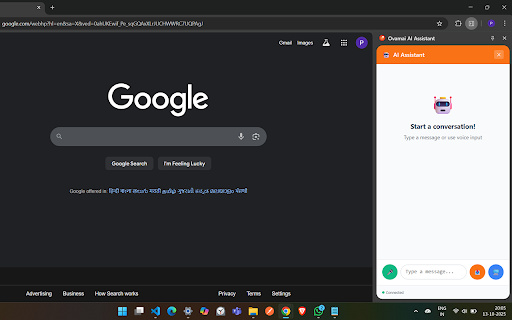
AI assistant with voice, text, and screen sharing capabilities
As of June 2026, Ovamai AI Assistant has 14 users in the Developer Tools category.
Usersup 27.3 percent+27.3%
14
14
Ratingno change0%
—
— reviews
Reviewsno change0%
—
Version
1.0.0
Manifest V3
History
5 snapshotsTracking since Apr 17, 2026.
View as table
| Date | Users | Rating | Reviews | Version |
|---|---|---|---|---|
| Apr 17, 2026 | 11 | — | — | 1.0.0 |
| Apr 27, 2026 | 14 | — | — | 1.0.0 |
| May 9, 2026 | 13 | — | — | 1.0.0 |
| May 21, 2026 | 20 | — | — | 1.0.0 |
| Jun 4, 2026 | 19 | — | — | 1.0.0 |
| Now | 14 | — | — | 1.0.0 |
Permissions & access
- Permissions
- activeTabstoragesidePanelscripting
- Host access
- <all_urls>
Screenshots
About
OvamAI Side Panel makes your browsing smarter and more productive. It lets you talk or type to an AI assistant, capture your screen instantly, and get answers without leaving the page.

Why Install OvamAI Side Panel?
Seamless AI Assistance: Chat or speak to AI while browsing—no need to switch tabs or apps.
Screen Capture Made Easy: Take screenshots anytime from any website with a single click. Perfect for work, research, or saving ideas.
One-Time Setup: Allow screen sharing once, and you’re ready to capture instantly—no repeated permissions needed.
Works Everywhere: Compatible with Gmail, ChatGPT, LinkedIn, and any other website you use.
Boost Productivity: Combine AI answers and screen captures to quickly complete tasks, collect information, or document important content.
Privacy First: Screen and microphone access are used only when the extension is active.

How It Works:
Open the side panel and approve screen sharing one time.
Send text or voice messages to interact with AI.
Capture screenshots automatically during interactions or manually when needed.
Close the side panel to stop screen sharing and keep your data private.

OvamAI Side Panel is perfect for anyone who wants an AI assistant and screen capture tool directly in their browser, making browsing smarter, faster, and more efficient.
Technical
- Version
- 1.0.0
- Manifest
- V3
- Size
- 45.98KiB
- Min Chrome
- 88
- Languages
- 1
- Featured
- No
Metadata
- ID
- idjnljpecagpjnoejcidfmlahaemcooe
- Developer ID
- uf653a5e09367291d1f5c79ff79ebdbfa
- Developer Email
- [email protected]
- Created
- Oct 28, 2025
- Last Updated (Store)
- Oct 28, 2025
- Last Scraped
- Jun 4, 2026
- Website
- —
- Support URL
- —
- Privacy Policy
- https://ovam.ai/privacypolicy
Similar extensions
Alternatives to Ovamai AI Assistant, ranked by description similarity.

AI Chat - Your pocket AI assistant
AI Chat is a fast, lightweight, and powerful Google Chrome extension designed to put artificial intelligence exactly where you work…
8
★ 5.0

AI Chatbot
AI Chatbot Side Panel - Gemini & ChatGPT
Unlock the power of AI-driven conversations right in your browser with our AI Chatbot…
10

MaxAiChat
AI-powered chatbot with voice, TTS, and on-page content scraping for context-aware answers. Works with OpenAI-compatible APIs.
21

Shot2Prompt - Free Full Page Capture to AI Prompts
Capture full page screenshots and generate detailed UI descriptions with AI
33
★ 5.0

Orian (Ollama WebUI)
Quick access to your favorite local LLM from your browser (Ollama).
1.0K
★ 3.1

Promptify
Get access to all AI models at one time.
22

Promptify
Get access to all AI models at one time.
—

Aion: Gemini AI Studio Workflow Optimizer
Screenshot and batch upload to AI
62
★ 5.0
Data sourced from the Chrome Web Store · last verified Jun 4, 2026.