CleanADS
Pick and hide page elements. Per-site rules, multi-select.
As of June 2026, CleanADS has 2 users in the Productivity category.
Usersno change0%
2
2
Ratingno change0%
—
— reviews
Reviewsno change0%
—
Version
1.2.4
Manifest V3
History
3 snapshotsTracking since May 29, 2026.
View as table
| Date | Users | Rating | Reviews | Version |
|---|---|---|---|---|
| May 29, 2026 | — | — | — | 1.2.4 |
| Jun 4, 2026 | — | — | — | 1.2.4 |
| Jun 10, 2026 | 1 | — | — | 1.2.4 |
| Now | 2 | — | — | 1.2.4 |
Permissions & access
- Permissions
- storageactiveTabscripting
- Host access
- None declared
Screenshots

About
# CleanADS — Chrome 网上应用店产品详情

> 复制对应语言区块到 [开发者后台](https://chrome.google.com/webstore/devconsole) 的商店信息中。
> 简短说明上限 **132 个字符**(中英文分别计算)。

---

## 中文(zh-CN)

### 扩展名称
CleanADS — 网页元素屏蔽

### 简短说明(≤132 字)
点选即可隐藏网页广告、弹窗与干扰区块;支持多选,按网站保存规则,刷新后自动生效。

### 详细说明

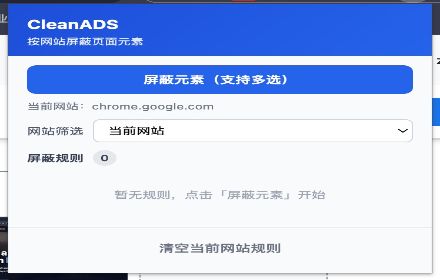
**CleanADS** 让你像「点哪里藏哪里」一样,自定义屏蔽网页上任何碍眼的元素——广告横幅、侧边栏、弹窗、推荐流,无需懂 CSS,也无需维护庞大规则库。

#### 核心功能

- **可视化点选**:进入选择模式后,悬停即可预览高亮,点击将元素加入屏蔽列表
- **多选一次完成**:可连续点选多个区域,按 Enter 或「完成屏蔽」一次性保存
- **按网站独立管理**:规则按域名保存,A 站的设置不会影响 B 站
- **刷新仍然有效**:再次打开同一网站时,自动应用已保存规则
- **规则可管控**:在弹窗中查看、启用、禁用或删除单条规则;支持按「当前网站 / 全部网站」筛选
- **稳定高亮**:采用浮层标注,避免悬停闪烁、难以点中的问题

#### 使用步骤

1. 打开需要清理的网页
2. 点击扩展图标 → **屏蔽元素(支持多选)**
3. 依次点击要隐藏的区域(绿色框表示已选)
4. 点击 **完成屏蔽** 或按 **Enter**;按 **Esc** 可取消
5. 在弹窗中随时管理、清空当前网站的规则

#### 隐私说明

- 屏蔽规则仅保存在浏览器本地(`chrome.storage`)
- 不上传、不出售任何个人数据
- 仅在您主动点击「屏蔽元素」时与当前页面交互

#### 适用场景

- 去掉固定广告位、悬浮按钮、登录遮罩
- 精简新闻站 / 论坛 / 后台系统中无关模块
- 为常用网站打造更干净的阅读与工作环境

---

## English (en)

### Extension name
CleanADS — Hide Page Elements

### Short description (≤132 characters)
Click to hide ads, pop-ups & clutter. Multi-select, per-site rules, persists after refresh. No CSS needed.

### Detailed description

**CleanADS** lets you hide anything distracting on a webpage—ad banners, sidebars, pop-ups, recommendation feeds—by simply pointing and clicking. No CSS knowledge required, and no massive filter lists to maintain.

#### Key features

- **Visual element picker**: Hover to preview a highlight, click to add elements to your block list
- **Multi-select workflow**: Pick several areas in one session, then press **Enter** or **Finish** to save all at once
- **Per-site rule sets**: Rules are stored by hostname—settings on Site A never affect Site B
- **Persistent after reload**: Saved rules apply automatically whenever you revisit the same site
- **Full rule management**: View, enable, disable, or delete rules from the popup; filter by current site or all sites
- **Stable highlighting**: Overlay-based outlines prevent flicker and hard-to-click targets

#### How to use

1. Open the page you want to clean up
2. Click the extension icon → **Block elements (multi-select)**
3. Click each region you want to hide (green outline = selected)
4. Click **Finish** or press **Enter**; press **Esc** to cancel
5. Manage or clear rules for the current site anytime from the popup

#### Privacy

- Block rules are stored **locally** in your browser only (`chrome.storage`)
- No personal data is uploaded or sold
- The extension interacts with a page only when you start the element picker

#### Great for

- Removing fixed ad slots, floating buttons, and login overlays
- Simplifying news sites, forums, and admin dashboards
- Building a cleaner reading or work experience on sites you use daily

---

## 审核用 — 权限说明 / Permission justification

### 中文
本扩展需要访问网页内容权限,以便在用户主动启动「屏蔽元素」时高亮并生成选择器,并将隐藏样式应用到当前页面。`storage` 用于在本地保存各网站的屏蔽规则。我们不会收集或上传用户数据。

### English
Host access is required only to highlight elements, generate CSS selectors, and apply hide rules when the user explicitly starts the element picker. `storage` keeps per-site block rules on the device. We do not collect or transmit user data.

---

## 分类建议 / Suggested category

| 语言 | 建议 |
|------|------|
| 中文 | 生产力 |
| English | Productivity |

---

## 版本更新说明模板 / Release notes template

### v1.0.0 — 中文
- 首次发布:可视化点选屏蔽、多选、按网站管理规则、刷新后自动生效

### v1.0.0 — English
- Initial release: visual element picker, multi-select, per-site rules, auto-apply on revisit
Technical
- Version
- 1.2.4
- Manifest
- V3
- Size
- 813KiB
- Min Chrome
- 88
- Languages
- 2
- Featured
- No
Metadata
- ID
- idjbngjjekaojjchhlncgldhccohekoh
- Developer ID
- u1da0fad077db35e3eb4d1975c960e1d6
- Developer Email
- [email protected]
- Created
- May 28, 2026
- Last Updated (Store)
- May 28, 2026
- Last Scraped
- Jun 10, 2026
- Website
- —
- Support URL
- —
- Privacy Policy
- —
Data sourced from the Chrome Web Store · last verified Jun 10, 2026.