
Font Changer Extension
Assist Neurodivergent individuals with accessibility
As of May 2026, Font Changer Extension has 1,000 users and a 2.29/5 rating from 7 reviews in the Accessibility category.
Usersup 13.4 percent+13.4%
1.0K
1,000
Ratingdown 18.2 percent−18.2%
2.29
7 reviews
Reviewsup 40.0 percent+40.0%
7
Version
0.1.0
Manifest V3
History
2 snapshotsTracking since Apr 28, 2026.
View as table
| Date | Users | Rating | Reviews | Version |
|---|---|---|---|---|
| Apr 28, 2026 | 882 | 2.80 | 5 | 0.1.0 |
| May 25, 2026 | 1.0K | 2.50 | 6 | 0.1.0 |
| Now | 1.0K | 2.29 | 7 | 0.1.0 |
Permissions & access
- Permissions
- None declared
- Host access
- None declared
Screenshots


About
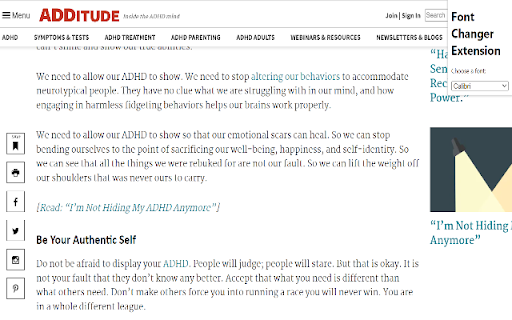
The Font Changer Extension is a tool that helps neurodivergent individuals improve accessibility on the web by allowing them to change the font formatting on any webpage. With a simple drop-down menu, you can choose from three specially designed fonts that are known to be more readable and easier on the eyes for those with dyslexia or other learning differences.

To use the extension, simply install it from the Chrome Web Store and click the extension icon in your browser's toolbar. A menu will appear with a list of available fonts to choose from. Simply select the font you want to use and the extension will automatically apply it to the webpage you are currently viewing. It's that easy!

To download the fonts to your computer, follow these steps:

Download the Font Changer Extension from the Chrome Web Store.

Ensure that each of the three fonts: OpenDyslexic, Calibri, and Arial Unicode MS are downloaded on your computer. I have included the URL for OpenDyslexic (https://opendyslexic.org/), feel free to download the others from any font download site you prefer, I have added sites for each.

https://freefontsdownload.net/free-arial-unicode-ms-font-36926.htm
https://freefontsvault.com/calibri-font-download-free/

For Windows type, "Font" into your search bar, and go into Font Settings. Then drag and drop the unzipped fonts to add them.

Once the fonts are installed, you can use them in any application on your computer, not just in the Font Changer Extension.

We hope you find the Font Changer Extension to be a useful tool for improving accessibility on the web. If you have any feedback or suggestions, please don't hesitate to let me know.
Technical
- Version
- 0.1.0
- Manifest
- V3
- Size
- 5.73KiB
- Min Chrome
- 88
- Languages
- 1
- Featured
- Yes
Metadata
- ID
- idjbljfkdcokcilnfknjejbbhnbclfmb
- Developer ID
- u1d200655afc26255b187263200c31dbc
- Developer Email
- [email protected]
- Created
- Dec 25, 2022
- Last Updated (Store)
- Dec 25, 2022
- Last Scraped
- May 25, 2026
- Website
- —
- Support URL
- —
- Privacy Policy
- —
Similar extensions
Alternatives to Font Changer Extension, ranked by description similarity.

Dyslexia Font Switcher
Switch any website's font to dyslexia-friendly fonts for better readability
4

custem Font Changer
Change fonts on various platforms
583
★ 5.0

The Dyslexicator
The Dyslexicator sets the font of a page to OpenDyslectic.
60

Font Changer
Change website fonts to any locally installed font or upload custom fonts
116
★ 3.0

Dyslexia Friendly
Increases readability of websites by changing to easier-to-read fonts and adding visual enhancements
10.0K
★ 4.3

Advanced Font Changer
Change the font of any website without altering its formatting.
10.0K
★ 4.4

Website Accessibility Helper by Ensquire
Make websites easier to read and navigate based on your needs. We support Color Blindess, Dyslexia, Vision Impairment, and more.
56
★ 5.0

Website Font Changer
Applies a selected Google Font to the current webpage.
29
★ 5.0
Data sourced from the Chrome Web Store · last verified May 25, 2026.