
AB Tasty Debugger
Debug A/B tests from AB Tasty. Open source.
As of June 2026, AB Tasty Debugger has 962 users and a 5.00/5 rating from 1 reviews in the Developer Tools category.
Usersup 3.6 percent+3.6%
962
962
Ratingno change0%
5.00
1 reviews
Reviewsno change0%
1
Version
1.6.0
Manifest V3
History
5 snapshotsTracking since Apr 17, 2026.
View as table
| Date | Users | Rating | Reviews | Version |
|---|---|---|---|---|
| Apr 17, 2026 | 929 | 5.00 | 1 | 1.6.0 |
| Apr 27, 2026 | 927 | 5.00 | 1 | 1.6.0 |
| May 7, 2026 | 942 | 5.00 | 1 | 1.6.0 |
| May 14, 2026 | 945 | 5.00 | 1 | 1.6.0 |
| May 23, 2026 | 938 | 5.00 | 1 | 1.6.0 |
| Now | 962 | 5.00 | 1 | 1.6.0 |
Permissions & access
- Permissions
- activeTab
- Host access
- None declared
Screenshots


About
Browser extension that simplifies the debugging of A/B tests from AB Tasty and adds useful informations.

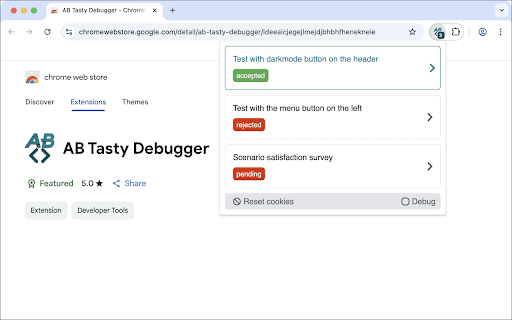
Display A/B tests available on the current page and detail their informations such as variations and trackings and targetings. For example, if a test does not display, the extension displays the current variation and invalid targets.

Features:

- Dark mode compatible (user preference media feature).
- Displays a badge with the number of A / B tests found on the current page.
- Displays a list of all A/B tests available on the current page with their status.
- The list of A/B tests is sorted to show the accepted tests at the top of the list.
- Displays a clear AB Tasty cookies button to clear AB Tasty cookies and reload the page.
- Displays a debug mode button to activate AB Tasty logs in the DevTools console.
- Displays a detail view of each tests with their general informations (ID, status, type, targeting mode, async, traffic).
- Displays a link to see the test report.
- List all variations of the test if the status is `accepted` or `traffic_rejected`, with their name, traffic, a link of JSON modifications and activation button.
- List all trackings information of the test with their name and selector.
- List all targeting information of the test (segment, trigger, URL, code, selector, cookie, IP) with their status.
- Displays a link to edit the test targetings on the AB Tasty editor.
- The list of targeting is sorted to show the invalid targets at the top of the list.
- Collapse/expand all variations, trackings and targetings information.
Technical
- Version
- 1.6.0
- Manifest
- V3
- Size
- 63.33KiB
- Min Chrome
- 88
- Languages
- 1
- Featured
- No
Metadata
- ID
- ideeaicjegejlmejdjbhbhfhenekneie
- Developer ID
- u4ecb4357df08711a0904b901a32c4ee1
- Developer Email
- [email protected]
- Created
- Mar 15, 2021
- Last Updated (Store)
- Nov 19, 2025
- Last Scraped
- Jun 5, 2026
- Website
- —
- Privacy Policy
- —
Similar extensions
Alternatives to AB Tasty Debugger, ranked by description similarity.

AB TESTING TOOL
Simple extension for displaying the optimizely data
15

Webtrends Optimize Editing Tools
The official extension for Webtrends Optimize. Build AB tests and personalise using our WYSIWYG editor and this Extension.
478
★ 5.0

ABConvert Helper
Detect and monitor ABConvert A/B testing script presence on Shopify stores
12
Adobe Target Activity Inspector
Detect and understand Adobe Target activities (at.js & Alloy.js) with real activity names and response tokens.
116

CRO Toolbox
A/B switcher, Datalayer reader, test analyser, MDE calculator & SRM checker for Convert.com, VWO, Varify, Kameleoon, Optimizely
165
★ 5.0

QA Test Case Helper
A professional tool for QA engineers that highlights testable elements and suggests comprehensive test cases
171
★ 4.0

Cookie Editor
View and edit cookies on the current website
34

InlineMedia
Browser Extension for the Inline Media Platform
26
Data sourced from the Chrome Web Store · last verified Jun 5, 2026.