SPHIOR Auth Sync

Sync logged-in session (cookies/headers) to SPHIOR for Enterprise authenticated DAST scanning.

As of June 2026, SPHIOR Auth Sync has 1 users in the Productivity category.

Usersno change0%
1
1
Ratingno change0%
— reviews
Reviewsno change0%
Version
0.7.1
Manifest V3
90-day change · In the last 90 days this extension 1 version update.

History

3 snapshots

Tracking since May 12, 2026.

1.011610.9884May 12, 2026Jun 18, 2026
View as table
DateUsersRatingReviewsVersion
May 12, 20260.7.0
May 24, 20260.7.0
May 30, 202610.7.0
Now10.7.1

Changelog

  • May 30, 2026
    description
    Sync your browser session to STLUR for Enterprise authenticated DAST security scanning — without ever exposing your
       password.                                                                                                         
                                                                                                                         
      HOW IT WORKS                                                                                                     
      ━━━━━━━━━━━━                                                                                                       
      1. Generate a one-time pairing code from your STLUR Enterprise dashboard                                         
      2. Open your target website in Chrome and log in as you normally would                                             
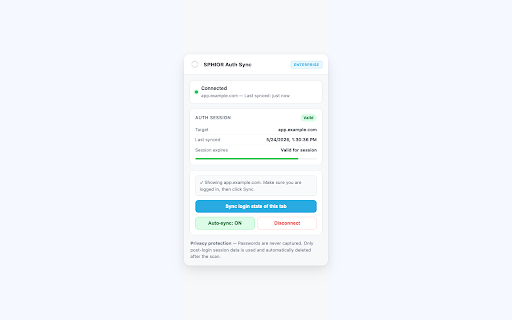
      3. Click "Sync" — your post-login session is encrypted and sent to STLUR                                         
      4. STLUR runs an authenticated security scan and delivers a full audit report
                                                                                                                         
      WHAT IT DOES                                                                                                       
      ━━━━━━━━━━━━                                                                                                       
      • Syncs your post-login session (cookies) to STLUR for authenticated scanning                                      
      • Auto-syncs when cookies change on the monitored site (e.g. after login)                                        
      • Alerts you before your session expires so scans don't fail mid-run                                               
      • Supports one active scan target per pairing session                                                            
                                                                                                                         
      WHY THESE PERMISSIONS ARE NEEDED                                                                                   
      ━━━━━━━━━━━━━━━━━━━━━━━━━━━━━━━━                                                                                   
      • cookies — to read post-login session cookies from your target site for transmission to STLUR                     
      • activeTab — to detect which site is currently open so the correct session is synced                              
      • storage — to persist your pairing token and session metadata locally                                           
      • alarms — to periodically check whether a scan has been requested by the STLUR backend                            
                                                                                                                         
      Cookie access for your target domain is requested on demand (when you click Sync) and only for the domain you      
      explicitly choose.                                                                                                 
                                                                                                                         
      SECURITY & PRIVACY                                                                                                 
      ━━━━━━━━━━━━━━━━━━                                                                                                 
      • Your username and password are NEVER captured or transmitted                                                     
      • Only post-login session cookies are used — the same data your browser already holds                            
      • All session data is AES-GCM-256 encrypted client-side before leaving your device
      • Session data is automatically deleted from STLUR servers after each scan completes
      • No browsing history, form data, or credentials are ever accessed
                                                                                                                         
      REQUIREMENTS                                                                                                       
      ━━━━━━━━━━━━                                                                                                       
      • An active STLUR Enterprise plan — stlur.com                                                                      
      • Chrome on the device used for scanning                                                                           
                                                                                                                       
      SUPPORTED LANGUAGES
      ━━━━━━━━━━━━━━━━━━                                                                                                 
      English, Japanese, Spanish, French, German, Portuguese, Chinese
    Sync your browser session to SPHIOR for Enterprise authenticated DAST security scanning — without ever exposing your
       password.                                                                                                         
                                                                                                                         
      HOW IT WORKS                                                                                                     
      ━━━━━━━━━━━━                                                                                                       
      1. Generate a one-time pairing code from your SPHIOR Enterprise dashboard                                         
      2. Open your target website in Chrome and log in as you normally would                                             
      3. Click "Sync" — your post-login session is encrypted and sent to SPHIOR                                        
      4. SPHIOR runs an authenticated security scan and delivers a full audit report
                                                                                                                         
      WHAT IT DOES                                                                                                       
      ━━━━━━━━━━━━                                                                                                       
      • Syncs your post-login session (cookies) to SPHIOR for authenticated scanning                                      
      • Auto-syncs when cookies change on the monitored site (e.g. after login)                                        
      • Alerts you before your session expires so scans don't fail mid-run                                               
      • Supports one active scan target per pairing session                                                            
                                                                                                                         
      WHY THESE PERMISSIONS ARE NEEDED                                                                                   
      ━━━━━━━━━━━━━━━━━━━━━━━━━━━━━━━━                                                                                   
      • cookies — to read post-login session cookies from your target site for transmission to SPHIOR                     
      • activeTab — to detect which site is currently open so the correct session is synced                              
      • storage — to persist your pairing token and session metadata locally                                           
      • alarms — to periodically check whether a scan has been requested by the SPHIOR backend                            
                                                                                                                         
      Cookie access for your target domain is requested on demand (when you click Sync) and only for the domain you      
      explicitly choose.                                                                                                 
                                                                                                                         
      SECURITY & PRIVACY                                                                                                 
      ━━━━━━━━━━━━━━━━━━                                                                                                 
      • Your username and password are NEVER captured or transmitted                                                     
      • Only post-login session cookies are used — the same data your browser already holds                            
      • All session data is AES-GCM-256 encrypted client-side before leaving your device
      • Session data is automatically deleted from SPHIOR servers after each scan completes
      • No browsing history, form data, or credentials are ever accessed
                                                                                                                         
      REQUIREMENTS                                                                                                       
      ━━━━━━━━━━━━                                                                                                       
      • An active SPHIOR Enterprise plan — sphior.com                                                                      
      • Chrome on the device used for scanning                                                                           
                                                                                                                       
      SUPPORTED LANGUAGES
      ━━━━━━━━━━━━━━━━━━                                                                                                 
      English, Japanese, Spanish, French, German, Portuguese, Chinese
  • May 30, 2026
    short_description
    Sync logged-in session (cookies/headers) to Stlur for Enterprise authenticated DAST scanning.
    Sync logged-in session (cookies/headers) to SPHIOR for Enterprise authenticated DAST scanning.
  • May 30, 2026
    name
    Stlur Auth Sync
    SPHIOR Auth Sync

Permissions & access

Permissions
cookiesstorageactiveTabwindowsalarms
Host access
https://stlur-workers.astrta58.workers.dev/*

Screenshots

SPHIOR Auth Sync screenshot 1SPHIOR Auth Sync screenshot 2SPHIOR Auth Sync screenshot 3SPHIOR Auth Sync screenshot 4SPHIOR Auth Sync screenshot 5

About

Sync your browser session to SPHIOR for Enterprise authenticated DAST security scanning — without ever exposing your
   password.                                                                                                         
                                                                                                                     
  HOW IT WORKS                                                                                                     
  ━━━━━━━━━━━━                                                                                                       
  1. Generate a one-time pairing code from your SPHIOR Enterprise dashboard                                         
  2. Open your target website in Chrome and log in as you normally would                                             
  3. Click "Sync" — your post-login session is encrypted and sent to SPHIOR                                        
  4. SPHIOR runs an authenticated security scan and delivers a full audit report
                                                                                                                     
  WHAT IT DOES                                                                                                       
  ━━━━━━━━━━━━                                                                                                       
  • Syncs your post-login session (cookies) to SPHIOR for authenticated scanning                                      
  • Auto-syncs when cookies change on the monitored site (e.g. after login)                                        
  • Alerts you before your session expires so scans don't fail mid-run                                               
  • Supports one active scan target per pairing session                                                            
                                                                                                                     
  WHY THESE PERMISSIONS ARE NEEDED                                                                                   
  ━━━━━━━━━━━━━━━━━━━━━━━━━━━━━━━━                                                                                   
  • cookies — to read post-login session cookies from your target site for transmission to SPHIOR                     
  • activeTab — to detect which site is currently open so the correct session is synced                              
  • storage — to persist your pairing token and session metadata locally                                           
  • alarms — to periodically check whether a scan has been requested by the SPHIOR backend                            
                                                                                                                     
  Cookie access for your target domain is requested on demand (when you click Sync) and only for the domain you      
  explicitly choose.                                                                                                 
                                                                                                                     
  SECURITY & PRIVACY                                                                                                 
  ━━━━━━━━━━━━━━━━━━                                                                                                 
  • Your username and password are NEVER captured or transmitted                                                     
  • Only post-login session cookies are used — the same data your browser already holds                            
  • All session data is AES-GCM-256 encrypted client-side before leaving your device
  • Session data is automatically deleted from SPHIOR servers after each scan completes
  • No browsing history, form data, or credentials are ever accessed
                                                                                                                     
  REQUIREMENTS                                                                                                       
  ━━━━━━━━━━━━                                                                                                       
  • An active SPHIOR Enterprise plan — sphior.com                                                                      
  • Chrome on the device used for scanning                                                                           
                                                                                                                   
  SUPPORTED LANGUAGES
  ━━━━━━━━━━━━━━━━━━                                                                                                 
  English, Japanese, Spanish, French, German, Portuguese, Chinese

Technical

Version
0.7.1
Manifest
V3
Size
45.67KiB
Min Chrome
88
Languages
5
Featured
No

Metadata

ID
idchlhlobaabnndjbfekmgppfonmdbbn
Developer ID
u327db32f5256828dffd8b14e91761fa5
Developer Email
[email protected]
Created
May 11, 2026
Last Updated (Store)
May 26, 2026
Last Scraped
Jun 18, 2026
Website
sphior.com
Support URL
sphior.com

Data sourced from the Chrome Web Store · last verified Jun 18, 2026.