
BuddyBar
Color palette manager for designers. Save, organize, and instantly access your brand colors while working in web-based design tools.
As of June 2026, BuddyBar has 63 users and a 5.00/5 rating from 2 reviews in the Productivity category.
Usersup 3.3 percent+3.3%
63
63
Ratingno change0%
5.00
2 reviews
Reviewsno change0%
2
Version
6.0.0
Manifest V3
90-day change · In the last 90 days this extension 1 version update, changed permissions.
History
9 snapshotsTracking since Apr 2, 2026.
View as table
| Date | Users | Rating | Reviews | Version |
|---|---|---|---|---|
| Apr 2, 2026 | 61 | 5.00 | 2 | 5.0.0 |
| Apr 17, 2026 | 60 | 5.00 | 2 | 6.0.0 |
| Apr 24, 2026 | 57 | 5.00 | 2 | 6.0.0 |
| May 2, 2026 | 54 | 5.00 | 2 | 6.0.0 |
| May 13, 2026 | 57 | 5.00 | 2 | 6.0.0 |
| May 19, 2026 | 54 | 5.00 | 2 | 6.0.0 |
| May 25, 2026 | 61 | 5.00 | 2 | 6.0.0 |
| Jun 1, 2026 | 64 | 5.00 | 2 | 6.0.0 |
| Jun 7, 2026 | 61 | 5.00 | 2 | 6.0.0 |
| Now | 63 | 5.00 | 2 | 6.0.0 |
Changelog
- Apr 2, 2026description
Here's the updated description:

BuddyBar is a color palette manager that keeps your brand colors within reach while you work.

Save unlimited color palettes, copy colors to your clipboard with one click, and stay consistent across all your design projects. BuddyBar appears as a floating toolbar on supported design sites, giving you instant access to your colors without switching tabs.

KEY FEATURES

• Unlimited color palettes with easy template switching
• One-click copy to clipboard in HEX format
• Eye dropper tool to pick colors directly from any webpage
• Extract colors from images by dragging them onto the bar
• Generate color schemes (complementary, analogous, triadic, and more)
• Accessibility checker with WCAG contrast ratings and one-click fixes
• Import and export palettes as .BuddyBar files
• Drag and drop to reorder your colors
• Light and dark mode support
• Keyboard shortcut (Alt+Shift+B) to show/hide the toolbar
• Syncs automatically with the BuddyBar desktop app for Mac and Windows. Edit colors on your desktop and see them instantly in Chrome

HOW IT WORKS

Install the extension and visit a supported design site
The BuddyBar toolbar appears automatically
Click any color swatch to copy it to your clipboard
Use the eye dropper to capture colors from your designs
Organize colors into templates for different projects
Visit https://buddybar.io/#supported-tools for the full list of supported sites and the BuddyBar desktop apps.

WHAT'S NEW IN v5.0

Image color extraction. Drag and drop any image onto the bar to pull out its dominant colors and save them as a new template.

Color scheme generator. Pick any color and generate complementary, analogous, triadic, split-complementary, or tetradic harmonies with one click.

Accessibility checker. Check contrast ratios for all your text and background color pairs against WCAG standards. Colors that don't pass get a one-click "Make Readable" fix.

Redesigned settings. Cleaner layout with categorized help sections and a "What's New" overview so you can find what you need faster.
Here's the updated description:

BuddyBar is a color palette manager that keeps your brand colors within reach while you work.

Save unlimited color palettes, copy colors to your clipboard with one click, and stay consistent across all your design projects. BuddyBar appears as a floating toolbar on supported design sites, giving you instant access to your colors without switching tabs.

KEY FEATURES

• Unlimited color palettes with easy template switching
• One-click copy to clipboard in HEX format
• Eye dropper tool to pick colors directly from any webpage
• Extract colors from images by dragging them onto the bar
• Generate color schemes (complementary, analogous, triadic, and more)
• Accessibility checker with WCAG contrast ratings and one-click fixes
• Import and export palettes as .BuddyBar files
• Drag and drop to reorder your colors
• Light and dark mode support
• Keyboard shortcut (Alt+Shift+B) to show/hide the toolbar
• Syncs automatically with the BuddyBar desktop app for Mac and Windows. Edit colors on your desktop and see them instantly in Chrome
• Lock individual colors to protect them from edits or deletion
• Lock entire templates to prevent any changes
• Shade ladders — generate a 10-stop tonal scale from any color
• Copy format presets — choose HEX, RGB, HSL, or CSS variable
• "Make This Usable" palette audit — detects near-duplicates, contrast issues, and suggests color roles

HOW IT WORKS

Install the extension and visit a supported design site
The BuddyBar toolbar appears automatically
Click any color swatch to copy it to your clipboard
Use the eye dropper to capture colors from your designs
Organize colors into templates for different projects
Visit https://buddybar.io/#supported-tools for the full list of supported sites and the BuddyBar desktop apps.

WHAT'S NEW IN v6.0

Color locking. Protect individual colors from accidental edits or deletion. Lock an entire template to freeze the whole palette.

Shade ladders. Generate a 10-stop tonal scale from any color, replacing Variations with a more useful tool.

Copy format presets. Choose between HEX, RGB, HSL, or CSS variable format when copying colors.

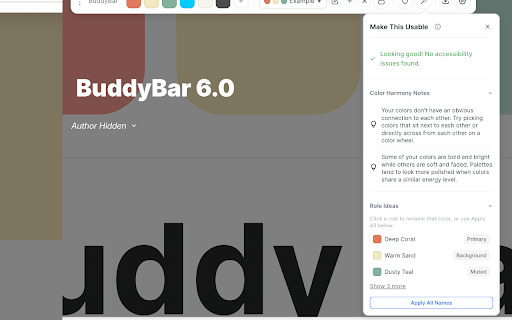
Make This Usable. One-click palette audit that detects near-duplicate colors, flags contrast issues, suggests color roles, and checks color harmony.

Readability auto-fix. Double-click any failing contrast pair to fix it instantly.

Dark mode polish and improved cross-platform sync reliability.
- Apr 2, 2026host_permissions
https://rise.articulate.com/*, https://www.figma.com/*, https://www.canva.com/*, https://*.office.com/*, https://*.sharepoint.com/*, https://docs.google.com/*, https://express.adobe.com/*, https://new.express.adobe.com/*, https://app.spline.design/file/*, https://framer.com/*, https://miro.com/*, https://www.notion.so/*, https://*.design.webflow.com/*, https://design.penpot.app/*
https://rise.articulate.com/*, https://www.figma.com/*, https://www.canva.com/*, https://*.office.com/*, https://*.sharepoint.com/*, https://docs.google.com/*, https://express.adobe.com/*, https://new.express.adobe.com/*, https://app.spline.design/file/*, https://framer.com/*, https://miro.com/*, https://www.notion.so/*, https://*.design.webflow.com/*, https://design.penpot.app/*, https://*.chameleoncreator.com/*
Permissions & access
- Permissions
- storageclipboardWriteactiveTabnativeMessagingalarms
- Host access
- https://rise.articulate.com/*, https://www.figma.com/*, https://www.canva.com/*, https://*.office.com/*, https://*.sharepoint.com/*, https://docs.google.com/*, https://express.adobe.com/*, https://new.express.adobe.com/*, https://app.spline.design/file/*, https://framer.com/*, https://miro.com/*, https://www.notion.so/*, https://*.design.webflow.com/*, https://design.penpot.app/*, https://*.chameleoncreator.com/*
Screenshots




About
Here's the updated description:

BuddyBar is a color palette manager that keeps your brand colors within reach while you work.

Save unlimited color palettes, copy colors to your clipboard with one click, and stay consistent across all your design projects. BuddyBar appears as a floating toolbar on supported design sites, giving you instant access to your colors without switching tabs.

KEY FEATURES

• Unlimited color palettes with easy template switching
• One-click copy to clipboard in HEX format
• Eye dropper tool to pick colors directly from any webpage
• Extract colors from images by dragging them onto the bar
• Generate color schemes (complementary, analogous, triadic, and more)
• Accessibility checker with WCAG contrast ratings and one-click fixes
• Import and export palettes as .BuddyBar files
• Drag and drop to reorder your colors
• Light and dark mode support
• Keyboard shortcut (Alt+Shift+B) to show/hide the toolbar
• Syncs automatically with the BuddyBar desktop app for Mac and Windows. Edit colors on your desktop and see them instantly in Chrome
• Lock individual colors to protect them from edits or deletion
• Lock entire templates to prevent any changes
• Shade ladders — generate a 10-stop tonal scale from any color
• Copy format presets — choose HEX, RGB, HSL, or CSS variable
• "Make This Usable" palette audit — detects near-duplicates, contrast issues, and suggests color roles

HOW IT WORKS

Install the extension and visit a supported design site
The BuddyBar toolbar appears automatically
Click any color swatch to copy it to your clipboard
Use the eye dropper to capture colors from your designs
Organize colors into templates for different projects
Visit https://buddybar.io/#supported-tools for the full list of supported sites and the BuddyBar desktop apps.

WHAT'S NEW IN v6.0

Color locking. Protect individual colors from accidental edits or deletion. Lock an entire template to freeze the whole palette.

Shade ladders. Generate a 10-stop tonal scale from any color, replacing Variations with a more useful tool.

Copy format presets. Choose between HEX, RGB, HSL, or CSS variable format when copying colors.

Make This Usable. One-click palette audit that detects near-duplicate colors, flags contrast issues, suggests color roles, and checks color harmony.

Readability auto-fix. Double-click any failing contrast pair to fix it instantly.

Dark mode polish and improved cross-platform sync reliability.
Technical
- Version
- 6.0.0
- Manifest
- V3
- Size
- 69.96KiB
- Min Chrome
- 88
- Languages
- 1
- Featured
- No
Metadata
- ID
- idboomljaodehdgmkibchmkdfiaogjif
- Developer ID
- u13cc429d94c748383180ff56546d39a6
- Developer Email
- [email protected]
- Created
- Sep 18, 2025
- Last Updated (Store)
- Mar 30, 2026
- Last Scraped
- Jun 7, 2026
- Website
- https://buddybar.io/
- Support URL
- https://buddybar.io/support.html
- Privacy Policy
- https://www.ixcreations.com/privacy.html
Similar extensions
Alternatives to BuddyBar, ranked by description similarity.

Clip Mojo - Color Palette Manager
Professional color palette manager with eyedropper, color clipping, harmony generator, and WCAG contrast checker
154
★ 5.0

Color Picker – Eye Dropper & Palette Generator
Pick colors, generate palettes, export to JSON/CSS/ASE.
—

AI Color Palette Extractor
AI-powered color extraction from any webpage with one click
7
★ 5.0

Color Palette Generator
Quickly generate a six-colour palette from any image with a right-click.
8

Palette Snatcher - Instant Color & Font Scanner
Extract dominant colors, typography, and assets from any website in one click. Export to Figma, Tailwind CSS, and more.
7

Color Palette Generator
Extract and save color schemes from any webpage
1

Palette Pilot
PalettePilot - The ONE color picker extension you didn't know you needed!
1

Color Palette from Image
Use Color Palette from Image app to get color palette from image instantly. Palette generator from uploaded or web page images.
49
Data sourced from the Chrome Web Store · last verified Jun 7, 2026.