
Snap OTP
OTP authenticator for Chrome with QR import, capture, sync, and optional passphrase protection.
As of June 2026, Snap OTP has 6 users in the Privacy & Security category.
Usersno change0%
6
6
Ratingno change0%
—
— reviews
Reviewsno change0%
—
Version
0.1.2
Manifest V3
90-day change · In the last 90 days this extension 1 version update.
History
6 snapshotsTracking since Apr 21, 2026.
View as table
| Date | Users | Rating | Reviews | Version |
|---|---|---|---|---|
| Apr 21, 2026 | — | — | — | 0.1.0 |
| Apr 26, 2026 | — | — | — | 0.1.0 |
| May 9, 2026 | 3 | — | — | 0.1.2 |
| May 20, 2026 | 4 | — | — | 0.1.2 |
| Jun 2, 2026 | 5 | — | — | 0.1.2 |
| Jun 8, 2026 | 4 | — | — | 0.1.2 |
| Now | 6 | — | — | 0.1.2 |
Changelog
- Apr 26, 2026description
`Snap OTP is a lightweight Chrome extension for storing and generating time-based one-time passwords inside Chrome.

Add accounts from the settings page by uploading a QR image or pasting an otpauth:// URI, or capture a QR code directly from the current tab. The popup stays focused on quick daily use, while the settings page handles import, protection, backup, restore, and full account management. Saved entries appear in the popup, where you can view live 6-digit codes, copy the current code, rename entries, adjust marker colors, and reorder the list.

Snap OTP stores entries in Chrome extension storage so they can follow your signed-in Chrome profile. If you want extra protection, you can enable an optional passphrase that encrypts saved OTP entries and locks Snap OTP until you unlock it again. The settings page also supports backup export, merge-safe restore for entries and app preferences, and a confirmation step before deleting all saved entries.

QR decoding and TOTP generation happen locally on-device. Snap OTP does not run a backend service and does not send OTP secrets to developer-owned servers.

Important security note: in standard mode, OTP secrets are stored in chrome.storage.sync, which makes your Chrome profile and Google account part of your authenticator security boundary. Passphrase protection is optional and changes how saved entries are protected in storage, but it does not remove Chrome profile security from that boundary.`
Snap OTP is a lightweight Chrome extension for storing and generating time-based one-time passwords (TOTP) directly in Chrome.

Add accounts from the Settings page by uploading a QR image or pasting an otpauth:// link, or capture a QR code directly from the current tab. The popup stays focused on quick everyday use, while Settings handles import, passphrase protection, backup and restore, and full account management. Once an account is saved, you can view live 6-digit codes in the popup, copy the current code, rename entries, change marker colors, and reorder the list.

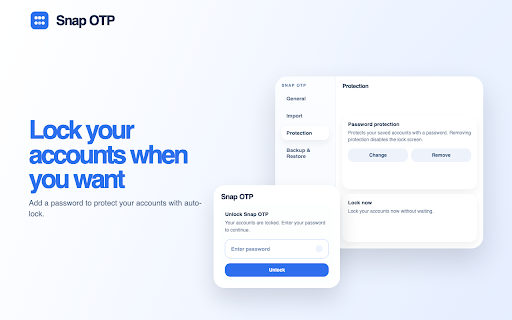
Snap OTP stores entries in Chrome extension storage so they can follow your signed-in Chrome profile. If you want extra protection, you can turn on an optional passphrase to encrypt saved entries and lock Snap OTP until you unlock it again. Settings also supports backup export, merge-safe restore for saved accounts and app preferences, and a confirmation step before deleting all saved accounts.

QR decoding and TOTP generation happen locally on your device. Snap OTP does not use a backend service and does not send OTP secrets to servers operated by the developer.

Important security note: in standard mode, OTP secrets are stored in chrome.storage.sync, which means your Chrome profile and Google account are part of your security boundary. Optional passphrase protection changes how saved entries are protected in storage, but it does not remove your Chrome profile from that boundary.
Permissions & access
- Permissions
- storageclipboardWriteactiveTabscriptingalarms
- Host access
- None declared
Screenshots



About
Snap OTP is a lightweight Chrome extension for storing and generating time-based one-time passwords (TOTP) directly in Chrome.

Add accounts from the Settings page by uploading a QR image or pasting an otpauth:// link, or capture a QR code directly from the current tab. The popup stays focused on quick everyday use, while Settings handles import, passphrase protection, backup and restore, and full account management. Once an account is saved, you can view live 6-digit codes in the popup, copy the current code, rename entries, change marker colors, and reorder the list.

Snap OTP stores entries in Chrome extension storage so they can follow your signed-in Chrome profile. If you want extra protection, you can turn on an optional passphrase to encrypt saved entries and lock Snap OTP until you unlock it again. Settings also supports backup export, merge-safe restore for saved accounts and app preferences, and a confirmation step before deleting all saved accounts.

QR decoding and TOTP generation happen locally on your device. Snap OTP does not use a backend service and does not send OTP secrets to servers operated by the developer.

Important security note: in standard mode, OTP secrets are stored in chrome.storage.sync, which means your Chrome profile and Google account are part of your security boundary. Optional passphrase protection changes how saved entries are protected in storage, but it does not remove your Chrome profile from that boundary.
Technical
- Version
- 0.1.2
- Manifest
- V3
- Size
- 1.78MiB
- Min Chrome
- 88
- Languages
- 1
- Featured
- No
Metadata
- ID
- iclpfjfhdnaoagflpgncjegpphfceeji
- Developer ID
- uc4b157fa458301deca50b127d8b43090
- Developer Email
- [email protected]
- Created
- Apr 20, 2026
- Last Updated (Store)
- Apr 23, 2026
- Last Scraped
- Jun 8, 2026
- Website
- —
- Privacy Policy
- https://junhyung-space.github.io/snapotp/privacy/
Data sourced from the Chrome Web Store · last verified Jun 8, 2026.