Share To Google Maps
This Chrome extension enables you to share any address available on any of the websites to Google map.
As of May 2026, Share To Google Maps has 653 users and a 5.00/5 rating from 1 reviews in the Workflow & Planning category.
Usersup 0.9 percent+0.9%
653
653
Ratingno change0%
5.00
1 reviews
Reviewsno change0%
1
Version
0.1
Manifest V3
History
2 snapshotsTracking since Apr 28, 2026.
View as table
| Date | Users | Rating | Reviews | Version |
|---|---|---|---|---|
| Apr 28, 2026 | 647 | 5.00 | 1 | 0.1 |
| May 25, 2026 | 654 | 5.00 | 1 | 0.1 |
| Now | 653 | 5.00 | 1 | 0.1 |
Permissions & access
- Permissions
- contextMenusnotificationsgcmstorage
- Host access
- None declared
Screenshots
About
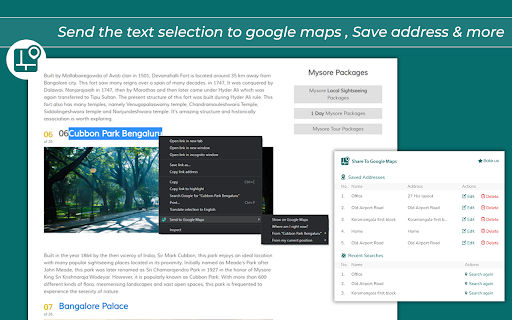
Share to Google Maps Chrome extension revolutionizes your browsing experience by seamlessly integrating web page addresses and locations with Google Maps. With this powerful extension, you can effortlessly share addresses or locations from web pages to Google Maps for quick navigation or further exploration. Discover a convenient and efficient way to access location information right from your browser.


Key Features:

>>Instant Address Integration: Easily share addresses or locations from web pages to Google Maps with a single click.

>>Effortless Navigation: Seamlessly transition from browsing to navigating, as your desired location opens directly in Google Maps.

>>Enhanced Exploration: Explore the surroundings of any location by effortlessly transferring it to Google Maps for further discovery.

>>Streamlined Workflow: Save time and effort by eliminating the need for manual copy-pasting or typing of addresses.


How to Use?

>>Install the Share to Google Maps Chrome extension from the Chrome Web Store.

>>Upon installation, the extension integrates seamlessly into your browser.

>>Browse the web and come across an address or location you want to explore on Google Maps.

>>Right-click on the address or location and select "Share to Google Maps" from the context menu.

>>Sit back and let the extension do the work! The selected address or location will open in Google Maps, ready for your exploration.


Upgrade your browsing experience with the Share to Google Maps Chrome extension today. Effortlessly integrate web page addresses and locations with Google Maps, making navigation and exploration a breeze. Simplify your workflow and discover a seamless way to access location information right from your browser.
Technical
- Version
- 0.1
- Manifest
- V3
- Size
- 194KiB
- Min Chrome
- 88
- Languages
- 1
- Featured
- No
Metadata
- ID
- icjhfpeapfckacmjgjnodoobdolbakdp
- Developer ID
- udfadbcfeec952e4f003ddae115696656
- Developer Email
- [email protected]
- Created
- May 31, 2023
- Last Updated (Store)
- May 31, 2023
- Last Scraped
- May 25, 2026
- Website
- —
- Support URL
- —
- Privacy Policy
- —
Similar extensions
Alternatives to Share To Google Maps, ranked by description similarity.

Maps Util
Maps Util
16
★ 5.0

G Maps Leads Finder - MapsLeads.net
Uncover valuable leads on Google Maps. Find business websites, phone, emails, and social media details with just a click.
2.0K
★ 1.4

QR Code Generator
Effortlessly generate QR codes for any webpage with a single click.
39
★ 5.0
Open via Google Maps
Open selected addresses in Google maps directly from the same page
6.0K
★ 4.4

Auto Google Meet: Open & Copy Links Instantly
One-click Google Meet link opener & copier. Instantly start a meeting and share the link!
4

MarkBook
MarkBook
23
★ 5.0

QRly
Elegant QR code generator with website favicon
—

Mapsted Chrome Extension
Invite and direct guests to your meeting with the click of a link.
6
Data sourced from the Chrome Web Store · last verified May 25, 2026.