
Operations: Command Center for Every New Tab
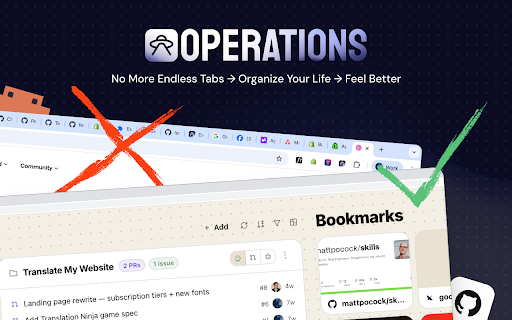
Replace your new tab with a personal dashboard: GitHub, projects, credentials, notes, and bookmarks.
As of June 2026, Operations: Command Center for Every New Tab has 81 users and a 5.00/5 rating from 4 reviews in the Productivity category.
Usersno change0%
81
81
Ratingno change0%
5.00
4 reviews
Reviewsno change0%
4
Version
0.1.5
Manifest V3
90-day change · In the last 90 days this extension 3 version updates, changed permissions.
History
9 snapshotsTracking since Apr 23, 2026.
View as table
| Date | Users | Rating | Reviews | Version |
|---|---|---|---|---|
| Apr 23, 2026 | — | — | — | 0.1.0 |
| Apr 28, 2026 | — | — | — | 0.1.0 |
| May 5, 2026 | 4 | — | — | 0.1.1 |
| May 11, 2026 | 5 | — | — | 0.1.1 |
| May 16, 2026 | 36 | 5.00 | 3 | 0.1.4 |
| May 22, 2026 | 68 | 5.00 | 3 | 0.1.4 |
| May 29, 2026 | 74 | 5.00 | 3 | 0.1.5 |
| Jun 5, 2026 | 72 | 5.00 | 4 | 0.1.5 |
| Jun 11, 2026 | 79 | 5.00 | 4 | 0.1.5 |
| Now | 81 | 5.00 | 4 | 0.1.5 |
Changelog
- May 22, 2026description
Operations replaces your browser's new-tab page with a personal dashboard for people who manage multiple projects in parallel — developers, product managers, founders, consultants, and agency leads.

Everything you open a new tab to check, grouped per project:

• GitHub — pull requests and issues across all your repositories, with assignee and review-requested filters
• Projects — cards grouping repos, live URLs, staging links, deploy targets (Vercel, Railway), and documentation
• Vault — API keys, tokens, and credentials, scoped per project and never sent anywhere
• Notes — project-scoped scratch space for the things you'd otherwise paste into Slack to yourself
• Bookmarks — your existing Chrome bookmarks, imported in one click. Pinned tiles for the things you open dozens of times a day, plus a searchable grid for the long tail
• Pomodoro — focus timer with custom blocks, your own sounds (built-in or uploaded), desktop notifications, and a rotating tip card during breaks
• Hydration — gentle glass-by-glass tracking against a daily goal, with optional streak counter
• Feed — a calm news rail above the footer: GitHub Trending, Claude Code, Shopify Dev, plus any Reddit communities you add. Archive what you've read; it doesn't come back.
• Todos — quick one-line tasks, project-scoped if you want. Open items sit at the top; ticked ones strike through and sink out of the way.

Why you might like it:

→ Per-project grouping. Stop hunting for "which repo was that PR in again?" — everything a project needs sits on one card.
→ Local-first. All data lives in your browser's local storage. Each Chrome profile is isolated. Nothing is synced to a cloud by default.
→ Full JSON export/import. Your data is yours — move it, back it up, or wipe it.
→ Five themes, including a serif "Field Manual" mode and a phosphor-cyan "Mission Control" mode for late-night sessions.
→ Built for keyboard-driven work. Fast to open, fast to scan, fast to dismiss.

Integrations:

GitHub (via your personal access token, stored locally — read-only)
Chrome bookmarks (one-time import, on-demand permission)
Operations is built by Studio N.O.P.E. — a Dutch design and engineering studio. Questions or feedback: [email protected]

Learn more at https://operations.studionope.nl
What's new in v0.1.5 (2026-05-15) Custom dashboard layouts. Drag widgets anywhere, resize them per column, hide what you don't use, restore from a tray, and reset to default — your dashboard, your rules. Added - 12-column masonry layout you can drag, resize, and rearrange - Per-widget hide with a tray that lets you bring widgets back at the position they were in - Settings → Dashboard → Layout panel with per-module toggles and Reset to default - Hide the news feed straight from edit mode - Disabled features (Pomodoro, Hydration, Calendar) appear as restore chips so they're one click away from coming back - Project weekday filter ("Show on" row in the editor) + manual drag-reorder of project cards - Vault item delete (with confirm) - Todos: pencil edit button, search + project filter, and now included in profile exports - Footer Support link to DM on X Changed - Custom project visuals now always win over the auto-fetched preview image - Restored widgets land at the top or all the way at the bottom — never squeezed in between - New default layout: Todos · Projects · Bookmarks on top, Notes + Vault below Fixed - Bookmark drag order persists across new-tab opens - Bookmark title edits no longer silently revert - Dragging a widget off the grid now commits the drop - Row heights in Todos / Notes / Vault / Bookmarks no longer jump when adding new items Performance - Onboarding loads about 430× faster ——— Operations replaces your browser's new-tab page with a personal dashboard for people who manage multiple projects in parallel — developers, product managers, founders, consultants, and agency leads. Everything you open a new tab to check, grouped per project: • GitHub — pull requests and issues across all your repositories, with assignee and review-requested filters • Projects — cards grouping repos, live URLs, staging links, deploy targets (Vercel, Railway), and documentation • Vault — API keys, tokens, and credentials, scoped per project and never sent anywhere • Notes — project-scoped scratch space for the things you'd otherwise paste into Slack to yourself • Bookmarks — your existing Chrome bookmarks, imported in one click. Pinned tiles for the things you open dozens of times a day, plus a searchable grid for the long tail • Pomodoro — focus timer with custom blocks, your own sounds (built-in or uploaded), desktop notifications, and a rotating tip card during breaks • Hydration — gentle glass-by-glass tracking against a daily goal, with optional streak counter • Feed — a calm news rail above the footer: GitHub Trending, Claude Code, Shopify Dev, plus any Reddit communities you add. Archive what you've read; it doesn't come back. • Todos — quick one-line tasks, project-scoped if you want. Open items sit at the top; ticked ones strike through and sink out of the way. Why you might like it: → Make it yours. Drag widgets where you want them, resize them per column, hide what you don't use, and reset to default anytime. New in v0.1.5. → Per-project grouping. Stop hunting for "which repo was that PR in again?" — everything a project needs sits on one card. → Local-first. All data lives in your browser's local storage. Each Chrome profile is isolated. Nothing is synced to a cloud by default. → Full JSON export/import. Your data is yours — move it, back it up, or wipe it. → Five themes, including a serif "Field Manual" mode and a phosphor-cyan "Mission Control" mode for late-night sessions. → Built for keyboard-driven work. Fast to open, fast to scan, fast to dismiss. Integrations: GitHub (via your personal access token, stored locally — read-only) Chrome bookmarks (one-time import, on-demand permission) Operations is built by Studio N.O.P.E. — a Dutch design and engineering studio. Questions or feedback: [email protected] Learn more at https://operations.studionope.nl - May 22, 2026category
productivity/developer
productivity/tools
- May 11, 2026description
Operations replaces your browser's new-tab page with a personal dashboard for people who manage multiple projects in parallel — developers, product managers, founders, consultants, and agency leads.

Everything you open a new tab to check, grouped per project:

• Google Calendar — upcoming events at a glance, without jumping to calendar.google.com
• GitHub — pull requests and issues across all your repositories
• Projects — cards grouping repos, live URLs, staging links, and documentation
• Vault — API keys, tokens, and credentials, scoped per project and never sent anywhere
• Notes — project-scoped scratch space for the things you'd otherwise paste into Slack to yourself
• Bookmarks — a fast-access carousel for the tools you open dozens of times a day

Why you might like it:

→ Per-project grouping. Stop hunting for "which repo was that PR in again?" — everything a project needs sits on one card.
→ Local-first. All data lives in your browser's local storage. Each Chrome profile is isolated. Nothing is synced to a cloud by default.
→ Full JSON export/import. Your data is yours — move it, back it up, or wipe it.
→ Built for keyboard-driven work. Fast to open, fast to scan, fast to dismiss.

Integrations:
- Google Calendar (read-only)
- GitHub (via your personal access token, stored locally)

Operations is built by Studio N.O.P.E. — a Dutch design and engineering studio. Questions or feedback: [email protected]

Learn more at https://operations.studionope.nl
Operations replaces your browser's new-tab page with a personal dashboard for people who manage multiple projects in parallel — developers, product managers, founders, consultants, and agency leads.

Everything you open a new tab to check, grouped per project:

• GitHub — pull requests and issues across all your repositories, with assignee and review-requested filters
• Projects — cards grouping repos, live URLs, staging links, deploy targets (Vercel, Railway), and documentation
• Vault — API keys, tokens, and credentials, scoped per project and never sent anywhere
• Notes — project-scoped scratch space for the things you'd otherwise paste into Slack to yourself
• Bookmarks — your existing Chrome bookmarks, imported in one click. Pinned tiles for the things you open dozens of times a day, plus a searchable grid for the long tail
• Pomodoro — focus timer with custom blocks, your own sounds (built-in or uploaded), desktop notifications, and a rotating tip card during breaks
• Hydration — gentle glass-by-glass tracking against a daily goal, with optional streak counter
• Feed — a calm news rail above the footer: GitHub Trending, Claude Code, Shopify Dev, plus any Reddit communities you add. Archive what you've read; it doesn't come back.
• Todos — quick one-line tasks, project-scoped if you want. Open items sit at the top; ticked ones strike through and sink out of the way.

Why you might like it:

→ Per-project grouping. Stop hunting for "which repo was that PR in again?" — everything a project needs sits on one card.
→ Local-first. All data lives in your browser's local storage. Each Chrome profile is isolated. Nothing is synced to a cloud by default.
→ Full JSON export/import. Your data is yours — move it, back it up, or wipe it.
→ Five themes, including a serif "Field Manual" mode and a phosphor-cyan "Mission Control" mode for late-night sessions.
→ Built for keyboard-driven work. Fast to open, fast to scan, fast to dismiss.

Integrations:

GitHub (via your personal access token, stored locally — read-only)
Chrome bookmarks (one-time import, on-demand permission)
Operations is built by Studio N.O.P.E. — a Dutch design and engineering studio. Questions or feedback: [email protected]

Learn more at https://operations.studionope.nl
- May 11, 2026short_description
Replace your new tab with a personal dashboard: calendar, GitHub, projects, credentials, notes, and bookmarks.
Replace your new tab with a personal dashboard: GitHub, projects, credentials, notes, and bookmarks.
- May 11, 2026name
Operations — Command Center for Every New Tab
Operations: Command Center for Every New Tab
- May 11, 2026host_permissions
https://api.github.com/*, https://www.googleapis.com/*, https://oauth2.googleapis.com/*, https://*.supabase.co/*, https://icons.duckduckgo.com/*
https://api.github.com/*, https://database.operations.studionope.nl/*
- May 11, 2026permissions
identity, storage, alarms, activeTab, tabs
identity, storage, alarms, notifications, activeTab, favicon
- Apr 28, 2026category
productivity/workflow
productivity/developer
Permissions & access
- Permissions
- identitystoragealarmsnotificationsactiveTabfavicon
- Host access
- https://api.github.com/*, https://database.operations.studionope.nl/*
Screenshots


About
What's new in v0.1.5 (2026-05-15)

Custom dashboard layouts. Drag widgets anywhere, resize them per column, hide what you don't use, restore from a tray, and reset to default — your dashboard, your rules.

Added
- 12-column masonry layout you can drag, resize, and rearrange
- Per-widget hide with a tray that lets you bring widgets back at the position they were in
- Settings → Dashboard → Layout panel with per-module toggles and Reset to default
- Hide the news feed straight from edit mode
- Disabled features (Pomodoro, Hydration, Calendar) appear as restore chips so they're one click away from coming back
- Project weekday filter ("Show on" row in the editor) + manual drag-reorder of project cards
- Vault item delete (with confirm)
- Todos: pencil edit button, search + project filter, and now included in profile exports
- Footer Support link to DM on X

Changed
- Custom project visuals now always win over the auto-fetched preview image
- Restored widgets land at the top or all the way at the bottom — never squeezed in between
- New default layout: Todos · Projects · Bookmarks on top, Notes + Vault below

Fixed
- Bookmark drag order persists across new-tab opens
- Bookmark title edits no longer silently revert
- Dragging a widget off the grid now commits the drop
- Row heights in Todos / Notes / Vault / Bookmarks no longer jump when adding new items

Performance
- Onboarding loads about 430× faster

———

Operations replaces your browser's new-tab page with a personal dashboard for people who manage multiple projects in parallel — developers, product managers, founders, consultants, and agency leads.

Everything you open a new tab to check, grouped per project:

• GitHub — pull requests and issues across all your repositories, with assignee and review-requested filters
• Projects — cards grouping repos, live URLs, staging links, deploy targets (Vercel, Railway), and documentation
• Vault — API keys, tokens, and credentials, scoped per project and never sent anywhere
• Notes — project-scoped scratch space for the things you'd otherwise paste into Slack to yourself
• Bookmarks — your existing Chrome bookmarks, imported in one click. Pinned tiles for the things you open dozens of times a day, plus a searchable grid for the long tail
• Pomodoro — focus timer with custom blocks, your own sounds (built-in or uploaded), desktop notifications, and a rotating tip card during breaks
• Hydration — gentle glass-by-glass tracking against a daily goal, with optional streak counter
• Feed — a calm news rail above the footer: GitHub Trending, Claude Code, Shopify Dev, plus any Reddit communities you add. Archive what you've read; it doesn't come back.
• Todos — quick one-line tasks, project-scoped if you want. Open items sit at the top; ticked ones strike through and sink out of the way.

Why you might like it:

→ Make it yours. Drag widgets where you want them, resize them per column, hide what you don't use, and reset to default anytime. New in v0.1.5.
→ Per-project grouping. Stop hunting for "which repo was that PR in again?" — everything a project needs sits on one card.
→ Local-first. All data lives in your browser's local storage. Each Chrome profile is isolated. Nothing is synced to a cloud by default.
→ Full JSON export/import. Your data is yours — move it, back it up, or wipe it.
→ Five themes, including a serif "Field Manual" mode and a phosphor-cyan "Mission Control" mode for late-night sessions.
→ Built for keyboard-driven work. Fast to open, fast to scan, fast to dismiss.

Integrations:

GitHub (via your personal access token, stored locally — read-only)
Chrome bookmarks (one-time import, on-demand permission)

Operations is built by Studio N.O.P.E. — a Dutch design and engineering studio. Questions or feedback: [email protected]

Learn more at https://operations.studionope.nl
Technical
- Version
- 0.1.5
- Manifest
- V3
- Size
- 1.01MiB
- Min Chrome
- 88
- Languages
- 1
- Featured
- No
Metadata
- ID
- ibjomfjmhpnlhpjnhomafjknncajehjn
- Developer ID
- u165e893abd7b0897282d24c8ea859d8a
- Developer Email
- [email protected]
- Created
- Apr 22, 2026
- Last Updated (Store)
- May 17, 2026
- Last Scraped
- Jun 11, 2026
- Website
- —
- Support URL
- https://operations.studionope.nl/support
- Privacy Policy
- https://operations.studionope.nl/privacy
Data sourced from the Chrome Web Store · last verified Jun 11, 2026.