
TrimTube - Hide YouTube Distractions
Hide recommendations, comments, and other distractions on YouTube so you can just watch what you came for.
As of June 2026, TrimTube - Hide YouTube Distractions has 2 users in the Productivity category.
Usersno change0%
2
2
Ratingno change0%
—
— reviews
Reviewsno change0%
—
Version
1.0.0
Manifest V3
History
5 snapshotsTracking since Apr 8, 2026.
View as table
| Date | Users | Rating | Reviews | Version |
|---|---|---|---|---|
| Apr 8, 2026 | — | — | — | 1.0.0 |
| Apr 26, 2026 | — | — | — | 1.0.0 |
| May 9, 2026 | 1 | — | — | 1.0.0 |
| May 20, 2026 | 2 | — | — | 1.0.0 |
| Jun 3, 2026 | 1 | — | — | 1.0.0 |
| Now | 2 | — | — | 1.0.0 |
Permissions & access
- Permissions
- storagetabs
- Host access
- https://www.youtube.com/*
Screenshots


About
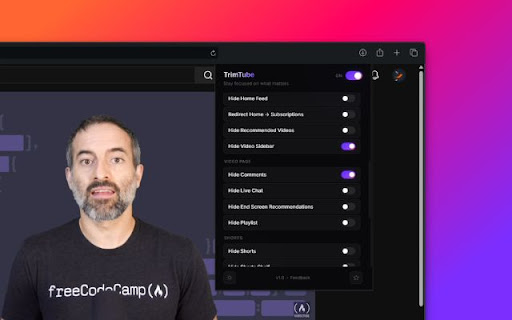
TrimTube helps you stay focused on YouTube by removing distracting page elements.

Features:

- Focus modes: Deep Focus, Learning, Minimal, and Custom
- Hide Home Feed and recommended videos
- Hide Shorts and Shorts shelves
- Hide comments, live chat, and video sidebar
- Disable autoplay and annotations
- Optional full-focus watch layout
- Optional thumbnail blur
- Keyboard shortcut for Full Focus toggle (Alt+Shift+F)

How it works:

- Runs only on youtube.com pages
- Applies your chosen visibility and focus settings locally
- Syncs preferences using Chrome storage
Technical
- Version
- 1.0.0
- Manifest
- V3
- Size
- 41.34KiB
- Min Chrome
- 88
- Languages
- 1
- Featured
- No
Metadata
- ID
- ibghgaopibdaebkbjlpnjahnjbhbnpod
- Developer ID
- uba9d52ab7a7e0c248216b365c7e71045
- Developer Email
- [email protected]
- Created
- Apr 8, 2026
- Last Updated (Store)
- Apr 8, 2026
- Last Scraped
- Jun 9, 2026
- Website
- —
- Support URL
- —
- Privacy Policy
- https://trimtube.biswajitrath.com/privacy
Data sourced from the Chrome Web Store · last verified Jun 9, 2026.