
Bulk Option Sets Uploader
Chrome extension to upload option sets in bulk to Bubble.io
As of May 2026, Bulk Option Sets Uploader has 89 users and a 5.00/5 rating from 3 reviews in the Productivity category.
Usersdown 3.3 percent−3.3%
89
89
Ratingno change0%
5.00
3 reviews
Reviewsup 50.0 percent+50.0%
3
Version
2.0
Manifest V3
History
4 snapshotsTracking since Apr 20, 2026.
View as table
| Date | Users | Rating | Reviews | Version |
|---|---|---|---|---|
| Apr 20, 2026 | 92 | 5.00 | 2 | 2.0 |
| May 6, 2026 | 92 | 5.00 | 3 | 2.0 |
| May 17, 2026 | 96 | 5.00 | 3 | 2.0 |
| May 30, 2026 | 91 | 5.00 | 3 | 2.0 |
| Now | 89 | 5.00 | 3 | 2.0 |
Permissions & access
- Permissions
- activeTabscriptingstoragetabs
- Host access
- https://bubble.io/*
Screenshots

About
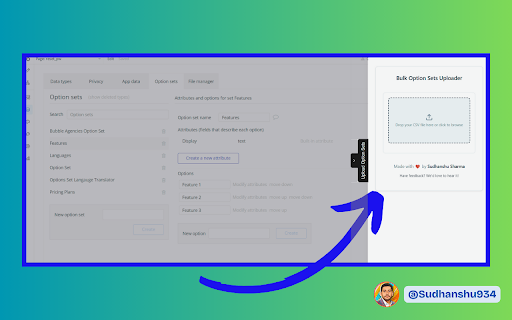
Are you tired of manually entering option sets in Bubble?

The Bulk Option Set Uploader for Bubble streamlines your workflow by allowing you to upload your entire option set from a CSV file in just a few simple steps.

→ Easy CSV Upload: Simply prepare your CSV file with headers.
→ Smart Configuration: Choose your primary display column and configure each attribute's data type (Text, Number, Boolean, Date, List of text, List of number).
→ One-Click Generation: Generate and copy your option set code instantly—then paste it into Bubble’s Option Sets section.

Enhance your productivity, reduce manual errors, and get back to building great apps faster. Perfect for Bubble developers looking to increase their productivity.

New Feature: New Data type added → (List of texts, List of numbers)

Created with ❤️ by Sudhanshu Sharma
Technical
- Version
- 2.0
- Manifest
- V3
- Size
- 41.01KiB
- Min Chrome
- 88
- Languages
- 1
- Featured
- No
Metadata
- ID
- ibflaiolnnllpnehobkpmcjndldggnho
- Developer ID
- udf9e053b6ad06b18d190609f4dbf3c1b
- Developer Email
- [email protected]
- Created
- Feb 26, 2025
- Last Updated (Store)
- May 19, 2025
- Last Scraped
- May 30, 2026
- Website
- —
- Support URL
- https://x.com/sudhanshu934
- Privacy Policy
- —
Similar extensions
Alternatives to Bulk Option Sets Uploader, ranked by description similarity.

Serkify Merch CSV Auto-Filler
Automatically upload and fill Merch by Amazon listings using CSV data
4

CSV Online Creator
A powerful Chrome extension for creating, editing, and exporting CSV files with an intuitive spreadsheet interface
23

AutoList for Facebook Marketplace - Bulk Lister & Automation
Bulk upload and fill Facebook Marketplace listings. Auto-fill titles, prices, descriptions, and IMAGEs.
254
★ 5.0

Redbubble Auto Uploader
Automate Redbubble uploads with Excel data. AI-powered metadata generation. Multi-language support.
52
★ 2.0

Gumroad Exporter - Bulk Export in Seconds
Stop copying products one by one. Export your entire Gumroad library to CSV, Excel or JSON with one click.
11

Etsy Bulk Upload & Listing Tool: AI Tags, CSV Import | BulkListingPro
Bulk upload Etsy listings fast. AI-generated titles, tags & descriptions. Import CSV/Excel. No monthly fees, pay per listing.
167

Notion CSV Importer: Effortless Data Mapping & Import
Import CSV files to Notion effortlessly. Map columns, ensure data accuracy, and track progress in real-time for a seamless workflow.
20

Clockodo Timelogs Import
Import a Timelog CSV file into Clockodo
7
★ 5.0
Data sourced from the Chrome Web Store · last verified May 30, 2026.