
Table Grab — Export Tables to CSV, Excel, Markdown
Export any web table to CSV, Excel, Markdown or JSON in one click. Free, no row limit, no sign-up, no API key. 100% local.
As of June 2026, Table Grab — Export Tables to CSV, Excel, Markdown has — users in the Workflow & Planning category.
Usersno change0%
—
—
Ratingno change0%
—
— reviews
Reviewsno change0%
—
Version
0.1.0
Manifest V3
History
1 snapshotsTracking since Jun 4, 2026.
Not enough history yet for this metric — the chart fills in as we collect more snapshots.
View as table
| Date | Users | Rating | Reviews | Version |
|---|---|---|---|---|
| Jun 4, 2026 | — | — | — | 0.1.0 |
| Now | — | — | — | 0.1.0 |
Permissions & access
- Permissions
- activeTabscripting
- Host access
- None declared
Screenshots


About
Table Grab copies and downloads any HTML table on a web page to CSV, Excel, Markdown, or JSON — in one click.

See a table you want in a spreadsheet? Copy-paste breaks the columns. Table Grab grabs it cleanly.

★ WHY TABLE GRAB
• 100% free — no row limit, no sign-up, no account, no API key.
• Your data never leaves your browser. No server, no tracking, nothing uploaded.
• Handles merged cells (rowspan / colspan) correctly.
• Excel-friendly CSV (UTF-8, opens with the right characters — no garbled text).
• Fast on heavy pages — tables are listed instantly.

★ HOW IT WORKS
1. Open any page with a table.
2. Click the Table Grab icon — it lists every table on the page, with a smart title taken from the content (not just "Table 1, 2, 3").
3. Hover a table to preview it and highlight it right on the page, so you know exactly which one it is.
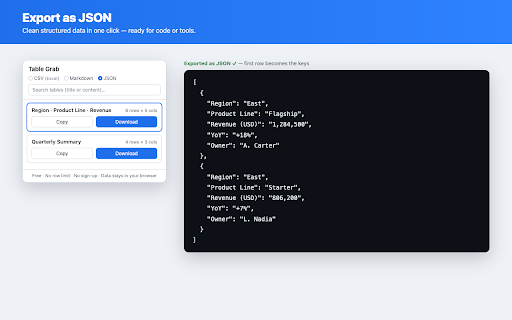
4. Pick a format (CSV / Excel / Markdown / JSON) and Copy or Download.

★ EXPORT FORMATS
• CSV — opens directly in Excel, Google Sheets, Numbers.
• Markdown — paste into Notion, Obsidian, GitHub, docs.
• JSON — structured data for quick reuse.

★ WHO IT'S FOR
E-commerce & operations (product lists, prices, rankings), finance & accounting (statements, reports), research, sales — anyone who needs a web table in a spreadsheet without writing a scraper.

★ PRIVACY
No login. No subscription. No data collection. Everything runs locally in your browser. Permissions are used only when you click the icon, to read the table on the page you're viewing.

Just grab the table.
Technical
- Version
- 0.1.0
- Manifest
- V3
- Size
- 12.82KiB
- Min Chrome
- 88
- Languages
- 1
- Featured
- No
Metadata
- ID
- ialkjncelpfhhhlkibofjpgpcnmoecdf
- Developer ID
- u36d94e97f1480ea89003ef584feda244
- Developer Email
- [email protected]
- Created
- Jun 3, 2026
- Last Updated (Store)
- Jun 3, 2026
- Last Scraped
- Jun 9, 2026
- Website
- —
- Support URL
- —
Data sourced from the Chrome Web Store · last verified Jun 9, 2026.