
Sound Shift
Change Volume of any screen on Youtube, Hotstar, Jio Cinema or Netflix
As of May 2026, Sound Shift has 229 users and a 5.00/5 rating from 2 reviews in the Workflow & Planning category.
Usersup 74.8 percent+74.8%
229
229
Ratingno change0%
5.00
2 reviews
Reviewsno change0%
2
Version
1.2.2
Manifest V3
History
3 snapshotsTracking since Apr 1, 2026.
View as table
| Date | Users | Rating | Reviews | Version |
|---|---|---|---|---|
| Apr 1, 2026 | 131 | 5.00 | 2 | 1.2.2 |
| Apr 30, 2026 | 145 | 5.00 | 2 | 1.2.2 |
| May 27, 2026 | 199 | 5.00 | 2 | 1.2.2 |
| Now | 229 | 5.00 | 2 | 1.2.2 |
Permissions & access
- Permissions
- activeTabscriptingstorage
- Host access
- None declared
Screenshots
About
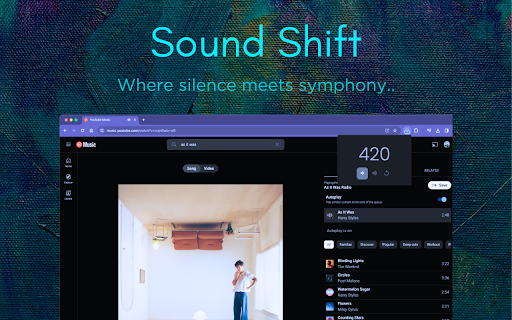
Introducing Sound Shift, the ultimate Google Chrome extension designed to elevate your streaming experience on any platform. Sound Shift seamlessly boosts audio levels, ensuring crystal-clear sound without any distortion, and it's optimised to work flawlessly in full-screen mode. Whether you're watching videos, enjoying music, or participating in virtual meetings, Sound Shift lets you take control of your audio environment with just a few clicks. It's the perfect solution for anyone tired of straining to hear, offering a simple and efficient way to enhance your online auditory experience.

Working on Youtube, Hotstar, Jio Cinema and Netflix!

How to Download, Install, and Use SoundShift:

1. Visit the Chrome Web Store.
2. Search for "Sound Shift" in the search bar.
3. Click on the "Add to Chrome" button on the extension's page.
4. A confirmation pop-up will appear; click "Add Extension" to install.
5. Once installed, the Sound Shift icon will appear in your Chrome toolbar.

Use:

1. Navigate to your favourite streaming platform.
2. Click on the Sound Shift icon in the toolbar.
3. Click on "Volume Up" or "Volume Down" buttons to increase or decrease volume according to your need.
4. Click on "Reset" button to turn it back to normal.

Enjoy enhanced audio on any streaming platform hassle-free, even in full-screen mode!
Sound Shift – Where Silence meets Symphony!
Technical
- Version
- 1.2.2
- Manifest
- V3
- Size
- 12.23KiB
- Min Chrome
- 88
- Languages
- 1
- Featured
- No
Metadata
- ID
- ialabhbhegakcagjafaaljebepkgpfag
- Developer ID
- ub20bdf0b09ba22b15c42b34e4c7e3d44
- Developer Email
- [email protected]
- Created
- Jan 19, 2024
- Last Updated (Store)
- Aug 8, 2024
- Last Scraped
- May 27, 2026
- Website
- —
- Support URL
- —
- Privacy Policy
- —
Similar extensions
Alternatives to Sound Shift, ranked by description similarity.

Sound Booster Plus
Boost your video and audio sound X2
476

Sound Booster that Works!
Sound booster increases volume up to a maximum level in any tab. Volume booster that really works! Amplify sound by up to 500%.
90.0K
★ 4.8

Sound Booster - increase volume up
Volume Booster helps boost sound video or music on any tab! Increase volume and bass booster, equalizer. Volume control.
2.0M
★ 4.5

SoundWave - Audio Equalizer
Boost and customize audio with a 10-band equalizer, bass booster, 22 presets. Works on YouTube, Spotify, and all websites.
68

Sound Booster that Works!
Sound booster increases volume up to a maximum level in any tab. Volume booster that really works! Amplify sound by up to 500%.
20.0K
★ 4.2

Volume Booster for Chrome – Volume Booster
Volume booster for Chrome. Increase volume up to 600% with equalizer presets, bass boost, and active-tab audio control.
10.0K
★ 4.8

Volume Booster - Sound & Bass boost
Volume booster that improve your sound system! Increase volume and bass booster, equalizer. Volume control for Chrome.
70.0K
★ 4.5

Ultra Volume Booster
Unleash Crystal-Clear Sound: Boost Volume, Preserve Quality, Any Website!
30.0K
★ 4.4
Data sourced from the Chrome Web Store · last verified May 27, 2026.