
Mirroring360 Sender for Chrome
Cast your Chromebook or Computer Screen to Another Computer (PC or MAC)
As of May 2026, Mirroring360 Sender for Chrome has — users and a 2.81/5 rating from 161 reviews in the Workflow & Planning category.
Usersno change0%
—
—
Ratingno change0%
2.81
161 reviews
Reviewsno change0%
161
Version
1.1.0.5
Manifest V3
History
2 snapshotsTracking since Apr 1, 2026.
Not enough history yet for this metric — the chart fills in as we collect more snapshots.
View as table
| Date | Users | Rating | Reviews | Version |
|---|---|---|---|---|
| Apr 1, 2026 | — | 2.81 | 161 | 1.1.0.5 |
| Apr 30, 2026 | 600.0K | 2.81 | 161 | 1.1.0.5 |
| Now | — | 2.81 | 161 | 1.1.0.5 |
Permissions & access
- Permissions
- tabsstoragenativeMessagingdesktopCapturetabCaptureactiveTab
- Host access
- None declared
Screenshots


About
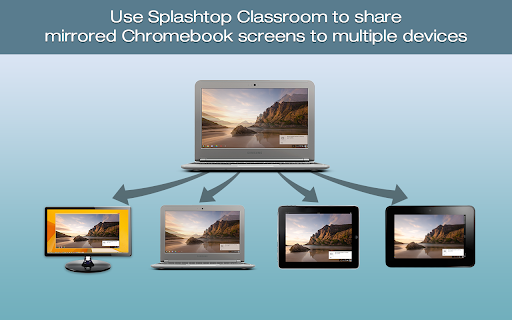
Mirroring360 is a collaboration tool suite for your 1:1 or BYOD classrooms and boardrooms.  Mirroring360 Sender Chrome App enables any presenter to cast his/her Chromebook or computer screen to another PC or Mac, wirelessly;   You will need install a separate Mirroring360 Receiver software on the receiving computer, available at www.mirroring360.com

Mirroring360 is designed for teachers,students, and business presenters with ease-of-use and fast-to-share as the top design goals.  Setup in 2 easy steps:
1.	Add this Mirroring360 Sender Chrome App to your Chromebook or Chrome browser on your computer
2.	Install the Mirroring360 (receiver) software on the receiving computer (www.mirroring360.com).

Mirroring360 Sender Chrome App allows you to:
* Cast your Chromebook or computer to another computer, instantly and wirelessly!
* Up to 4 Chromebook or computer screens can be casted simultaneously
* Real-time share ANY application, files, or multi-media content from your Chromebook or computer

* Complementary Mirroring Assist capability enables you to cross subnets and VLANs, even if the computers are on different VLANs

Mirroring360 is deployed in thousands of schools / districts today, enjoyed by millions of teachers / students.  Learn more by visiting www.mirroring360.com

	“Using Mirroring360 in an instructional setting has shown a direct increase in engagement among our students.” – Matt Penner, Director of Information and Instructional Technology, Val Verde Unified School District
Technical
- Version
- 1.1.0.5
- Manifest
- V3
- Size
- 226KiB
- Min Chrome
- 88
- Languages
- 4
- Featured
- No
Metadata
- ID
- iaigceaehdihlnolehbapjfbbfpnlngg
- Developer ID
- u7156f4c2593b318a77bf5ee92cdedd47
- Developer Email
- [email protected]
- Created
- Jul 8, 2014
- Last Updated (Store)
- Aug 8, 2022
- Last Scraped
- May 27, 2026
- Website
- —
- Support URL
- http://www.mirroring360.com/help
- Privacy Policy
- https://www.mirroring360.com/privacy
Similar extensions
Alternatives to Mirroring360 Sender for Chrome, ranked by description similarity.

MirrorOp Sender
Real-time screen sharing and remote desktop operations
9.0K
★ 3.0

vCastSender
vCastSender
—
★ 3.4

VIA Screen Share
Share your desktop or application using VIA Screen Share [Minimum VIA Version 2.5]
30.0K
★ 2.8

LightCast Sender
Mirror your device to any computer screen any time
10.0K
★ 3.6

Collage
Clear Touch Collage app allows you to mirror your Chromebook to the Clear Touch Panel. Collage is a great tool for sharing your…
100.0K
★ 3.0

C-Connection
Real-time screen sharing
2.0K
★ 5.0

The Conference system Screen Sharing
Add Screen Sharing to the conference system.
9.0K
Zoom Rooms
Zoom Rooms for Chrome OS
—
★ 3.3
Data sourced from the Chrome Web Store · last verified May 27, 2026.