
Markdown
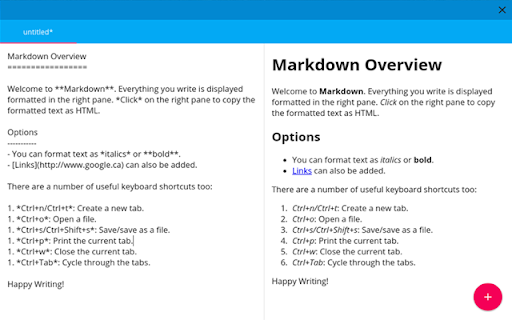
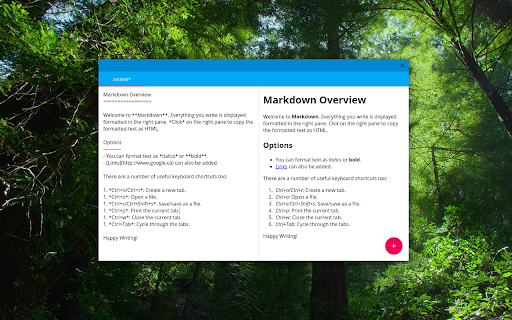
A simple, beautiful Markdown Editor using Material Design.
As of May 2026, Markdown has 308 users and a 3.58/5 rating from 12 reviews.
Usersdown 6.9 percent−6.9%
308
308
Ratingno change0%
3.58
12 reviews
Reviewsno change0%
12
Version
0.3.1
Manifest V2
History
3 snapshotsTracking since Apr 1, 2026.
View as table
| Date | Users | Rating | Reviews | Version |
|---|---|---|---|---|
| Apr 1, 2026 | 331 | 3.58 | 12 | 0.3.1 |
| Apr 30, 2026 | 329 | 3.58 | 12 | 0.3.1 |
| May 27, 2026 | 313 | 3.58 | 12 | 0.3.1 |
| Now | 308 | 3.58 | 12 | 0.3.1 |
Permissions & access
- Permissions
- clipboardWritestoragealwaysOnTopWindowscontextMenus
- Host access
- https://fonts.gstatic.com/s/opensans/v10/cJZKeOuBrn4kERxqtaUH3VtXRa8TVwTICgirnJhmVJw.woff2, https://fonts.gstatic.com/s/opensans/v10/k3k702ZOKiLJc3WVjuplzBUOjZSKWg4xBWp_C_qQx0o.woff2, https://fonts.gstatic.com/s/opensans/v10/xjAJXh38I15wypJXxuGMBo4P5ICox8Kq3LLUNMylGO4.woff2, https://fonts.gstatic.com/s/opensans/v10/PRmiXeptR36kaC0GEAetxolIZu-HDpmDIZMigmsroc4.woff2
Screenshots
About
Markdown is a text editor that let's you focus on what actually matters: writing. With no distractions, a simple beautiful interface, and all the features you need to get work done, Markdown is great for distraction free writing, writing for your blog, and writing simple HTML without worrying about the syntax.

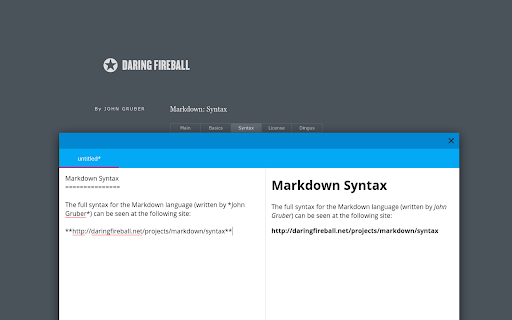
All of the basic commands are explained on every new tab page, which opens by default when you run Markdown, and also whenever you press Ctrl+n, Ctrl+t, or the pink new tab button at the bottom. If you need more advanced formatting, feel free to check out the excellent guide to Markdown syntax by John Gruber: http://daringfireball.net/projects/markdown/syntax.

Version 0.3.1 updates KaTeX support to version 0.5.1.

Version 0.3.0 adds in support for changing the syntax highlight theme as well as bug fixes when using syntax highlighting and LaTeX processing at the same time.

Version 0.2.3 contains minor bug fixes to the interface.

Version 0.2.2 adds a custom CSS field in the settings menu where you can add your own formatting.

Version 0.2.1 adds a new option in the settings menu to enable syntax highlighting in code blocks. It will automatically detect which programming language you used. Pressing tab when editing now inputs 4 spaces to make typing code easier.

Version 0.2.0 has lots of new options including a settings menu where you can control lots of the formatting and rendering aspects. You can now display equations instantly using LaTeX code (rendered using KaTeX). There are lots more things so check out the Settings tab by pressing Ctrl+K.
Technical
- Version
- 0.3.1
- Manifest
- V2
- Size
- 466KiB
- Min Chrome
- 36
- Languages
- 1
- Featured
- No
Metadata
- ID
- iaidaeojkdnpahodojncgafnfaabiedf
- Developer ID
- u254422fcb7446e9e8521c42dc62360ce
- Developer Email
- —
- Created
- Mar 8, 2015
- Last Updated (Store)
- Nov 2, 2015
- Last Scraped
- May 27, 2026
- Website
- joshuacaron.ca
- Support URL
- https://github.com/joshuacaron/markdown
- Privacy Policy
- —
Similar extensions
Alternatives to Markdown, ranked by description similarity.

noteroot Editor
The Markdown editor for the digital classroom
38
★ 3.0

Markdown Primer
A fast Markdown viewer with Extensions support, Themes, and Extra modules: YAML, LaTeX, Diagrams, Web Fonts
38
★ 5.0

Markdown Formatter for Bearblog
Easily format your markdown text by selecting it and pressing a key to wrap it, saving you time and effort. Built for Bearblog.
6
★ 5.0

Markdown Magician — Markdown 編輯器
在瀏覽器側邊面板或完整分頁隨時編輯 Markdown,支援即時預覽、Mermaid 流程圖、KaTeX 數學公式、多分頁管理。
44
★ 5.0
md everywhere
We can write 'Markdown' texts everywhere.
953
★ 3.8

SAPA Markdown Editor
Markdown editor with KaTeX. Export MD/HTML/DOC/PDF, print preview / Markdown + KaTeX. MD/HTML/DOC/PDF 다운로드, 인쇄 미리보기
20

Rich Markdown Preview
ローカルのMarkdownファイルを美しくプレビュー。カスタマイズ可能なテーマ、フォント選択、目次の自動生成に対応。
35
★ 4.5

Markdown Editor
A lite, free & flexible Markdown editor app for your browser.
468
★ 2.0
Data sourced from the Chrome Web Store · last verified May 27, 2026.