
Read aloud with auto language detection
Text-to-speech web reader
As of May 2026, Read aloud with auto language detection has — users and a 4.14/5 rating from 14 reviews in the Workflow & Planning category.
Usersno change0%
—
—
Ratingno change0%
4.14
14 reviews
Reviewsno change0%
14
Version
0.0.1.0
Manifest V3
History
2 snapshotsTracking since Apr 1, 2026.
Not enough history yet for this metric — the chart fills in as we collect more snapshots.
View as table
| Date | Users | Rating | Reviews | Version |
|---|---|---|---|---|
| Apr 1, 2026 | — | 4.14 | 14 | 0.0.1.0 |
| Apr 30, 2026 | 10.0K | 4.14 | 14 | 0.0.1.0 |
| Now | — | 4.14 | 14 | 0.0.1.0 |
Permissions & access
- Permissions
- activeTabstoragescripting
- Host access
- None declared
Screenshots
About
This extension helps you read websites aloud by using Google Chrome text-to-speech engine.
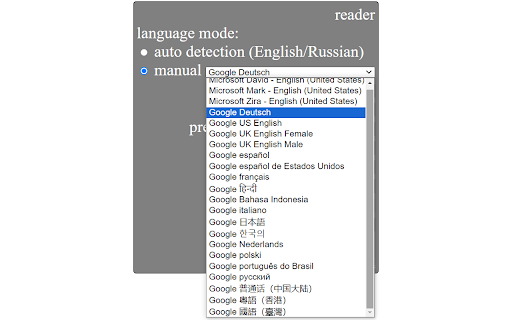
It can automatically detect the language of the current sentence (currently supported for English and Russian). Also, you can manually choose any language among supported by Google Chrome text-to-speech engine: English, Deutsch, Español, Español de Estados Unidos, Français, हिन्दी, Bahasa Indonesia, Italiano, 日本語, 한국의, Nederlands, Polski, Português do Brasil, Русский, 普通话(中国大陆), 粤語 (香港), 國語 (臺灣).

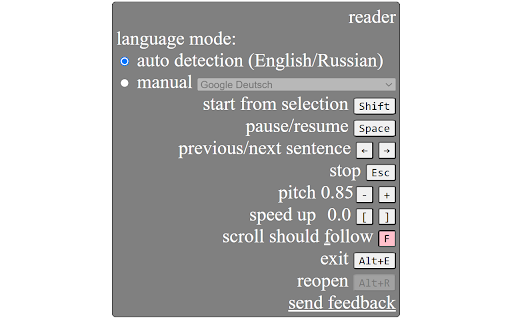
You can conveniently control the extension using keyboard shortcuts: go to previous/next sentence, start/pause, change speed etc.

When you listen, the current sentence is always highlighted (selected) on the webpage. There is also a convenient option of auto-scrolling to follow the current sentence.

How to use:
Quick start: select any part of a sentence on a web page where you want to start reading and press Alt+R (or click the extension icon). Extension widget will appear and will start reading. Mouse over the widget to see all the options and keyboard shortcuts. Most commonly you will use Shift to start from current selection, Esc to stop, Space to pause/resume, left and right arrows to go to previous/next sentence.

Enjoy reading aloud!
Technical
- Version
- 0.0.1.0
- Manifest
- V3
- Size
- 64.23KiB
- Min Chrome
- 88
- Languages
- 1
- Featured
- No
Metadata
- ID
- iaeiplcjdnogoipoblmicfocnhfobpmi
- Developer ID
- u4d1ddbc6677ee6239c60cb5312b254ca
- Developer Email
- [email protected]
- Created
- Jul 5, 2020
- Last Updated (Store)
- Apr 21, 2024
- Last Scraped
- May 27, 2026
- Website
- —
- Privacy Policy
- —
Similar extensions
Alternatives to Read aloud with auto language detection, ranked by description similarity.

Text Reader
A Chrome extension to read selected text on web pages
15

Text to Speech for Google Chrome™
Want to listen to text being read out to you?
70.0K
★ 2.9

Speak Text
Speak Text converts selected text into speech.
271
★ 2.5

Read Anything: Turn websites into lector's voice
Read Anything turns any website text into a lector's voice. Listen to web content, customize settings, and boost productivity!
324
★ 1.0

VoiceMagic: Transform Text into Spoken Words
Select text and read it. Hear text read aloud. A Text to Speech Voice Reader.
114
★ 3.0

Translator - Select to Translate
Translate words and phrases while browsing the web using the Google Translator. Full page translator.
60.0K
★ 4.2

ReadOut: The Ultimate Text-to-Speech Voice Reader
100% Free Text-to-Speech. No Ads. 10+ languages. Customize highlights & navigation. Ideal for students, researchers & readers.
98
★ 2.0
Speech my text
Text to voice converter is a professional Chrome extension that can convert any text into speech. A Text-to-speech voice converter…
408
★ 4.4
Data sourced from the Chrome Web Store · last verified May 27, 2026.