
Audio Booster: Real Surround, EQ & Spatial Sound
Turn any tab's stereo into immersive surround or 8D spatial audio. Boost volume, fine-tune with a 7-band EQ and normalizer.
As of June 2026, Audio Booster: Real Surround, EQ & Spatial Sound has 2,000 users and a 4.59/5 rating from 34 reviews in the Productivity category.
Usersup 100.0 percent+100.0%
2.0K
2,000
Ratingdown 1.1 percent−1.1%
4.59
34 reviews
Reviewsup 36.0 percent+36.0%
34
Version
5.6.46
Manifest V3
90-day change · In the last 90 days this extension gained 1.0K users, 8 version updates, changed permissions.
History
10 snapshotsTracking since Apr 8, 2026.
View as table
| Date | Users | Rating | Reviews | Version |
|---|---|---|---|---|
| Apr 8, 2026 | 1.0K | 4.64 | 25 | 4.4.44 |
| Apr 18, 2026 | 2.0K | 4.64 | 25 | 4.5.22 |
| Apr 28, 2026 | 2.0K | 4.68 | 28 | 4.5.23 |
| May 3, 2026 | 2.0K | 4.57 | 30 | 4.5.23 |
| May 8, 2026 | 2.0K | 4.57 | 30 | 4.7.62 |
| May 20, 2026 | 2.0K | 4.59 | 32 | 4.7.62 |
| May 24, 2026 | 2.0K | 4.59 | 32 | 4.7.69 |
| May 29, 2026 | 2.0K | 4.59 | 32 | 4.8.64 |
| Jun 3, 2026 | 2.0K | 4.59 | 32 | 4.14.23 |
| Jun 7, 2026 | 2.0K | 4.59 | 32 | 5.6.7 |
| Now | 2.0K | 4.59 | 34 | 5.6.46 |
Changelog
- Jun 3, 2026description
Stereo Audio to Real Surround Sound: Take Your Sound to the Next Level!

Get ready to rediscover your favorite music and movies! Transforms flat stereo audio from your browser into a vibrant 3D surround sound experience (2.1, 4.0, 4.1, 5.1, 7.1, and 7.2), plus a brand new 8D Virtual mode with HRTF. It is the ultimate tool to get the most out of your speakers or headphones, and it is completely free!

⚠️ LIMITATIONS & IMPORTANT NOTES

📺 Full Screen Mode Restriction: Chrome's tabCapture API has security restrictions that block standard fullscreen mode. Press F11 to force fullscreen while capturing.

🎞️ Per-Tab Permissions: Chrome requires you to grant permission for each tab by clicking the extension icon on it.

〰️ Note for Optical Cable (SPDIF/Toslink) Users: Optical cables only support 2 channels uncompressed. Browsers send PCM audio, so your system reports stereo. Don't worry — manually select 5.1, 7.1 or 7.2 and the extension generates the surround signal. Your receiver handles the rest. Ignore the warning icon.

🚀 WHAT'S NEW & HIGHLIGHTS

🌀 8D Virtual (New!) Brand new spatial mode that rotates audio around your head using true HRTF (Head-Related Transfer Function). Adjustable rotation speed (2-15 seconds per revolution). Works on any hardware — headphones strongly recommended for the full immersive experience.

🎭 Audio Presets Switch instantly between optimized configurations: Cinema Action, Voice/Podcast, Music Stereo+, Gaming, or your own custom setup. All your manual tweaks are preserved when you return to Default.

🔊 Smart Global Mode (Set it and Forget it!) Activate once and the extension follows your audio:
- 🕵️ Automatic Detection of the active tab
- 👀 Seamless Switching between YouTube, Spotify, etc.
- 🚦 Patient resume when you hit play again
- 🎯 Always Active option: capture starts automatically when you open the popup

🎧 Smart Mono Mix (New!) Detects when only one channel has audio (common in old recordings or bad uploads) and automatically copies it to the other side, eliminating mono playback issues without you doing anything.

🎚️ 7-Band Graphic Equalizer Full control over bass, mids and highs with intuitive sliders, plus pre-amplification (0-200%) to boost quiet sources.

🌐 Cinematic Surround Sound (Improved Matrix) The audio engine intelligently separates vocals to the front while sending ambient sounds to the rears. Configurable ambiance depth, direct rear send, L/R channel inversion and adjustable delay buffer for that real theater feel.

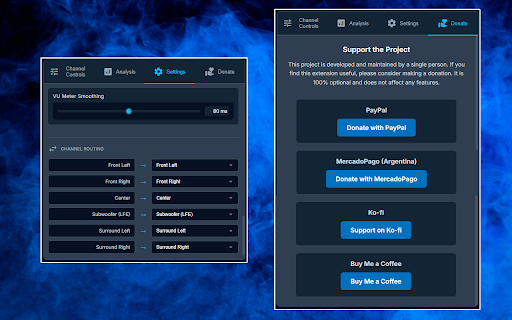
🎛️ Free Channel Routing Reassign any input channel to any output. Send Center to LFE, swap surrounds, mute specific channels — total flexibility.

📊 4-View Audio Analysis Switch between four real-time visualizations:
- Logarithmic frequency spectrum
- Time-domain waveform
- 7-band level meters
- 3D sound field showing speaker placement and activity

🔊 Deep Bass and Clear Vocals Smart Subwoofer/Center separation with professional-grade Linkwitz-Riley filters. Customizable crossover frequencies (50-500Hz Center HPF, 80-250Hz Subwoofer LPF) with built-in test mode to isolate each channel.

🎛️ Automatic Volume Control (Normalization) Smart AGC with look-ahead to keep ads and content at consistent volume without harsh peaks.

⚡ Performance Optimizations
- Auto Silence Bypass: pauses CPU-heavy processing when there's no audio
- Configurable Visualizer FPS (Auto/60/30/15)
- VU Meter smoothing
- Lightweight AudioWorklet processing with zero garbage collection in the hot path

☁️ Sync Across Devices Sign in with your Google account and your settings travel with you to every Chrome installation.

🌍 24 Languages Available in English, Spanish, French, German, Italian, Portuguese (BR/PT), Russian, Japanese, Chinese (Simplified/Traditional), Korean, Hindi, Arabic, Polish, Dutch, Turkish, Indonesian, Ukrainian, Swedish, Vietnamese, Czech, Thai and Hebrew.

⚙️ Automatic Configuration On install, the extension detects your hardware and selects the best system. You can always change it manually.

📈 Anonymous Statistics (Opt-Out) Helps improve the extension. Zero personal data sent. Can be disabled in Settings.

🎁 ABOUT DONATIONS: 100% free with all features unlocked. The "Donate" tab is completely optional.

🔒 PERMISSIONS NOTE: The "tabs" permission is needed only to detect which tab is playing and active. We do NOT read, store or share your browsing history. Your data NEVER leaves your browser.

🛠️ SUPPORT: Use our Help Center before leaving a negative review:
👉 https://chromewebstore.google.com/detail/hpmbefgjnjkkdcgdbjplmdhiedhgknek/support

Positive reviews keep this project free. Thank you!
Stereo Audio to Real Surround Sound — Take Your Sound to the Next Level!

Get ready to rediscover your favorite music and movies! This extension turns flat stereo audio from any tab into a vibrant surround experience (2.1, 4.0, 4.1, 5.1, 7.1 and 7.2) or true 8D spatial sound with HRTF — louder, clearer and perfectly balanced. The ultimate tool to get the most out of your speakers or headphones, and it's 100% free.

⚠️ LIMITATIONS & IMPORTANT NOTES

📺 Full Screen Mode: Chrome's tabCapture API has security restrictions that block standard fullscreen while capturing. Press F11 to force fullscreen.

🎞️ Per-Tab Permission: Chrome requires you to enable each tab by clicking the extension icon on it (or press Alt+Shift+S).

〰️ Note for Optical Cable (SPDIF/Toslink) users: optical carries only 2 uncompressed channels, so your system reports stereo. Don't worry — manually select 5.1, 7.1 or 7.2 and the extension generates the surround signal; your receiver handles the rest. Ignore the warning icon.

🚀 HIGHLIGHTS

🌀 8D Virtual (HRTF) — True binaural spatial sound that rotates around your head using real Head-Related Transfer Functions. Choose the path (Circular, Orbital, Pendulum) and rotation speed (2–15 seconds per turn). Works on any hardware — headphones strongly recommended for the full immersive experience.

🎚️ Cinematic Surround Engine — An intelligent matrix keeps vocals up front while sending ambient sounds to the rears. Configurable ambiance depth, direct rear send, L/R rear inversion and adjustable delay buffer for that real theater feel.

🗣️ Dialogue Boost (New!) — One slider lifts voices (center channel, or the L+R mid in systems without a center) so you never miss a line.

🌙 Night Mode (New!) — Evens out loud and quiet scenes so explosions don't wake the house and whispers stay audible. Perfect for late-night watching.

🎧 Crossfeed for Headphones (New!) — Softens the harsh hard-panned stereo separation for a more natural, speaker-like listen on headphones.

🛡️ Limiter & Normalizer (New!) — A per-channel limiter stops clipping and distortion, while the smart look-ahead AGC keeps ads and content at a consistent volume without harsh peaks.

🎭 Audio Presets (now with your own!) — Switch instantly between optimized setups: Cinema Action, Voice/Podcast, Music Stereo+, Gaming… or save your own named presets and export/import them as a file. Your manual tweaks are preserved when you return to Default.

📌 Per-Site Memory (New!) — Optionally remember and auto-apply your settings for each website (e.g. 5.1 + EQ on one site, plain stereo on another).

🔊 Smart Global Mode (Set it and forget it!) — Activate once and the extension follows your audio:
- 🕵️ Automatic detection of the active tab
- 👀 Seamless switching between YouTube, Spotify, etc.
- 🚦 Patient resume when you hit play again
- 🎯 "Always Active" option: capture starts automatically when you open the popup

🎧 Smart Mono Mix — Detects when only one channel has audio (common in old recordings or bad uploads) and copies it to the other side automatically, with no action from you.

🎚️ 7-Band Graphic Equalizer — Full control over bass, mids and highs with intuitive sliders, plus pre-amplification (0–200%) to boost quiet sources.

🎛️ Free Channel Routing — Reassign any input channel to any output. Send Center to LFE, swap surrounds, mute specific channels — total flexibility.

📊 Live Audio Analysis (4 views + loudness) — Switch between real-time logarithmic frequency spectrum, time-domain waveform, 7-band level meters and a 3D sound field, with live readouts of clipping, peak frequency, spectral centroid, dynamic range and LUFS loudness.

🔊 Deep Bass & Clear Vocals — Smart Subwoofer/Center separation with professional-grade Linkwitz-Riley filters. Customizable crossover (50–500 Hz Center HPF, 80–250 Hz Subwoofer LPF) with a built-in test mode to isolate each channel.

⚡ Performance Optimizations
- Auto Silence Bypass: pauses CPU-heavy processing when there's no audio
- Configurable Visualizer FPS (Auto/60/30/15)
- VU meter smoothing
- Lightweight AudioWorklet processing with near-zero garbage collection in the hot path

⌨️ Keyboard Shortcuts (New!) — Toggle the extension on the current tab (Alt+Shift+S) or open the popup (Alt+Shift+U). Both customizable in chrome://extensions/shortcuts.

🎨 Light & Dark Theme (New!) — Follows your system automatically, or force light or dark.

☁️ Sync Across Devices — Sign in with your Google account and your settings travel with you to every Chrome installation.

🌍 24 Languages — English, Spanish, French, German, Italian, Portuguese (BR/PT), Russian, Japanese, Chinese (Simplified/Traditional), Korean, Hindi, Arabic, Polish, Dutch, Turkish, Indonesian, Ukrainian, Swedish, Vietnamese, Czech, Thai and Hebrew.

⚙️ Automatic Configuration — On install, the extension detects your hardware and selects the best system. You can always change it manually.

📈 Anonymous Statistics (Opt-Out) — Helps improve the extension and show where it's being used on a live map. Only a coarse, city-level location (derived from your IP) is used — never your audio, browsing or personal data. Disable it anytime in Settings.

🎁 ABOUT DONATIONS: 100% free with all features unlocked. The "Donate" tab is completely optional.

🔒 PERMISSIONS NOTE: "tabs" is used only to detect which tab is playing and active; "tabCapture" to process that tab's audio; "storage" to save your settings. We do NOT read, store or share your browsing history, and your audio NEVER leaves your browser.

🛠️ SUPPORT: Please use our Help Center before leaving a negative review:
👉 https://chromewebstore.google.com/detail/hpmbefgjnjkkdcgdbjplmdhiedhgknek/support

Positive reviews keep this project free. Thank you!
- Jun 3, 2026short_description
Converts stereo to true surround sound. Also enhances Stereo 2.0 with EQ and Normalizer. Works on any site, even protected.
Turn any tab's stereo into immersive surround or 8D spatial audio. Boost volume, fine-tune with a 7-band EQ and normalizer.
- Jun 3, 2026name
Stereo amplifier & true surround sound converter
Audio Booster: Real Surround, EQ & Spatial Sound
- Jun 3, 2026host_permissions
https://sysprofile.com.ar/*, https://www.google-analytics.com/*, https://ipwho.is/*
https://sysprofile.com.ar/*, https://www.google-analytics.com/*
- May 29, 2026host_permissions
https://sysprofile.com.ar/*, https://www.google-analytics.com/*
https://sysprofile.com.ar/*, https://www.google-analytics.com/*, https://ipwho.is/*
- May 24, 2026description
Stereo Audio to Real Surround Sound: Take Your Sound to the Next Level!

Get ready to rediscover your favorite music and movies! Stereo Audio to Real Surround Sound transforms flat stereo audio from your browser into a vibrant and powerful 3D surround sound experience (2.1, 4.0, 4.1, 5.1, 7.1, and 7.2). It is the ultimate tool to get the most out of your speakers or headphones, and it is completely free!

⚠️ LIMITATIONS & IMPORTANT NOTES

📺 Full Screen Mode Restriction: Chrome's tabCapture API has security restrictions that block standard fullscreen mode to prevent extensions from capturing content secretly. The tabCapture function is designed to capture the visible content of the active tab, not the entire browser screen. This is a Chrome limitation, not the extension's.

Note: The only way to force fullscreen mode while capturing audio is by pressing the F11 key.

🎞️ Per-Tab Permissions: It is not possible to apply the extension to all tabs at once automatically. Chrome requires you to personally grant permission for each specific tab you want the extension to access. The only way to grant this "invocation" permission is by clicking the extension icon in the toolbar while you are on that specific tab.

〰️ Note for Optical Cable (SPDIF/Toslink) Users:

If you use optical cables with modern browsers like Chrome, Edge, or other Chromium-based browsers:

👉 Cable Limit: Optical cables are an older technology. They only support 2 channels (stereo) for uncompressed audio.

👉 Browser Behavior: Browsers send uncompressed audio. They do not compress sound into Dolby or DTS formats like a movie player or console does.

👉 The Result: Since the browser sends uncompressed audio and the cable only supports 2 channels, your computer tells the browser: "I only support stereo." That is why 2 channels are detected.

👉 The Solution: Don't worry! Our extension is designed to fix exactly this. Even if it indicates "2 channels," simply manually select 5.1, 7.1, or 7.2 in the extension. We will generate the surround sound, and your receiver/home theater will take care of the rest to distribute it to your speakers.  You will see a small warning icon, but if you use an optical cable, you can safely ignore it.


🚀 WHAT'S NEW & HIGHLIGHTS:

🔊 Smart Global Mode (Set it and Forget it!) You no longer have to activate the extension every time. Activate it once and let it work for you:

🕵️ Automatic Detection: Automatically captures audio from the tab you are currently viewing.

👀 Seamless Switching: If you switch from YouTube to Spotify, the sound follows you instantly without you having to touch anything.

🚦 Always Ready: If you pause music to take a call, the extension waits patiently and resumes control as soon as you hit play again.

🎚️ 7-Band Graphic Equalizer (New) Do you like powerful bass or prefer crystal clear vocals? Now you have full control. Adjust the sound to your liking by boosting bass, clarifying highs, or removing annoying noises with easy-to-use sliders.

🌐 Cinematic Surround Sound (Improved Matrix) We have improved our audio "brain". Now, the extension intelligently separates vocals to keep them clear up front, while sending ambient sounds to your rear speakers. Plus, you can adjust the depth to create an incredible sense of space, just like being in a movie theater.

📊 3D Sound Visualizer Don't just listen, watch your music! The new "Analysis" tab shows you in real-time how sound is distributed around you with a futuristic 3D graphic, so you can see how your speakers are working.

🔊 Deep Bass and Clear Vocals The Subwoofer separation function is now much smarter. It uses professional-grade high-quality filters to send only deep bass to your subwoofer and keep vocals crisp in the center channel, avoiding any distortion.

🎛️ Automatic Volume Control (Normalization) Tired of ads sounding louder than the video? Enable this option to maintain a consistent and comfortable volume level at all times, protecting your ears from sudden jumps.

⚙️ Automatic Configuration Upon installation, the extension automatically detects your sound equipment and selects the best configuration for you (for example, 5.1 or 7.1), so you can start enjoying immediately without complications.


🎁 ABOUT DONATIONS: This extension is 100% free and has all features unlocked for everyone. The "Donate" tab is completely optional for those users who wish to voluntarily support the project's development and maintenance.


🔒 NOTE ON PERMISSIONS (IMPORTANT): For the "Smart Global Mode" magic to work, we need the "tabs" permission.

What for? Simply to detect when a tab starts playing sound and which one you are looking at, to automatically activate the audio.

Privacy: We do NOT read, store, or share your browsing history. Your data NEVER leaves your browser.


🛠️ SUPPORT AND FEEDBACK: Your experience and satisfaction are most important to me. If you find any problems, have questions, or want to suggest a new feature, please use our Help Center before leaving a negative review: 👉 https://chromewebstore.google.com/detail/hpmbefgjnjkkdcgdbjplmdhiedhgknek/support

Positive reviews help enormously to keep this project free. If something doesn't work as expected, give me a chance to help you first. Thank you!
Stereo Audio to Real Surround Sound: Take Your Sound to the Next Level!

Get ready to rediscover your favorite music and movies! Transforms flat stereo audio from your browser into a vibrant 3D surround sound experience (2.1, 4.0, 4.1, 5.1, 7.1, and 7.2), plus a brand new 8D Virtual mode with HRTF. It is the ultimate tool to get the most out of your speakers or headphones, and it is completely free!

⚠️ LIMITATIONS & IMPORTANT NOTES

📺 Full Screen Mode Restriction: Chrome's tabCapture API has security restrictions that block standard fullscreen mode. Press F11 to force fullscreen while capturing.

🎞️ Per-Tab Permissions: Chrome requires you to grant permission for each tab by clicking the extension icon on it.

〰️ Note for Optical Cable (SPDIF/Toslink) Users: Optical cables only support 2 channels uncompressed. Browsers send PCM audio, so your system reports stereo. Don't worry — manually select 5.1, 7.1 or 7.2 and the extension generates the surround signal. Your receiver handles the rest. Ignore the warning icon.

🚀 WHAT'S NEW & HIGHLIGHTS

🌀 8D Virtual (New!) Brand new spatial mode that rotates audio around your head using true HRTF (Head-Related Transfer Function). Adjustable rotation speed (2-15 seconds per revolution). Works on any hardware — headphones strongly recommended for the full immersive experience.

🎭 Audio Presets Switch instantly between optimized configurations: Cinema Action, Voice/Podcast, Music Stereo+, Gaming, or your own custom setup. All your manual tweaks are preserved when you return to Default.

🔊 Smart Global Mode (Set it and Forget it!) Activate once and the extension follows your audio:
- 🕵️ Automatic Detection of the active tab
- 👀 Seamless Switching between YouTube, Spotify, etc.
- 🚦 Patient resume when you hit play again
- 🎯 Always Active option: capture starts automatically when you open the popup

🎧 Smart Mono Mix (New!) Detects when only one channel has audio (common in old recordings or bad uploads) and automatically copies it to the other side, eliminating mono playback issues without you doing anything.

🎚️ 7-Band Graphic Equalizer Full control over bass, mids and highs with intuitive sliders, plus pre-amplification (0-200%) to boost quiet sources.

🌐 Cinematic Surround Sound (Improved Matrix) The audio engine intelligently separates vocals to the front while sending ambient sounds to the rears. Configurable ambiance depth, direct rear send, L/R channel inversion and adjustable delay buffer for that real theater feel.

🎛️ Free Channel Routing Reassign any input channel to any output. Send Center to LFE, swap surrounds, mute specific channels — total flexibility.

📊 4-View Audio Analysis Switch between four real-time visualizations:
- Logarithmic frequency spectrum
- Time-domain waveform
- 7-band level meters
- 3D sound field showing speaker placement and activity

🔊 Deep Bass and Clear Vocals Smart Subwoofer/Center separation with professional-grade Linkwitz-Riley filters. Customizable crossover frequencies (50-500Hz Center HPF, 80-250Hz Subwoofer LPF) with built-in test mode to isolate each channel.

🎛️ Automatic Volume Control (Normalization) Smart AGC with look-ahead to keep ads and content at consistent volume without harsh peaks.

⚡ Performance Optimizations
- Auto Silence Bypass: pauses CPU-heavy processing when there's no audio
- Configurable Visualizer FPS (Auto/60/30/15)
- VU Meter smoothing
- Lightweight AudioWorklet processing with zero garbage collection in the hot path

☁️ Sync Across Devices Sign in with your Google account and your settings travel with you to every Chrome installation.

🌍 24 Languages Available in English, Spanish, French, German, Italian, Portuguese (BR/PT), Russian, Japanese, Chinese (Simplified/Traditional), Korean, Hindi, Arabic, Polish, Dutch, Turkish, Indonesian, Ukrainian, Swedish, Vietnamese, Czech, Thai and Hebrew.

⚙️ Automatic Configuration On install, the extension detects your hardware and selects the best system. You can always change it manually.

📈 Anonymous Statistics (Opt-Out) Helps improve the extension. Zero personal data sent. Can be disabled in Settings.

🎁 ABOUT DONATIONS: 100% free with all features unlocked. The "Donate" tab is completely optional.

🔒 PERMISSIONS NOTE: The "tabs" permission is needed only to detect which tab is playing and active. We do NOT read, store or share your browsing history. Your data NEVER leaves your browser.

🛠️ SUPPORT: Use our Help Center before leaving a negative review:
👉 https://chromewebstore.google.com/detail/hpmbefgjnjkkdcgdbjplmdhiedhgknek/support

Positive reviews keep this project free. Thank you!
- May 3, 2026description
Stereo Audio to Real Surround Sound: Take Your Sound to the Next Level!

Get ready to rediscover your favorite music and movies! Stereo Audio to Real Surround Sound transforms flat stereo audio from your browser into a vibrant and powerful 3D surround sound experience (2.1, 4.0, 4.1, 5.1, 7.1, and 7.2). It is the ultimate tool to get the most out of your speakers or headphones, and it is completely free!

⚠️ LIMITATIONS & IMPORTANT NOTES

📺 Full Screen Mode Restriction: Chrome's tabCapture API has security restrictions that block standard fullscreen mode to prevent extensions from capturing content secretly. The tabCapture function is designed to capture the visible content of the active tab, not the entire browser screen. This is a Chrome limitation, not the extension's.

Note: The only way to force fullscreen mode while capturing audio is by pressing the F11 key.

🎞️ Per-Tab Permissions: It is not possible to apply the extension to all tabs at once automatically. Chrome requires you to personally grant permission for each specific tab you want the extension to access. The only way to grant this "invocation" permission is by clicking the extension icon in the toolbar while you are on that specific tab.

〰️ Note for Optical Cable (SPDIF/Toslink) Users:

If you use optical cables with modern browsers like Chrome, Edge, or other Chromium-based browsers:

👉 Cable Limit: Optical cables are an older technology. They only support 2 channels (stereo) for uncompressed audio.

👉 Browser Behavior: Browsers send uncompressed audio. They do not compress sound into Dolby or DTS formats like a movie player or console does.

👉 The Result: Since the browser sends uncompressed audio and the cable only supports 2 channels, your computer tells the browser: "I only support stereo." That is why 2 channels are detected.

👉 The Solution: Don't worry! Our extension is designed to fix exactly this. Even if it indicates "2 channels," simply manually select 5.1, 7.1, or 7.2 in the extension. We will generate the surround sound, and your receiver/home theater will take care of the rest to distribute it to your speakers.  You will see a small warning icon, but if you use an optical cable, you can safely ignore it.


🚀 WHAT'S NEW & HIGHLIGHTS:

🔊 Smart Global Mode (Set it and Forget it!) You no longer have to activate the extension every time. Activate it once and let it work for you:

🕵️ Automatic Detection: Automatically captures audio from the tab you are currently viewing.

👀 Seamless Switching: If you switch from YouTube to Spotify, the sound follows you instantly without you having to touch anything.

🚦 Always Ready: If you pause music to take a call, the extension waits patiently and resumes control as soon as you hit play again.

🎚️ 7-Band Graphic Equalizer (New) Do you like powerful bass or prefer crystal clear vocals? Now you have full control. Adjust the sound to your liking by boosting bass, clarifying highs, or removing annoying noises with easy-to-use sliders.

🌐 Cinematic Surround Sound (Improved Matrix) We have improved our audio "brain". Now, the extension intelligently separates vocals to keep them clear up front, while sending ambient sounds to your rear speakers. Plus, you can adjust the depth to create an incredible sense of space, just like being in a movie theater.

📊 3D Sound Visualizer Don't just listen, watch your music! The new "Analysis" tab shows you in real-time how sound is distributed around you with a futuristic 3D graphic, so you can see how your speakers are working.

🔊 Deep Bass and Clear Vocals The Subwoofer separation function is now much smarter. It uses professional-grade high-quality filters to send only deep bass to your subwoofer and keep vocals crisp in the center channel, avoiding any distortion.

🎛️ Automatic Volume Control (Normalization) Tired of ads sounding louder than the video? Enable this option to maintain a consistent and comfortable volume level at all times, protecting your ears from sudden jumps.

⚙️ Automatic Configuration Upon installation, the extension automatically detects your sound equipment and selects the best configuration for you (for example, 5.1 or 7.1), so you can start enjoying immediately without complications.


🎁 ABOUT DONATIONS: This extension is 100% free and has all features unlocked for everyone. The "Donate" tab is completely optional for those users who wish to voluntarily support the project's development and maintenance.


🔒 NOTE ON PERMISSIONS (IMPORTANT): For the "Smart Global Mode" magic to work, we need the "tabs" permission.

What for? Simply to detect when a tab starts playing sound and which one you are looking at, to automatically activate the audio.

Privacy: We do NOT read, store, or share your browsing history. Your data NEVER leaves your browser.


🛠️ SUPPORT AND FEEDBACK: Your experience and satisfaction are most important to me. If you find any problems, have questions, or want to suggest a new feature, please use our Help Center before leaving a negative review: 👉 https://chromewebstore.google.com/detail/hpmbefgjnjkkdcgdbjplmdhiedhgknek/support

Positive reviews help enormously to keep this project free. If something doesn't work as expected, give me a chance to help you first. Thank you!


📢 SHARE IT WITH THE WORLD! Do you like how your browser sounds now? Don't keep it to yourself!.

#AudioConverter #SurroundSound #HomeTheater

Help your friends discover the best sound by sharing the extension on your social networks.
Stereo Audio to Real Surround Sound: Take Your Sound to the Next Level!

Get ready to rediscover your favorite music and movies! Stereo Audio to Real Surround Sound transforms flat stereo audio from your browser into a vibrant and powerful 3D surround sound experience (2.1, 4.0, 4.1, 5.1, 7.1, and 7.2). It is the ultimate tool to get the most out of your speakers or headphones, and it is completely free!

⚠️ LIMITATIONS & IMPORTANT NOTES

📺 Full Screen Mode Restriction: Chrome's tabCapture API has security restrictions that block standard fullscreen mode to prevent extensions from capturing content secretly. The tabCapture function is designed to capture the visible content of the active tab, not the entire browser screen. This is a Chrome limitation, not the extension's.

Note: The only way to force fullscreen mode while capturing audio is by pressing the F11 key.

🎞️ Per-Tab Permissions: It is not possible to apply the extension to all tabs at once automatically. Chrome requires you to personally grant permission for each specific tab you want the extension to access. The only way to grant this "invocation" permission is by clicking the extension icon in the toolbar while you are on that specific tab.

〰️ Note for Optical Cable (SPDIF/Toslink) Users:

If you use optical cables with modern browsers like Chrome, Edge, or other Chromium-based browsers:

👉 Cable Limit: Optical cables are an older technology. They only support 2 channels (stereo) for uncompressed audio.

👉 Browser Behavior: Browsers send uncompressed audio. They do not compress sound into Dolby or DTS formats like a movie player or console does.

👉 The Result: Since the browser sends uncompressed audio and the cable only supports 2 channels, your computer tells the browser: "I only support stereo." That is why 2 channels are detected.

👉 The Solution: Don't worry! Our extension is designed to fix exactly this. Even if it indicates "2 channels," simply manually select 5.1, 7.1, or 7.2 in the extension. We will generate the surround sound, and your receiver/home theater will take care of the rest to distribute it to your speakers.  You will see a small warning icon, but if you use an optical cable, you can safely ignore it.


🚀 WHAT'S NEW & HIGHLIGHTS:

🔊 Smart Global Mode (Set it and Forget it!) You no longer have to activate the extension every time. Activate it once and let it work for you:

🕵️ Automatic Detection: Automatically captures audio from the tab you are currently viewing.

👀 Seamless Switching: If you switch from YouTube to Spotify, the sound follows you instantly without you having to touch anything.

🚦 Always Ready: If you pause music to take a call, the extension waits patiently and resumes control as soon as you hit play again.

🎚️ 7-Band Graphic Equalizer (New) Do you like powerful bass or prefer crystal clear vocals? Now you have full control. Adjust the sound to your liking by boosting bass, clarifying highs, or removing annoying noises with easy-to-use sliders.

🌐 Cinematic Surround Sound (Improved Matrix) We have improved our audio "brain". Now, the extension intelligently separates vocals to keep them clear up front, while sending ambient sounds to your rear speakers. Plus, you can adjust the depth to create an incredible sense of space, just like being in a movie theater.

📊 3D Sound Visualizer Don't just listen, watch your music! The new "Analysis" tab shows you in real-time how sound is distributed around you with a futuristic 3D graphic, so you can see how your speakers are working.

🔊 Deep Bass and Clear Vocals The Subwoofer separation function is now much smarter. It uses professional-grade high-quality filters to send only deep bass to your subwoofer and keep vocals crisp in the center channel, avoiding any distortion.

🎛️ Automatic Volume Control (Normalization) Tired of ads sounding louder than the video? Enable this option to maintain a consistent and comfortable volume level at all times, protecting your ears from sudden jumps.

⚙️ Automatic Configuration Upon installation, the extension automatically detects your sound equipment and selects the best configuration for you (for example, 5.1 or 7.1), so you can start enjoying immediately without complications.


🎁 ABOUT DONATIONS: This extension is 100% free and has all features unlocked for everyone. The "Donate" tab is completely optional for those users who wish to voluntarily support the project's development and maintenance.


🔒 NOTE ON PERMISSIONS (IMPORTANT): For the "Smart Global Mode" magic to work, we need the "tabs" permission.

What for? Simply to detect when a tab starts playing sound and which one you are looking at, to automatically activate the audio.

Privacy: We do NOT read, store, or share your browsing history. Your data NEVER leaves your browser.


🛠️ SUPPORT AND FEEDBACK: Your experience and satisfaction are most important to me. If you find any problems, have questions, or want to suggest a new feature, please use our Help Center before leaving a negative review: 👉 https://chromewebstore.google.com/detail/hpmbefgjnjkkdcgdbjplmdhiedhgknek/support

Positive reviews help enormously to keep this project free. If something doesn't work as expected, give me a chance to help you first. Thank you!
- Apr 18, 2026host_permissions
https://sysprofile.com.ar/*
https://sysprofile.com.ar/*, https://www.google-analytics.com/*
- Apr 18, 2026permissions
storage, tabCapture, offscreen, tabs
storage, tabCapture, offscreen, tabs, alarms
- Apr 8, 2026description
Stereo Audio to Real Surround Sound: Take Your Sound to the Next Level!

Get ready to rediscover your favorite music and movies! Stereo Audio to Real Surround Sound transforms flat stereo audio from your browser into a vibrant and powerful 3D surround sound experience (4.0, 4.1, 5.1, 7.1, and 7.2). It is the ultimate tool to get the most out of your speakers or headphones, and it is completely free!

⚠️ LIMITATIONS & IMPORTANT NOTES

📺 Full Screen Mode Restriction: Chrome's tabCapture API has security restrictions that block standard fullscreen mode to prevent extensions from capturing content secretly. The tabCapture function is designed to capture the visible content of the active tab, not the entire browser screen. This is a Chrome limitation, not the extension's.

Note: The only way to force fullscreen mode while capturing audio is by pressing the F11 key.

🎞️ Per-Tab Permissions: It is not possible to apply the extension to all tabs at once automatically. Chrome requires you to personally grant permission for each specific tab you want the extension to access. The only way to grant this "invocation" permission is by clicking the extension icon in the toolbar while you are on that specific tab.

〰️ Note for Optical Cable (SPDIF/Toslink) Users:

If you use optical cables with modern browsers like Chrome, Edge, or other Chromium-based browsers:

👉 Cable Limit: Optical cables are an older technology. They only support 2 channels (stereo) for uncompressed audio.

👉 Browser Behavior: Browsers send uncompressed audio. They do not compress sound into Dolby or DTS formats like a movie player or console does.

👉 The Result: Since the browser sends uncompressed audio and the cable only supports 2 channels, your computer tells the browser: "I only support stereo." That is why 2 channels are detected.

👉 The Solution: Don't worry! Our extension is designed to fix exactly this. Even if it indicates "2 channels," simply manually select 5.1, 7.1, or 7.2 in the extension. We will generate the surround sound, and your receiver/home theater will take care of the rest to distribute it to your speakers.  You will see a small warning icon, but if you use an optical cable, you can safely ignore it.


🚀 WHAT'S NEW & HIGHLIGHTS:

🔊 Smart Global Mode (Set it and Forget it!) You no longer have to activate the extension every time. Activate it once and let it work for you:

🕵️ Automatic Detection: Automatically captures audio from the tab you are currently viewing.

👀 Seamless Switching: If you switch from YouTube to Spotify, the sound follows you instantly without you having to touch anything.

🚦 Always Ready: If you pause music to take a call, the extension waits patiently and resumes control as soon as you hit play again.

🎚️ 7-Band Graphic Equalizer (New) Do you like powerful bass or prefer crystal clear vocals? Now you have full control. Adjust the sound to your liking by boosting bass, clarifying highs, or removing annoying noises with easy-to-use sliders.

🌐 Cinematic Surround Sound (Improved Matrix) We have improved our audio "brain". Now, the extension intelligently separates vocals to keep them clear up front, while sending ambient sounds to your rear speakers. Plus, you can adjust the depth to create an incredible sense of space, just like being in a movie theater.

📊 3D Sound Visualizer Don't just listen, watch your music! The new "Analysis" tab shows you in real-time how sound is distributed around you with a futuristic 3D graphic, so you can see how your speakers are working.

🔊 Deep Bass and Clear Vocals The Subwoofer separation function is now much smarter. It uses professional-grade high-quality filters to send only deep bass to your subwoofer and keep vocals crisp in the center channel, avoiding any distortion.

🎛️ Automatic Volume Control (Normalization) Tired of ads sounding louder than the video? Enable this option to maintain a consistent and comfortable volume level at all times, protecting your ears from sudden jumps.

⚙️ Automatic Configuration Upon installation, the extension automatically detects your sound equipment and selects the best configuration for you (for example, 5.1 or 7.1), so you can start enjoying immediately without complications.


🎁 ABOUT DONATIONS: This extension is 100% free and has all features unlocked for everyone. The "Donate" tab is completely optional for those users who wish to voluntarily support the project's development and maintenance.


🔒 NOTE ON PERMISSIONS (IMPORTANT): For the "Smart Global Mode" magic to work, we need the "tabs" permission.

What for? Simply to detect when a tab starts playing sound and which one you are looking at, to automatically activate the audio.

Privacy: We do NOT read, store, or share your browsing history. Your data NEVER leaves your browser.


🛠️ SUPPORT AND FEEDBACK: Your experience and satisfaction are most important to me. If you find any problems, have questions, or want to suggest a new feature, please use our Help Center before leaving a negative review: 👉 https://chromewebstore.google.com/detail/hpmbefgjnjkkdcgdbjplmdhiedhgknek/support

Positive reviews help enormously to keep this project free. If something doesn't work as expected, give me a chance to help you first. Thank you!


📢 SHARE IT WITH THE WORLD! Do you like how your browser sounds now? Don't keep it to yourself!.

#AudioConverter #SurroundSound #HomeTheater

Help your friends discover the best sound by sharing the extension on your social networks.
Stereo Audio to Real Surround Sound: Take Your Sound to the Next Level!

Get ready to rediscover your favorite music and movies! Stereo Audio to Real Surround Sound transforms flat stereo audio from your browser into a vibrant and powerful 3D surround sound experience (2.1, 4.0, 4.1, 5.1, 7.1, and 7.2). It is the ultimate tool to get the most out of your speakers or headphones, and it is completely free!

⚠️ LIMITATIONS & IMPORTANT NOTES

📺 Full Screen Mode Restriction: Chrome's tabCapture API has security restrictions that block standard fullscreen mode to prevent extensions from capturing content secretly. The tabCapture function is designed to capture the visible content of the active tab, not the entire browser screen. This is a Chrome limitation, not the extension's.

Note: The only way to force fullscreen mode while capturing audio is by pressing the F11 key.

🎞️ Per-Tab Permissions: It is not possible to apply the extension to all tabs at once automatically. Chrome requires you to personally grant permission for each specific tab you want the extension to access. The only way to grant this "invocation" permission is by clicking the extension icon in the toolbar while you are on that specific tab.

〰️ Note for Optical Cable (SPDIF/Toslink) Users:

If you use optical cables with modern browsers like Chrome, Edge, or other Chromium-based browsers:

👉 Cable Limit: Optical cables are an older technology. They only support 2 channels (stereo) for uncompressed audio.

👉 Browser Behavior: Browsers send uncompressed audio. They do not compress sound into Dolby or DTS formats like a movie player or console does.

👉 The Result: Since the browser sends uncompressed audio and the cable only supports 2 channels, your computer tells the browser: "I only support stereo." That is why 2 channels are detected.

👉 The Solution: Don't worry! Our extension is designed to fix exactly this. Even if it indicates "2 channels," simply manually select 5.1, 7.1, or 7.2 in the extension. We will generate the surround sound, and your receiver/home theater will take care of the rest to distribute it to your speakers.  You will see a small warning icon, but if you use an optical cable, you can safely ignore it.


🚀 WHAT'S NEW & HIGHLIGHTS:

🔊 Smart Global Mode (Set it and Forget it!) You no longer have to activate the extension every time. Activate it once and let it work for you:

🕵️ Automatic Detection: Automatically captures audio from the tab you are currently viewing.

👀 Seamless Switching: If you switch from YouTube to Spotify, the sound follows you instantly without you having to touch anything.

🚦 Always Ready: If you pause music to take a call, the extension waits patiently and resumes control as soon as you hit play again.

🎚️ 7-Band Graphic Equalizer (New) Do you like powerful bass or prefer crystal clear vocals? Now you have full control. Adjust the sound to your liking by boosting bass, clarifying highs, or removing annoying noises with easy-to-use sliders.

🌐 Cinematic Surround Sound (Improved Matrix) We have improved our audio "brain". Now, the extension intelligently separates vocals to keep them clear up front, while sending ambient sounds to your rear speakers. Plus, you can adjust the depth to create an incredible sense of space, just like being in a movie theater.

📊 3D Sound Visualizer Don't just listen, watch your music! The new "Analysis" tab shows you in real-time how sound is distributed around you with a futuristic 3D graphic, so you can see how your speakers are working.

🔊 Deep Bass and Clear Vocals The Subwoofer separation function is now much smarter. It uses professional-grade high-quality filters to send only deep bass to your subwoofer and keep vocals crisp in the center channel, avoiding any distortion.

🎛️ Automatic Volume Control (Normalization) Tired of ads sounding louder than the video? Enable this option to maintain a consistent and comfortable volume level at all times, protecting your ears from sudden jumps.

⚙️ Automatic Configuration Upon installation, the extension automatically detects your sound equipment and selects the best configuration for you (for example, 5.1 or 7.1), so you can start enjoying immediately without complications.


🎁 ABOUT DONATIONS: This extension is 100% free and has all features unlocked for everyone. The "Donate" tab is completely optional for those users who wish to voluntarily support the project's development and maintenance.


🔒 NOTE ON PERMISSIONS (IMPORTANT): For the "Smart Global Mode" magic to work, we need the "tabs" permission.

What for? Simply to detect when a tab starts playing sound and which one you are looking at, to automatically activate the audio.

Privacy: We do NOT read, store, or share your browsing history. Your data NEVER leaves your browser.


🛠️ SUPPORT AND FEEDBACK: Your experience and satisfaction are most important to me. If you find any problems, have questions, or want to suggest a new feature, please use our Help Center before leaving a negative review: 👉 https://chromewebstore.google.com/detail/hpmbefgjnjkkdcgdbjplmdhiedhgknek/support

Positive reviews help enormously to keep this project free. If something doesn't work as expected, give me a chance to help you first. Thank you!


📢 SHARE IT WITH THE WORLD! Do you like how your browser sounds now? Don't keep it to yourself!.

#AudioConverter #SurroundSound #HomeTheater

Help your friends discover the best sound by sharing the extension on your social networks.
Permissions & access
- Permissions
- storagetabCaptureoffscreentabsalarms
- Host access
- https://sysprofile.com.ar/*, https://www.google-analytics.com/*
Screenshots


About
Stereo Audio to Real Surround Sound — Take Your Sound to the Next Level!

Get ready to rediscover your favorite music and movies! This extension turns flat stereo audio from any tab into a vibrant surround experience (2.1, 4.0, 4.1, 5.1, 7.1 and 7.2) or true 8D spatial sound with HRTF — louder, clearer and perfectly balanced. The ultimate tool to get the most out of your speakers or headphones, and it's 100% free.

⚠️ LIMITATIONS & IMPORTANT NOTES

📺 Full Screen Mode: Chrome's tabCapture API has security restrictions that block standard fullscreen while capturing. Press F11 to force fullscreen.

🎞️ Per-Tab Permission: Chrome requires you to enable each tab by clicking the extension icon on it (or press Alt+Shift+S).

〰️ Note for Optical Cable (SPDIF/Toslink) users: optical carries only 2 uncompressed channels, so your system reports stereo. Don't worry — manually select 5.1, 7.1 or 7.2 and the extension generates the surround signal; your receiver handles the rest. Ignore the warning icon.

🚀 HIGHLIGHTS

🌀 8D Virtual (HRTF) — True binaural spatial sound that rotates around your head using real Head-Related Transfer Functions. Choose the path (Circular, Orbital, Pendulum) and rotation speed (2–15 seconds per turn). Works on any hardware — headphones strongly recommended for the full immersive experience.

🎚️ Cinematic Surround Engine — An intelligent matrix keeps vocals up front while sending ambient sounds to the rears. Configurable ambiance depth, direct rear send, L/R rear inversion and adjustable delay buffer for that real theater feel.

🗣️ Dialogue Boost (New!) — One slider lifts voices (center channel, or the L+R mid in systems without a center) so you never miss a line.

🌙 Night Mode (New!) — Evens out loud and quiet scenes so explosions don't wake the house and whispers stay audible. Perfect for late-night watching.

🎧 Crossfeed for Headphones (New!) — Softens the harsh hard-panned stereo separation for a more natural, speaker-like listen on headphones.

🛡️ Limiter & Normalizer (New!) — A per-channel limiter stops clipping and distortion, while the smart look-ahead AGC keeps ads and content at a consistent volume without harsh peaks.

🎭 Audio Presets (now with your own!) — Switch instantly between optimized setups: Cinema Action, Voice/Podcast, Music Stereo+, Gaming… or save your own named presets and export/import them as a file. Your manual tweaks are preserved when you return to Default.

📌 Per-Site Memory (New!) — Optionally remember and auto-apply your settings for each website (e.g. 5.1 + EQ on one site, plain stereo on another).

🔊 Smart Global Mode (Set it and forget it!) — Activate once and the extension follows your audio:
- 🕵️ Automatic detection of the active tab
- 👀 Seamless switching between YouTube, Spotify, etc.
- 🚦 Patient resume when you hit play again
- 🎯 "Always Active" option: capture starts automatically when you open the popup

🎧 Smart Mono Mix — Detects when only one channel has audio (common in old recordings or bad uploads) and copies it to the other side automatically, with no action from you.

🎚️ 7-Band Graphic Equalizer — Full control over bass, mids and highs with intuitive sliders, plus pre-amplification (0–200%) to boost quiet sources.

🎛️ Free Channel Routing — Reassign any input channel to any output. Send Center to LFE, swap surrounds, mute specific channels — total flexibility.

📊 Live Audio Analysis (4 views + loudness) — Switch between real-time logarithmic frequency spectrum, time-domain waveform, 7-band level meters and a 3D sound field, with live readouts of clipping, peak frequency, spectral centroid, dynamic range and LUFS loudness.

🔊 Deep Bass & Clear Vocals — Smart Subwoofer/Center separation with professional-grade Linkwitz-Riley filters. Customizable crossover (50–500 Hz Center HPF, 80–250 Hz Subwoofer LPF) with a built-in test mode to isolate each channel.

⚡ Performance Optimizations
- Auto Silence Bypass: pauses CPU-heavy processing when there's no audio
- Configurable Visualizer FPS (Auto/60/30/15)
- VU meter smoothing
- Lightweight AudioWorklet processing with near-zero garbage collection in the hot path

⌨️ Keyboard Shortcuts (New!) — Toggle the extension on the current tab (Alt+Shift+S) or open the popup (Alt+Shift+U). Both customizable in chrome://extensions/shortcuts.

🎨 Light & Dark Theme (New!) — Follows your system automatically, or force light or dark.

☁️ Sync Across Devices — Sign in with your Google account and your settings travel with you to every Chrome installation.

🌍 24 Languages — English, Spanish, French, German, Italian, Portuguese (BR/PT), Russian, Japanese, Chinese (Simplified/Traditional), Korean, Hindi, Arabic, Polish, Dutch, Turkish, Indonesian, Ukrainian, Swedish, Vietnamese, Czech, Thai and Hebrew.

⚙️ Automatic Configuration — On install, the extension detects your hardware and selects the best system. You can always change it manually.

📈 Anonymous Statistics (Opt-Out) — Helps improve the extension and show where it's being used on a live map. Only a coarse, city-level location (derived from your IP) is used — never your audio, browsing or personal data. Disable it anytime in Settings.

🎁 ABOUT DONATIONS: 100% free with all features unlocked. The "Donate" tab is completely optional.

🔒 PERMISSIONS NOTE: "tabs" is used only to detect which tab is playing and active; "tabCapture" to process that tab's audio; "storage" to save your settings. We do NOT read, store or share your browsing history, and your audio NEVER leaves your browser.

🛠️ SUPPORT: Please use our Help Center before leaving a negative review:
👉 https://chromewebstore.google.com/detail/hpmbefgjnjkkdcgdbjplmdhiedhgknek/support

Positive reviews keep this project free. Thank you!
Technical
- Version
- 5.6.46
- Manifest
- V3
- Size
- 403KiB
- Min Chrome
- 88
- Languages
- 24
- Featured
- No
Metadata
- ID
- hpmbefgjnjkkdcgdbjplmdhiedhgknek
- Developer ID
- uf40cafa6195f1a4b31bd2340feb5c31a
- Developer Email
- [email protected]
- Created
- Sep 25, 2025
- Last Updated (Store)
- Jun 6, 2026
- Last Scraped
- Jun 13, 2026
- Website
- sysprofile.com.ar
- Privacy Policy
- —
Similar extensions
Alternatives to Audio Booster: Real Surround, EQ & Spatial Sound, ranked by description similarity.

Volume Booster Pro
Advanced volume booster with voice boost, bass boost, and per-tab control up to 800%
109
★ 5.0

Equalizer with Volume Booster - Equalizer
Enhance sound with Browser Equalizer & Sound Amplifier. Adjust the sound to your taste on any site!
20.0K
★ 4.6

Volume Booster 6X - Increase Sound
Volume Booster 6x helps you amplify sound of videos playing in your browser
132
★ 4.7

Super Great Volume Booster
Boost audio volume up to 600% with Super Great Volume Booster
300
★ 5.0

Ultimate Volume Booster
The Ultimate Volume Booster: Boost any tab's audio up to 1000% with premium clarity, safe boost protection, and per-site memory.
178
★ 5.0

Music Equalizer & Bass Booster – Sound Enhancer for Chrome
Boost bass, enhance audio & customize sound with genre presets. Music equalizer and boost bass for a better listening experience.
500.0K
★ 4.8

Pro Stream Audio
Real-time audio compression and normalization for browser content. Consistent levels for streaming platforms.
29
★ 5.0

Smart Volume Adjuster - Volume control
Volume control - easily and intuitively adjust volume in Chrome with one click
643
★ 3.7
Data sourced from the Chrome Web Store · last verified Jun 13, 2026.