
Encrypted Clipboard Manager - History, Secure Sync & Snippets
Zero-knowledge encrypted clipboard with cross-device sync, code snippets, 10+ languages, PIN lock, quick capture & search.
As of June 2026, Encrypted Clipboard Manager - History, Secure Sync & Snippets has 30 users and a 5.00/5 rating from 5 reviews in the Workflow & Planning category.
Usersup 233.3 percent+233.3%
30
30
Ratingno change0%
5.00
5 reviews
Reviewsup 150.0 percent+150.0%
5
Version
5.2.0
Manifest V3
90-day change · In the last 90 days this extension 4 version updates.
History
10 snapshotsTracking since Apr 1, 2026.
View as table
| Date | Users | Rating | Reviews | Version |
|---|---|---|---|---|
| Apr 1, 2026 | 9 | 5.00 | 2 | 3.1.0 |
| Apr 19, 2026 | 10 | 5.00 | 2 | 3.1.0 |
| Apr 26, 2026 | 8 | 5.00 | 3 | 3.1.0 |
| May 3, 2026 | 12 | 5.00 | 3 | 3.1.0 |
| May 9, 2026 | 13 | 5.00 | 3 | 3.1.0 |
| May 14, 2026 | 18 | 5.00 | 3 | 3.1.0 |
| May 20, 2026 | 18 | 5.00 | 3 | 4.1.0 |
| May 27, 2026 | 25 | 5.00 | 4 | 4.1.0 |
| Jun 3, 2026 | 26 | 5.00 | 5 | 5.0.0 |
| Jun 9, 2026 | 27 | 5.00 | 5 | 5.1.0 |
| Now | 30 | 5.00 | 5 | 5.2.0 |
Changelog
- Jun 9, 2026description
Encrypted Clipboard Manager goes beyond standard history tools by prioritizing your data security. Unlike other clipboard extensions that store your data in plain text or on insecure servers, we use a Zero-Knowledge Architecture. Your clipboard history is encrypted locally on your device using AES-256 GCM before it ever syncs, meaning we cannot see, read, or access your data ever.

🚀 Why Encrypted Clipboard Manager? Stop worrying about accidentally copying passwords, API keys, or sensitive personal info. With our military-grade encryption and local-first storage, your clipboard remains yours alone.

📢 What's New in v5.1.0 -

* Smart Type + Keyword based search wasn't working on the "Magic Notch"

📢 What's New in v5.0.0 -

* 🧩 Text Snippets - Save and organize reusable text with code syntax highlighting across 10+ programming languages. Perfect for developers, support templates, and repetitive content.
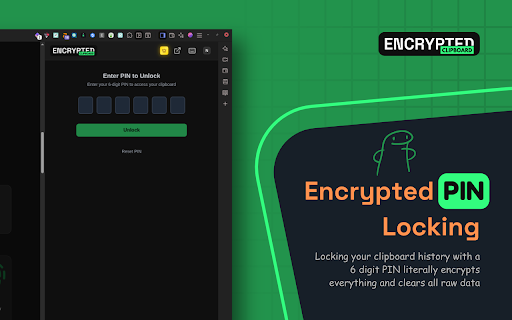
* 🔐 PIN Lock & Auto Lock - Add an encrypted PIN to lock your clipboard on demand or configure automatic locking after inactivity.
* ⚡ Quick Capture - Instantly capture text, links, images, and screenshots from any webpage in one click.
* 🔍 Snippet Search - Smart search with language prefix filters (e.g. @js:, @python:) to find code snippets instantly.

📢 What's New in v4.0.0 -

* 🔗 Clipboard Sharing - Share clipboard items with end-to-end encrypted links for seamless team collaboration.

🔥 KEY FEATURES -

🔒 Zero-Knowledge Security

    - End-to-End Encryption: Data is encrypted on your device using a key derived from your password.
    - Local-First Storage: Your history lives in your browser's secure IndexedDB, not on our servers.
    - PIN Lock: Secure your clipboard with an encrypted PIN and auto-lock after inactivity.

📋 Powerful Clipboard History

    - Smart Search: Instantly find anything you've copied with case-insensitive search.
    - Rich Data Types: Automatically detects and formats JSON, Colors (HEX/RGB), Links, and Code snippets.
    - Organization: Star favorites, tag items, and categorize your clips for quick access.
    - Floating Mode: Pop out the clipboard for a rapid-access window that stays on top.

🧩 Text Snippets & Code Tools

    - Code Syntax Highlighting: Full support for JavaScript, Python, TypeScript, C#, Go, Rust, and more.
    - Language Filtering: Search snippets by language using smart prefixes.
    - Plain & Code Modes: Toggle between plain text and code snippets for flexible organization.

☁️ Secure Cross-Device Sync (Optional)

    - Sync your clipboard seamlessly between computers without compromising security.
    - Sync data is encrypted before transmission — the cloud only sees encrypted blobs.
    - Works perfectly offline and syncs when you reconnect.

⚡ Developer Productivity Tools

    - JSON Editor: Inspect and format JSON directly in the clipboard.
    - Smart Paste: Paste as plain text, or use active tab integration.
    - Dark Mode: Beautiful, native-feeling dark mode UI.
    - Quick Capture: One-click capture of page content, screenshots, and DOM elements.

🛡️ PRIVACY PROMISE

    - No Tracking: We do not collect usage analytics, telemetry, or behavioral data.
    - No Ads: A clean, distraction-free experience.
    - Transparent: What happens on your device, stays on your device.

Perfect for: Developers, IT Professionals, Crypto Users, and anyone who values digital privacy.

Download now to secure your clipboard workflow!
Encrypted Clipboard Manager goes beyond standard history tools by prioritizing your data security. Unlike other clipboard extensions that store your data in plain text or on insecure servers, we use a Zero-Knowledge Architecture. Your clipboard history is encrypted locally on your device using AES-256 GCM before it ever syncs, meaning we cannot see, read, or access your data ever. 🚀 Why Encrypted Clipboard Manager? Stop worrying about accidentally copying passwords, API keys, or sensitive personal info. With our military-grade encryption and local-first storage, your clipboard remains yours alone. 📢 What's New in v5.2.0 - * Improved first sync performance * Fixed long running sync process failures and made more reliable * Improved some small UX issues 📢 What's New in v5.1.0 - * Smart Type + Keyword based search wasn't working on the "Magic Notch" 📢 What's New in v5.0.0 - * 🧩 Text Snippets - Save and organize reusable text with code syntax highlighting across 10+ programming languages. Perfect for developers, support templates, and repetitive content. * 🔐 PIN Lock & Auto Lock - Add an encrypted PIN to lock your clipboard on demand or configure automatic locking after inactivity. * ⚡ Quick Capture - Instantly capture text, links, images, and screenshots from any webpage in one click. * 🔍 Snippet Search - Smart search with language prefix filters (e.g. @js:, @python:) to find code snippets instantly. 📢 What's New in v4.0.0 - * 🔗 Clipboard Sharing - Share clipboard items with end-to-end encrypted links for seamless team collaboration. 🔥 KEY FEATURES - 🔒 Zero-Knowledge Security - End-to-End Encryption: Data is encrypted on your device using a key derived from your password. - Local-First Storage: Your history lives in your browser's secure IndexedDB, not on our servers. - PIN Lock: Secure your clipboard with an encrypted PIN and auto-lock after inactivity. 📋 Powerful Clipboard History - Smart Search: Instantly find anything you've copied with case-insensitive search. - Rich Data Types: Automatically detects and formats JSON, Colors (HEX/RGB), Links, and Code snippets. - Organization: Star favorites, tag items, and categorize your clips for quick access. - Floating Mode: Pop out the clipboard for a rapid-access window that stays on top. 🧩 Text Snippets & Code Tools - Code Syntax Highlighting: Full support for JavaScript, Python, TypeScript, C#, Go, Rust, and more. - Language Filtering: Search snippets by language using smart prefixes. - Plain & Code Modes: Toggle between plain text and code snippets for flexible organization. ☁️ Secure Cross-Device Sync (Optional) - Sync your clipboard seamlessly between computers without compromising security. - Sync data is encrypted before transmission — the cloud only sees encrypted blobs. - Works perfectly offline and syncs when you reconnect. ⚡ Developer Productivity Tools - JSON Editor: Inspect and format JSON directly in the clipboard. - Smart Paste: Paste as plain text, or use active tab integration. - Dark Mode: Beautiful, native-feeling dark mode UI. - Quick Capture: One-click capture of page content, screenshots, and DOM elements. 🛡️ PRIVACY PROMISE - No Tracking: We do not collect usage analytics, telemetry, or behavioral data. - No Ads: A clean, distraction-free experience. - Transparent: What happens on your device, stays on your device. Perfect for: Developers, IT Professionals, Crypto Users, and anyone who values digital privacy. Download now to secure your clipboard workflow! - Jun 3, 2026description
Encrypted Clipboard Manager goes beyond standard history tools by prioritizing your data security. Unlike other clipboard extensions that store your data in plain text or on insecure servers, we use a Zero-Knowledge Architecture. Your clipboard history is encrypted locally on your device using AES-256 GCM before it ever syncs, meaning we cannot see, read, or access your data ever. 🚀 Why Encrypted Clipboard Manager? Stop worrying about accidentally copying passwords, API keys, or sensitive personal info. With our military-grade encryption and local-first storage, your clipboard remains yours alone. 📢 What's New in v5.0.0 - * 🧩 Text Snippets - Save and organize reusable text with code syntax highlighting across 10+ programming languages. Perfect for developers, support templates, and repetitive content. * 🔐 PIN Lock & Auto Lock - Add an encrypted PIN to lock your clipboard on demand or configure automatic locking after inactivity. * ⚡ Quick Capture - Instantly capture text, links, images, and screenshots from any webpage in one click. * 🔍 Snippet Search - Smart search with language prefix filters (e.g. @js:, @python:) to find code snippets instantly. 📢 What's New in v4.0.0 * 🔗 Clipboard Sharing - Share clipboard items with end-to-end encrypted links for seamless team collaboration. 🔥 KEY FEATURES - 🔒 Zero-Knowledge Security - End-to-End Encryption: Data is encrypted on your device using a key derived from your password. - Local-First Storage: Your history lives in your browser's secure IndexedDB, not on our servers. - PIN Lock: Secure your clipboard with an encrypted PIN and auto-lock after inactivity. 📋 Powerful Clipboard History - Smart Search: Instantly find anything you've copied with case-insensitive search. - Rich Data Types: Automatically detects and formats JSON, Colors (HEX/RGB), Links, and Code snippets. - Organization: Star favorites, tag items, and categorize your clips for quick access. - Floating Mode: Pop out the clipboard for a rapid-access window that stays on top. 🧩 Text Snippets & Code Tools - Code Syntax Highlighting: Full support for JavaScript, Python, TypeScript, C#, Go, Rust, and more. - Language Filtering: Search snippets by language using smart prefixes. - Plain & Code Modes: Toggle between plain text and code snippets for flexible organization. ☁️ Secure Cross-Device Sync (Optional) - Sync your clipboard seamlessly between computers without compromising security. - Sync data is encrypted before transmission — the cloud only sees encrypted blobs. - Works perfectly offline and syncs when you reconnect. ⚡ Developer Productivity Tools - JSON Editor: Inspect and format JSON directly in the clipboard. - Smart Paste: Paste as plain text, or use active tab integration. - Dark Mode: Beautiful, native-feeling dark mode UI. - Quick Capture: One-click capture of page content, screenshots, and DOM elements. 🛡️ PRIVACY PROMISE - No Tracking: We do not collect usage analytics, telemetry, or behavioral data. - No Ads: A clean, distraction-free experience. - Transparent: What happens on your device, stays on your device. Perfect for: Developers, IT Professionals, Crypto Users, and anyone who values digital privacy. Download now to secure your clipboard workflow!Encrypted Clipboard Manager goes beyond standard history tools by prioritizing your data security. Unlike other clipboard extensions that store your data in plain text or on insecure servers, we use a Zero-Knowledge Architecture. Your clipboard history is encrypted locally on your device using AES-256 GCM before it ever syncs, meaning we cannot see, read, or access your data ever. 🚀 Why Encrypted Clipboard Manager? Stop worrying about accidentally copying passwords, API keys, or sensitive personal info. With our military-grade encryption and local-first storage, your clipboard remains yours alone. 📢 What's New in v5.1.0 - * Smart Type + Keyword based search wasn't working on the "Magic Notch" 📢 What's New in v5.0.0 - * 🧩 Text Snippets - Save and organize reusable text with code syntax highlighting across 10+ programming languages. Perfect for developers, support templates, and repetitive content. * 🔐 PIN Lock & Auto Lock - Add an encrypted PIN to lock your clipboard on demand or configure automatic locking after inactivity. * ⚡ Quick Capture - Instantly capture text, links, images, and screenshots from any webpage in one click. * 🔍 Snippet Search - Smart search with language prefix filters (e.g. @js:, @python:) to find code snippets instantly. 📢 What's New in v4.0.0 - * 🔗 Clipboard Sharing - Share clipboard items with end-to-end encrypted links for seamless team collaboration. 🔥 KEY FEATURES - 🔒 Zero-Knowledge Security - End-to-End Encryption: Data is encrypted on your device using a key derived from your password. - Local-First Storage: Your history lives in your browser's secure IndexedDB, not on our servers. - PIN Lock: Secure your clipboard with an encrypted PIN and auto-lock after inactivity. 📋 Powerful Clipboard History - Smart Search: Instantly find anything you've copied with case-insensitive search. - Rich Data Types: Automatically detects and formats JSON, Colors (HEX/RGB), Links, and Code snippets. - Organization: Star favorites, tag items, and categorize your clips for quick access. - Floating Mode: Pop out the clipboard for a rapid-access window that stays on top. 🧩 Text Snippets & Code Tools - Code Syntax Highlighting: Full support for JavaScript, Python, TypeScript, C#, Go, Rust, and more. - Language Filtering: Search snippets by language using smart prefixes. - Plain & Code Modes: Toggle between plain text and code snippets for flexible organization. ☁️ Secure Cross-Device Sync (Optional) - Sync your clipboard seamlessly between computers without compromising security. - Sync data is encrypted before transmission — the cloud only sees encrypted blobs. - Works perfectly offline and syncs when you reconnect. ⚡ Developer Productivity Tools - JSON Editor: Inspect and format JSON directly in the clipboard. - Smart Paste: Paste as plain text, or use active tab integration. - Dark Mode: Beautiful, native-feeling dark mode UI. - Quick Capture: One-click capture of page content, screenshots, and DOM elements. 🛡️ PRIVACY PROMISE - No Tracking: We do not collect usage analytics, telemetry, or behavioral data. - No Ads: A clean, distraction-free experience. - Transparent: What happens on your device, stays on your device. Perfect for: Developers, IT Professionals, Crypto Users, and anyone who values digital privacy. Download now to secure your clipboard workflow! - May 27, 2026description
Privacy first clipboard manager designed for privacy-conscious developers and power users. Encrypted Clipboard Manager goes beyond standard history tools by prioritizing your data security. Unlike other clipboard extensions that store your data in plain text or on insecure servers, we use a Zero-Knowledge Architecture. Your clipboard history is encrypted locally on your device using AES-256 GCM before it ever syncs, meaning we cannot see, read, or access your data ever. 🚀 Why Encrypted Clipboard Manager? Stop worrying about accidentally copying passwords, API keys, or sensitive personal info. With our military-grade encryption and local-first storage, your clipboard remains yours alone. 🔥 KEY FEATURES 🔒 Zero-Knowledge Security End-to-End Encryption: Data is encrypted on your device using a key derived from your password. Local-First Storage: Your history lives in your browser's secure IndexedDB, not on our servers. PIN Lock: Add an extra layer of protection to your local history. 📋 Powerful Clipboard History Smart Search: Instantly find anything you've copied with can insensitive search. Rich Data Types: Automatically detects and formats JSON, Colors (HEX/RGB), Links, and Code snippets. Organization: Star favorites, tag items, and categorize your snippets for quick access. Floating Mode: Pop out the clipboard for a rapid-access window that stays on top. ☁️ Secure Cross-Device Sync (Optional) Sync your clipboard seamlessly between computers without compromising security. Sync data is encrypted before transmission - the cloud only sees encrypted blobs. Works perfectly offline and syncs when you reconnect. ⚡ Developer Productivity Tools JSON Editor: Inspect and format JSON directly in the clipboard. Smart Paste: Paste as plain text, or use active tab integration. Dark Mode: Beautiful, native-feeling dark mode UI. 🛡️ PRIVACY PROMISE No Tracking: We do not collect usage analytics, telemetry, or behavioral data. No Ads: A clean, distraction-free experience. Transparent: What happens on your device, stays on your device. Perfect for: Developers, IT Professionals, Crypto Users, and anyone who values digital privacy. Download now to secure your clipboard workflow!Encrypted Clipboard Manager goes beyond standard history tools by prioritizing your data security. Unlike other clipboard extensions that store your data in plain text or on insecure servers, we use a Zero-Knowledge Architecture. Your clipboard history is encrypted locally on your device using AES-256 GCM before it ever syncs, meaning we cannot see, read, or access your data ever. 🚀 Why Encrypted Clipboard Manager? Stop worrying about accidentally copying passwords, API keys, or sensitive personal info. With our military-grade encryption and local-first storage, your clipboard remains yours alone. 📢 What's New in v5.0.0 - * 🧩 Text Snippets - Save and organize reusable text with code syntax highlighting across 10+ programming languages. Perfect for developers, support templates, and repetitive content. * 🔐 PIN Lock & Auto Lock - Add an encrypted PIN to lock your clipboard on demand or configure automatic locking after inactivity. * ⚡ Quick Capture - Instantly capture text, links, images, and screenshots from any webpage in one click. * 🔍 Snippet Search - Smart search with language prefix filters (e.g. @js:, @python:) to find code snippets instantly. 📢 What's New in v4.0.0 * 🔗 Clipboard Sharing - Share clipboard items with end-to-end encrypted links for seamless team collaboration. 🔥 KEY FEATURES - 🔒 Zero-Knowledge Security - End-to-End Encryption: Data is encrypted on your device using a key derived from your password. - Local-First Storage: Your history lives in your browser's secure IndexedDB, not on our servers. - PIN Lock: Secure your clipboard with an encrypted PIN and auto-lock after inactivity. 📋 Powerful Clipboard History - Smart Search: Instantly find anything you've copied with case-insensitive search. - Rich Data Types: Automatically detects and formats JSON, Colors (HEX/RGB), Links, and Code snippets. - Organization: Star favorites, tag items, and categorize your clips for quick access. - Floating Mode: Pop out the clipboard for a rapid-access window that stays on top. 🧩 Text Snippets & Code Tools - Code Syntax Highlighting: Full support for JavaScript, Python, TypeScript, C#, Go, Rust, and more. - Language Filtering: Search snippets by language using smart prefixes. - Plain & Code Modes: Toggle between plain text and code snippets for flexible organization. ☁️ Secure Cross-Device Sync (Optional) - Sync your clipboard seamlessly between computers without compromising security. - Sync data is encrypted before transmission — the cloud only sees encrypted blobs. - Works perfectly offline and syncs when you reconnect. ⚡ Developer Productivity Tools - JSON Editor: Inspect and format JSON directly in the clipboard. - Smart Paste: Paste as plain text, or use active tab integration. - Dark Mode: Beautiful, native-feeling dark mode UI. - Quick Capture: One-click capture of page content, screenshots, and DOM elements. 🛡️ PRIVACY PROMISE - No Tracking: We do not collect usage analytics, telemetry, or behavioral data. - No Ads: A clean, distraction-free experience. - Transparent: What happens on your device, stays on your device. Perfect for: Developers, IT Professionals, Crypto Users, and anyone who values digital privacy. Download now to secure your clipboard workflow! - May 27, 2026short_description
Securely manage clipboard history & sync across devices with zero-knowledge encryption. 100% private, local-first storage.
Zero-knowledge encrypted clipboard with cross-device sync, code snippets, 10+ languages, PIN lock, quick capture & search.
- May 27, 2026name
Encrypted Clipboard Manager
Encrypted Clipboard Manager - History, Secure Sync & Snippets
Permissions & access
- Permissions
- storageactiveTabsidePanelclipboardReadclipboardWriteoffscreenalarmscontextMenusgcmnotificationssystem.displaydownloadsscripting
- Host access
- <all_urls>
Screenshots



About
Encrypted Clipboard Manager goes beyond standard history tools by prioritizing your data security. Unlike other clipboard extensions that store your data in plain text or on insecure servers, we use a Zero-Knowledge Architecture. Your clipboard history is encrypted locally on your device using AES-256 GCM before it ever syncs, meaning we cannot see, read, or access your data ever.

🚀 Why Encrypted Clipboard Manager? Stop worrying about accidentally copying passwords, API keys, or sensitive personal info. With our military-grade encryption and local-first storage, your clipboard remains yours alone.

📢 What's New in v5.2.0 -

* Improved first sync performance
* Fixed long running sync process failures and made more reliable
* Improved some small UX issues

📢 What's New in v5.1.0 -

* Smart Type + Keyword based search wasn't working on the "Magic Notch"

📢 What's New in v5.0.0 -

* 🧩 Text Snippets - Save and organize reusable text with code syntax highlighting across 10+ programming languages. Perfect for developers, support templates, and repetitive content.
* 🔐 PIN Lock & Auto Lock - Add an encrypted PIN to lock your clipboard on demand or configure automatic locking after inactivity.
* ⚡ Quick Capture - Instantly capture text, links, images, and screenshots from any webpage in one click.
* 🔍 Snippet Search - Smart search with language prefix filters (e.g. @js:, @python:) to find code snippets instantly.

📢 What's New in v4.0.0 -

* 🔗 Clipboard Sharing - Share clipboard items with end-to-end encrypted links for seamless team collaboration.

🔥 KEY FEATURES -

🔒 Zero-Knowledge Security

    - End-to-End Encryption: Data is encrypted on your device using a key derived from your password.
    - Local-First Storage: Your history lives in your browser's secure IndexedDB, not on our servers.
    - PIN Lock: Secure your clipboard with an encrypted PIN and auto-lock after inactivity.

📋 Powerful Clipboard History

    - Smart Search: Instantly find anything you've copied with case-insensitive search.
    - Rich Data Types: Automatically detects and formats JSON, Colors (HEX/RGB), Links, and Code snippets.
    - Organization: Star favorites, tag items, and categorize your clips for quick access.
    - Floating Mode: Pop out the clipboard for a rapid-access window that stays on top.

🧩 Text Snippets & Code Tools

    - Code Syntax Highlighting: Full support for JavaScript, Python, TypeScript, C#, Go, Rust, and more.
    - Language Filtering: Search snippets by language using smart prefixes.
    - Plain & Code Modes: Toggle between plain text and code snippets for flexible organization.

☁️ Secure Cross-Device Sync (Optional)

    - Sync your clipboard seamlessly between computers without compromising security.
    - Sync data is encrypted before transmission — the cloud only sees encrypted blobs.
    - Works perfectly offline and syncs when you reconnect.

⚡ Developer Productivity Tools

    - JSON Editor: Inspect and format JSON directly in the clipboard.
    - Smart Paste: Paste as plain text, or use active tab integration.
    - Dark Mode: Beautiful, native-feeling dark mode UI.
    - Quick Capture: One-click capture of page content, screenshots, and DOM elements.

🛡️ PRIVACY PROMISE

    - No Tracking: We do not collect usage analytics, telemetry, or behavioral data.
    - No Ads: A clean, distraction-free experience.
    - Transparent: What happens on your device, stays on your device.

Perfect for: Developers, IT Professionals, Crypto Users, and anyone who values digital privacy.

Download now to secure your clipboard workflow!Technical
- Version
- 5.2.0
- Manifest
- V3
- Size
- 929KiB
- Min Chrome
- 88
- Languages
- 1
- Featured
- No
Metadata
- ID
- hplfhaecbalimhnmlacdbmecldhpjgli
- Developer ID
- ued15c0f08a02a640ffc53e72f454bf84
- Developer Email
- [email protected]
- Created
- Jan 17, 2026
- Last Updated (Store)
- Jun 7, 2026
- Last Scraped
- Jun 9, 2026
- Website
- encryptedclipboard.app
- Support URL
- https://encryptedclipboard.app/privacy
- Privacy Policy
- https://encryptedclipboard.app/privacy
Similar extensions
Alternatives to Encrypted Clipboard Manager - History, Secure Sync & Snippets, ranked by description similarity.

Smart Clipboard Manager
A smart clipboard manager that helps you organize and access your clipboard history.
94
★ 5.0

Clipboard History Manager - Secure, Fast, and Open Source
Powerful clipboard history manager. Save, search & organize everything you copy. Tags, shortcuts & unlimited storage.
9.0K
★ 4.6

Pure Copy
Smart clipboard manager: Save text snippets, copy without formatting, track history. Perfect for productivity.
21

ClipFlow — Clipboard History
Save your copy history. Search, manage, and recover text easily. Local storage only.
1

CopyClip - Clipboard History Management Side Panel
A clipboard history tool that allows you to copy and paste from your clipboard history.
1.0K
★ 4.2

Clipboard History Pro
Track clipboard history, search copied text, pin favorites, and create custom text snippets.
9

Clipboard History Manager
Clipboard history manager that stores copied text and links. Best way to Effortlessly access stored links and text.
6

Advanced Clipboard Organizer by DiscoverMyBusiness
A powerful Advanced Clipboard Organizer by DiscoverMyBusiness that stores and syncs your clipboard history
10
Data sourced from the Chrome Web Store · last verified Jun 9, 2026.