
i-control
An extension to controll the scrolling on a webpage with your eyes. Still in beta.
As of May 2026, i-control has 19 users and a 5.00/5 rating from 1 reviews in the fun category.
Usersdown 13.6 percent−13.6%
19
19
Ratingno change0%
5.00
1 reviews
Reviewsno change0%
1
Version
0.0.0.1
Manifest V3
History
3 snapshotsTracking since Apr 1, 2026.
View as table
| Date | Users | Rating | Reviews | Version |
|---|---|---|---|---|
| Apr 1, 2026 | 22 | 5.00 | 1 | 0.0.0.1 |
| Apr 30, 2026 | 24 | 5.00 | 1 | 0.0.0.1 |
| May 27, 2026 | 21 | 5.00 | 1 | 0.0.0.1 |
| Now | 19 | 5.00 | 1 | 0.0.0.1 |
Permissions & access
- Permissions
- storagetabs
- Host access
- None declared
Screenshots

About
How cool it would be to control webpages with your eyes.

Oh wait...

Now you can! This extension is going to give you the POWWAA to control the scrollbars on (almost) any webpage by looking at the sides. And all for free of course.

It's an open-source project, with the purpose of giving people the possibility to sit back and read hands-free. Due to the fact that it is still in it's early development, there is a lot of room to improve, which is why every feedback and new idea is welcome!

It uses your eye movement, so it need to access the camera. However, your data is only stored locally, at you, and I do not collect a single piece of data about you with this extension - I don't care about you thaat much :))

To use it:
    1. Add the extension to Chrome
    2. Go to a page that you can scroll on
    3. Click on the extension's icon, and allow it to run in the current domain
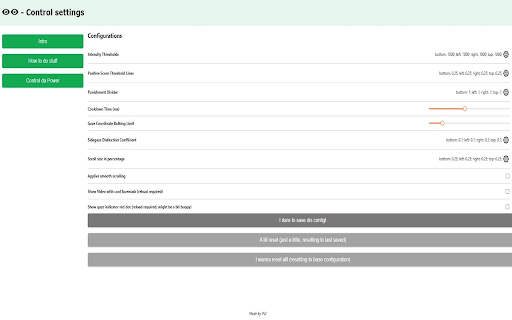
    4. Below the checkbox, select which sides to control, and click on train
    5. Go through the training, and start looking at the specified directions to control it
    6. Try to meddle a bit with the program using the options page, to find the best setup
    7. Have fun!

Cool tech stuff:

It is using Webgazer.js (https://webgazer.cs.brown.edu/), which is made by some awesome people. I took their script and made some changes so it fits the needs of a Chrome extension (as it appears, their license allowed it).

Also, I have extended an amazing react chrome extension boilerplate (https://github.com/lxieyang/chrome-extension-boilerplate-react). This one just saved me, huge thanks here again to its developer.

The above two pieces take all the credit for their parts, I only did the interconnection, a bit of a UI, some fixes, changes and calculations.

Check it out on github:
https://github.com/istvan73/chrome-extension-boilerplate-react/tree/initial

Looking forward to hear any feedback from you!
Steve
Technical
- Version
- 0.0.0.1
- Manifest
- V3
- Size
- 1002KiB
- Min Chrome
- 88
- Languages
- 1
- Featured
- No
Metadata
- ID
- hpkimkpghpibbnpkmgmpmahjldjejlhl
- Developer ID
- u0caa3768f40ec0c586b2baa77166642a
- Developer Email
- [email protected]
- Created
- Apr 22, 2022
- Last Updated (Store)
- Apr 22, 2022
- Last Scraped
- May 27, 2026
- Website
- —
- Support URL
- —
- Privacy Policy
- —
Similar extensions
Alternatives to i-control, ranked by description similarity.

Od Wepkit
Turn any webpage into an interactive visual playground.
15
★ 5.0

SmoothScroll
Scroll smoothly on all websites with your mouse and keyboard.
100.0K
★ 4.5

Cursor Tails - Animations for your mouse
Adding funny effects whenever you move your mouse. This extension make your mouse moving create fun effects.
3.0K
★ 3.4

Custom Scrollbar
Custom Scrollbar is a Chrome extension that allows users to customize the appearance of scrollbars in their browser
2.0K
★ 4.1

Skroll v0.7
Track scroll distance with friends!
3
★ 5.0

Subway Surfers Screen Reader
Screen reader with integrated subway surfers gameplay.
3.0K
★ 4.5

Hide Scrollbar
Hides scrollbar on all pages.
20.0K
★ 4.5

Sau.cx
Unlock precise video playback control, with Sau.cx Chrome Extension! Frame-by-frame cueing, screenshot, social-sharing, and more.
—
Data sourced from the Chrome Web Store · last verified May 27, 2026.